Exploring the Pros Cons Automation Tools has become crucial for businesses in 2024 looking to enhance efficiency and productivity.
Executives ask two questions about automation: where does it pay, and what could go wrong. This article gives you a pragmatic view of the pros and cons of automation tools, with concrete examples, decision criteria, and a path to value.
You will learn what automation tools are, where they deliver measurable ROI, where they introduce risk or hidden costs, how to decide if a workflow is a good candidate, and how to pilot and scale with confidence.
WHAT ARE AUTOMATIONS TOOLS?
Automation tools are software that execute tasks and workflows with minimal human intervention. They connect systems, trigger actions, move data, make rules based decisions, and, increasingly, apply AI to interpret unstructured inputs.
Common categories include robotic process automation for user interface tasks, workflow and integration platforms for system to system tasks, process mining to discover bottlenecks, and AI assistants to handle language, images, and decisions.
Tool Type Best For Strengths Limits Vendors Robotic Process Automation (RPA) Automating repetitive UI tasks in legacy or desktop apps Works without APIs. Mimics user actions. Good for rule-based tasks. Can be brittle when UIs change. Needs governance. UiPath, Automation Anywhere, SS&C Blue Prism Workflow & Integration (iPaaS) System-to-system integrations and event-driven workflows Scalable, API-first, strong connectors. Requires available APIs and clear data contracts. Workato, Power Automate, Zapier, Make, MuleSoft Business Process Automation End-to-end processes with human-in-the-loop and SLAs Model-driven, auditable, task assignment, SLA tracking. Heavier setup. Needs process design discipline. Appian, Pega, Camunda Process Mining Discovering and prioritizing automation opportunities Data-driven insights, baseline metrics, ROI targeting. Needs event logs or desktop capture data. Celonis, UiPath Process Mining, Microsoft Minit AI Assistants & LLM Orchestration Understanding text, generating content, complex decisions Handles unstructured inputs, natural language, classification. Probabilistic. Requires guardrails and human oversight. Azure OpenAI, OpenAI, Google Vertex AI, Copilot Studio
PROS OF AUTOMATION TOOLS
When applied to the right workflows, automation improves speed, quality, and cost to serve. It also creates the operations backbone you need to scale without linearly adding headcount.
SIGNIFICANT TIME SAVINGS
- Cycle times drop when routine steps, for example intake, validation, and routing, run in parallel and trigger instantly on events rather than waiting for manual batching. McKinsey estimates that a large share of activities across roles are amenable to automation, which translates into faster throughput when orchestrated well.
- Queues shrink because bots work off hours and clear backlogs. Simple examples include nightly invoice matching, claims triage, or CRM data cleanup.
- Exception velocity increases when automation flags anomalies and routes them with full context to the right owner, reducing handoffs and rework.
- Real example: Forrester’s Total Economic Impact study on an RPA platform documented faster processing for high volume back office tasks, contributing to strong time savings for finance teams.
COST SAVINGS
- Lower cost to serve by removing manual touchpoints and after hours overtime, and by reducing rework and exceptions.
- High ROI in targeted use cases. Forrester found a 399 percent ROI over three years and a payback under 12 months for a composite organization using an enterprise RPA platform. Results vary, but the pattern is common for high volume, rules driven work.
- Infrastructure efficiency in cloud native workflows that scale up and down with demand, so you avoid over provisioning.
- Compliance efficiencies from built in audit trails and policy enforcement, which can cut the cost of controls testing and remediation.
FEWER ERRORS
- Consistency by design. Bots and workflows follow the same steps every time, which prevents common slips and copy paste mistakes that creep into manual work.
- Data validation in forms and integrations blocks invalid entries at the source and applies reference checks automatically.
- Lower spreadsheet risk. Research has shown that a large share of operational spreadsheets contain errors, a risk that process automation reduces by moving logic into governed systems.
- Better auditability with logs and immutable trails, which speeds investigations and reduces compliance penalties.
IMPROVED EMPLOYEE FOCUS
- Less drudgery, more judgment. Teams spend time on exceptions, customers, and analysis, rather than routine clicks.
- Skills uplift. Business users take on citizen developer roles in governed environments, accelerating continuous improvement.
- Engagement gains when work is redesigned around higher value tasks. Global surveys show most organizations use automation to augment people, not replace them, and report better outcomes when they do.
SUPPORTS BUSINESS SCALABILITY
- Elastic capacity. Digital workers scale linearly with volume without adding managers, desks, or equipment.
- Resilience. Orchestration and retries make workflows tolerant of transient system issues. See guidance on building reliable stateful workflows.
- Faster market entry by composing new processes from reusable blocks, not starting from scratch.
- Hyperautomation as a strategy, combining process discovery, RPA, integration, and AI to scale end to end.
CONS OF AUTOMATION TOOLS
There are trade offs. Getting the benefits requires upfront investment, governance, and ongoing care to avoid brittleness and tool sprawl.
COST OF IMPLEMENTATION
- Licensing and platform costs for enterprise grade RPA, orchestration, monitoring, and analytics.
- Integration and data work. Clean data, stable APIs, and identity management often require significant effort.
- Change and compliance. Process documentation, controls, and audits add to total cost of ownership.
- Ongoing maintenance for bot updates, connector changes, and security patches. Budget for product owners, not only developers. Independent studies show payback can be rapid in the right use cases, but the costs are real and should be modeled.
ROLE SHIFTS
- Work redesign. Some tasks disappear, others change. Reskilling and clear communication are essential.
- New roles emerge, for example bot operators, citizen developers, and process owners, which you must staff and govern.
- Labor impacts. The World Economic Forum highlights that task automation changes skill demand and requires investment in training at scale.
TECHNICAL ERRORS
- Brittle UI automations can fail when page structures change. Selector design and object anchors reduce risk.
- External dependencies such as API limits can throttle throughput or fail with upstream outages. Plan for backoff and retries.
- Silent failures if monitoring is weak. You need health checks, alerts, and end to end observability, not only bot logs.
TRAINING REQUIREMENTS
- Adoption is not automatic. Users need onboarding for new workflows and digital assistants.
- Change management materially influences outcomes. Studies show projects with excellent change management are far more likely to meet objectives.
- Governance training for citizen developers, including security, privacy, and lifecycle practices.
LIMITED ADAPTABILITY
- Rule based automations struggle with ambiguity, novelty, or poor data quality. They need escalation paths or AI components.
- Model drift and AI variance in AI driven steps requires evaluation sets, monitoring, and human in the loop for safety critical outcomes.
- Automation sprawl happens when multiple teams build similar flows in different tools. A platform strategy with standards mitigates this.
HOW TO DECIDE IF YOU NEED TO AUTOMATE YOUR WORKFLOW
A good automation candidate is high volume, rules driven, and measurable. Start with a clear baseline and a sharp definition of success. Here are the key details you need to consider:
- Transaction volume is high and growing, and cycle time or backlog affects customers or revenue.
- Rules are stable, documented, and exceptions are limited or easily classified.
- Data inputs are digital or can be digitized, for example via e forms or OCR with confidence thresholds.
- Error costs are material, for example chargebacks, compliance fines, or churn due to delays.
- There is a credible path to reuse or scale across business units once the first use case lands.
- Security and regulatory requirements can be met with platform features and controls.
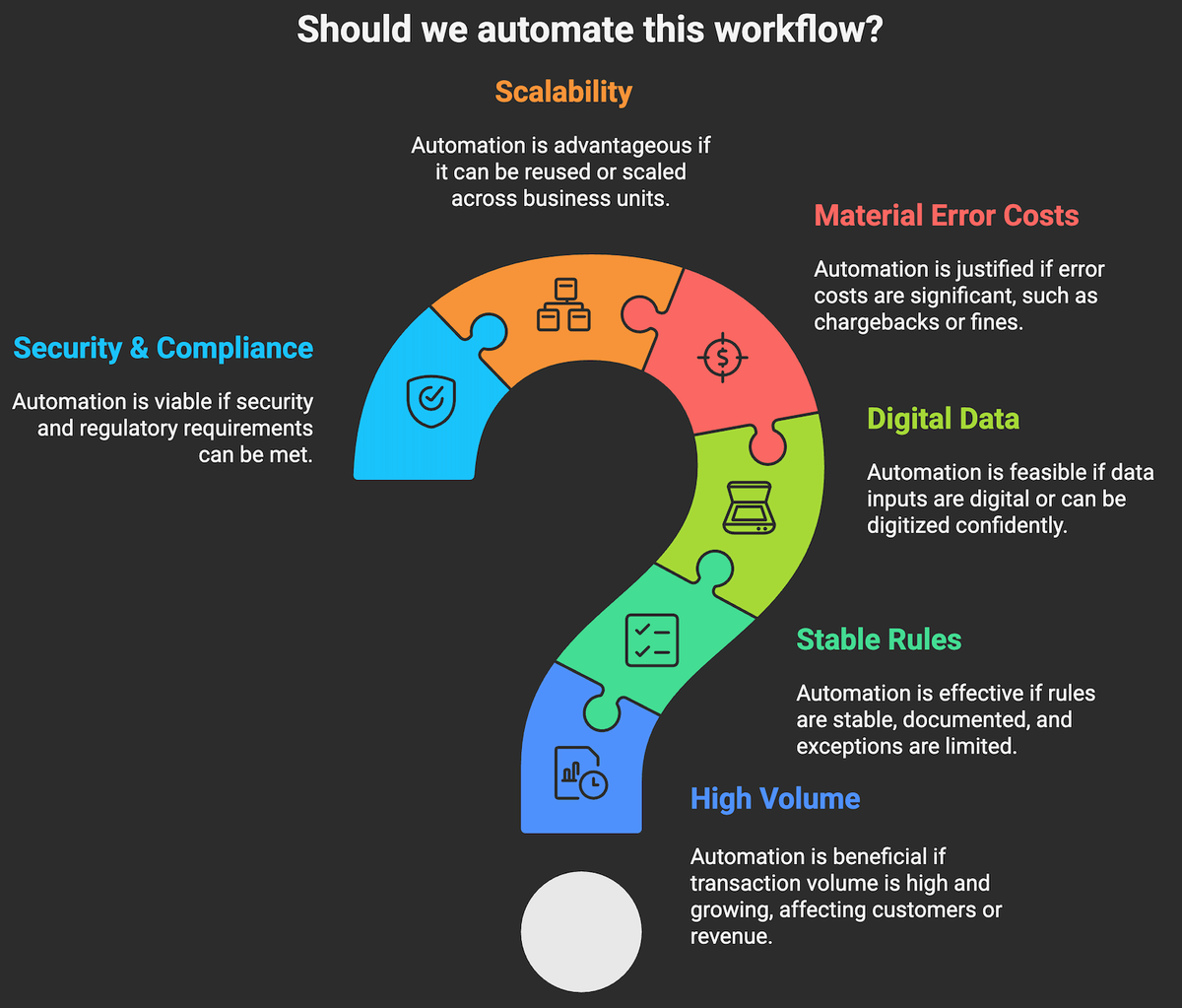
If several of the above are not true, postpone automation or run a small experiment to learn before committing a significant budget.
- Baseline the current state. Measure volumes, cycle times, touches per item, error rates, and cost per transaction. Use process mining where available.
- Prioritize by value and feasibility. Score use cases on impact, complexity, data readiness, and risk. Pick one pilot with a clear owner.
- Pilot in production like conditions. Define success criteria, for example 40 percent cycle time reduction, 30 percent error reduction, payback under 12 months.
- Engineer for resilience. Use APIs where possible, design retries, add monitoring and alerts, and document fallbacks.
- Govern and roll out. Establish standards, security reviews, versioning, and an intake process for new automations.
- Scale what works. Package components for reuse, expand training, and track portfolio level ROI.
HOW CAN MAKEITFUTURE HELP YOU WITH AUTOMATION SOLUTIONS?
Automation accelerates time to value, reduces errors, and lowers operating costs, but only when you select the right workflows, engineer for reliability, and manage change. Be deliberate about where you start, instrument outcomes, and scale through a platform approach.
Makeitfuture partners with C suite leaders, IT directors, and operations teams to design, prove, and scale automation that delivers measurable ROI. We bring process discovery, business case modeling, and full stack delivery across RPA, workflow and integration, and AI assistants. Our operating model includes governance, security, and change management so your portfolio grows with control, not chaos.
- Rapid opportunity assessment and ROI modeling
- Pilots that land in 6 to 12 weeks with production ready guardrails
- Platform selection and architecture across RPA, iPaaS, orchestration, and AI
- Process mining to prioritize high yield use cases
- Managed services for bot operations, monitoring, and continuous improvement
Want proof points before you commit? Explore our selected case studies that show how we improved cycle times, quality, and cost to serve across finance, customer operations, and supply chain. Contact us and we’ll find a way to make it work …or work smoother!