Embracing open source workflow management can revolutionize how tasks are streamlined within any organization.
You want faster cycle times, fewer manual handoffs, and a platform you control. This guide compares five proven open source workflow automation tools, when to use each, clear pros and cons, and what to expect from pricing in 2026. You will also get a quick comparison table and practical criteria to pick the right fit for your stack.
We focus on tools leaders actually deploy at scale, not just side projects. The shortlist: n8n, Node RED, Apache Airflow, Camunda, and Bonitasoft. Each solves a different class of workflow problem, from low code integrations to enterprise grade BPM and data pipeline orchestration.
WHY USE OPEN SOURCE TOOLS FOR WORKFLOW AUTOMATION?
Open source workflow automation tools give you control, flexibility, and community backed velocity. They pair well with AI and modern cloud environments while reducing lock in risk.
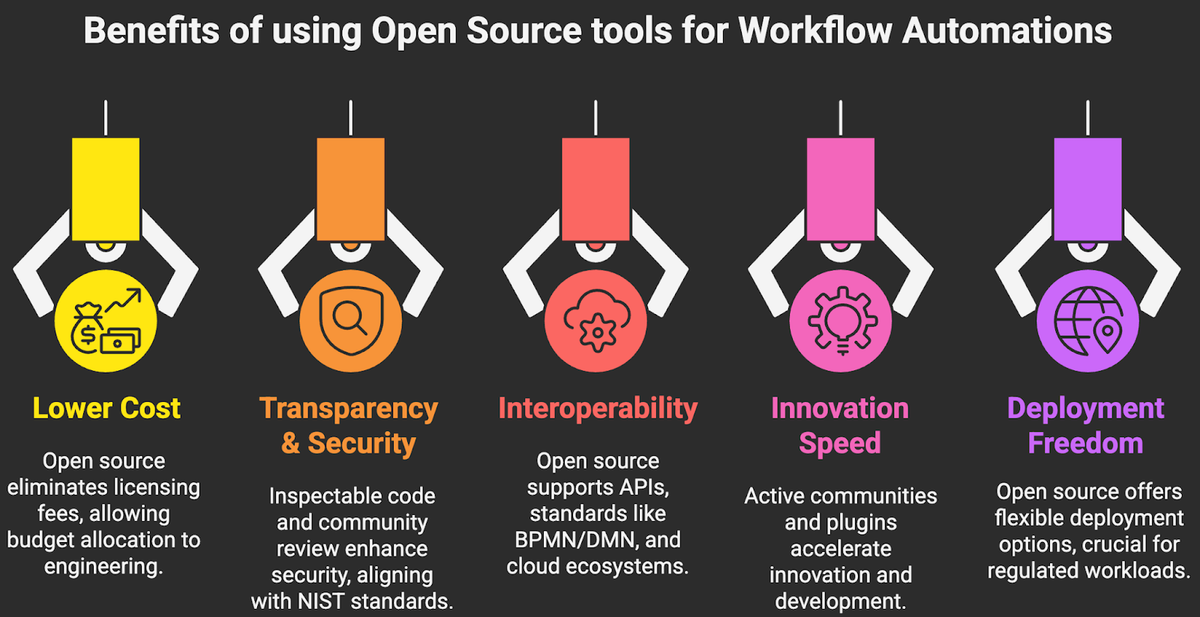
- Lower total cost of ownership, no per bot licensing. Budget goes to engineering, not shelfware.
- Transparency and security through inspectable code and community scrutiny, aligned with NIST’s Secure Software Development Framework practices.
- Interoperability across APIs, standards like BPMN and DMN, and cloud native ecosystems. BPMN 2.0 is an open standard from OMG.
- Speed of innovation via active communities, plugins, and connectors.
- Deployment freedom, run on premises, in your VPC, or as managed services, which is essential for regulated workloads.
A QUICK COMPARISON OF TOP OPEN SOURCE TOOLS
Use the table to shortlist by fit. Then go deeper in the detailed sections below.
Tool Best For Workflow Style Hosting License Posture Learning Curve n8n Low code integrations and AI enhanced automations across SaaS and internal APIs Event and task flows with nodes, webhooks, cron Self hosted or n8n Cloud Source available, sustainable use license Easy to moderate Node RED IoT and edge automations, lightweight on premises integrations Visual flow based, real time messaging Self hosted; third party managed options Open source, Apache 2.0 Easy Apache Airflow Data and ML batch orchestration with complex dependencies DAGs defined in Python, scheduled Self hosted or managed by cloud vendors Open source, Apache 2.0 Moderate to advanced Camunda Enterprise BPMN and human in the loop processes, micro-service orchestration BPMN, DMN, long running workflows Self hosted or Camunda SaaS Community open source; Camunda 8 is source available Advanced Bonitasoft Process apps with custom UIs and case management BPMN driven with UI designer Self hosted; enterprise subscriptions Community open source; Enterprise add ons Moderate
1. N8N
Website: https://n8n.io
n8n is a low code automation platform with a visual editor and hundreds of prebuilt connectors for SaaS, databases, and AI models. You can build event driven workflows, orchestrate APIs, and add custom code where needed. It supports webhooks, cron scheduling, sub workflows, credentials vaulting, and scalable worker mode for concurrency.
History and focus: Launched by Jan Oberhauser, n8n grew quickly by offering an open developer experience and a broad integration library. It is known for ease of use plus escape hatches for engineers, including a Code node for JavaScript and robust webhooks.
Best use case: Automating cross SaaS workflows and API orchestration with occasional human steps, for example lead routing, marketing ops, customer success handoffs, finance reconciliations, or AI assisted content generation pipelines.
Pros of n8n
- Visual builder accelerates delivery while allowing code where it matters.
- Large integration catalog and AI nodes for LLM prompts, embeddings, and tools.
- Good for event driven patterns, webhooks, and rapid iteration.
- Self hosting option in a VPC, helpful for compliance.
- Scales with worker mode, queues, and horizontal replicas.
Cons of n8n
- License is source available with restrictions on offering a competing service, not OSI approved open source.
- Complex version control and change promotion require process discipline and external Git workflows.
- Very large, mission critical orchestrations may need complementary tools for testing and observability.
Available pricing options
Self hosted is free under the Sustainable Use License. n8n Cloud offers a free tier and paid tiers for higher executions, users, and support. Confirm latest plan tiers and limits on the official pricing page.
2. NODE-RED
Website: https://nodered.org
Node RED is a flow based programming tool built on Node.js. It excels at wiring together hardware devices, APIs, and online services, often at the edge. Drag nodes onto a canvas, connect them, and deploy in seconds. It ships with MQTT, HTTP, filesystem, and function nodes, and has a massive community library.
History and focus: Created by IBM’s Emerging Technology team, Node RED became a staple for IoT gateways and lightweight on premises integrations. The community shares thousands of nodes and example flows in the public library.
Best use case: IoT and edge automations, such as device telemetry processing with MQTT, local rule evaluation, and forwarding curated events to cloud services. Also handy for quick fixes inside the firewall.
Pros Node-Red
- Very lightweight and fast to deploy on anything from a laptop to a Raspberry Pi.
- Thriving ecosystem of community nodes and flows.
- Great for real time messaging and local integrations with minimal overhead.
- True open source under Apache 2.0 and easy to extend in JavaScript.
Cons Node-Red
- Limited enterprise governance out of the box, versioning and multi environment promotion require extra tooling.
- Not designed for complex, long running human workflows or heavy batch scheduling.
- Clustering and horizontal scale patterns need external orchestration.
Available pricing options
Community edition is free and open source. Enterprises often use a managed layer to operate Node RED at scale, such as FlowForge for provisioning, access control, and updates, priced per instance or per user. See vendor pages for current plans.
3. APACHE AIRFLOW
Apache Airflow is the de facto standard for orchestrating batch workflows as DAGs in Python. It schedules and monitors tasks with explicit dependencies, backfills historical runs, and integrates with major data and ML stacks through a rich provider ecosystem. Core concepts, including DAGs, operators, sensors, and XComs, are well documented and battle tested.
History and focus: Created at Airbnb, then donated to the Apache Software Foundation, Airflow is synonymous with data engineering orchestration across warehouses, lakes, and ML pipelines.
Best use case: Complex, scheduled data and ML pipelines with dependencies, SLAs, and backfills, for example ELT ingestion, feature store updates, model retraining, and report generation.
Pros Apache Airflow
- Mature orchestration, observability, and backfilling, ideal for data operations.
- Extensible with hundreds of providers for cloud and data platforms.
- Python first definition gives engineers full control, testing, and CI integration.
- Kubernetes support and robust scheduling semantics for enterprise scale.
Cons Apache Airflow
- Not a real time or event streaming system. Latency is usually measured in minutes, not milliseconds.
- Higher operational complexity than low code tools. Requires engineers.
- UI and versioning workflows can be opinionated and require team conventions.
Available pricing options
Open source is free. Managed services include AWS Managed Workflows for Apache Airflow, Google Cloud Composer, and Astronomer, each priced based on compute, environment hours, and support.
4. CAMUNDA
Website: https://camunda.com
Camunda is a standards based BPM platform for modeling and executing business processes with BPMN and decisions with DMN. It powers long running, human in the loop workflows with strong visibility, SLAs, and microservice orchestration. Camunda 8 uses the Zeebe engine for horizontally scalable, event driven execution, with connectors, forms, and Optimize for analytics.
History and focus: Originating in Germany, Camunda became a leader in developer friendly BPM, popular in financial services, insurance, and logistics for mission critical processes aligned to BPMN 2.0.
Best use case: End to end business processes with humans, SLAs, and complex orchestration, such as order to cash, claims, KYC onboarding, or case management across microservices and SaaS.
Pros Camunda
- Standards based modeling with BPMN and DMN that business and engineering can share.
- Strong support for long running processes, compensation, and human tasks.
- Scalable event driven engine in Camunda 8 with modern APIs.
- Good observability and optimization tooling for throughput and compliance.
Cons Camunda
- Steeper learning curve than low code iPaaS style tools.
- Licensing posture has shifted, Camunda 8 is source available while Community remains open source. Validate license compliance for your use.
- Connector catalog is growing but narrower than dedicated iPaaS catalogs.
Available pricing options
Community edition is free. Camunda Platform 8 offers a free SaaS tier with usage limits and paid enterprise subscriptions for advanced features, scale, and support. Verify limits and pricing on Camunda’s site.
5. BONITASOFT
Website: https://www.bonitasoft.com
Bonitasoft, the company behind the Bonita platform, provides an open source BPM suite for modeling processes in BPMN, building custom UIs with Bonita UI Designer, and integrating systems through connectors and REST APIs. It is well suited for case management and process applications that require tailored front ends.
History and focus: Bonitasoft has long roots in the BPM community with an emphasis on developer tooling plus a free Community edition, often used by enterprises that need customizable process applications.
Best use case: Process apps with bespoke user experiences, for example employee onboarding, service request management, and customer portals where form UX matters as much as workflow logic.
Pros Bonitasoft
- Full stack experience, BPMN engine plus UI designer and connectors.
- Community edition to start, enterprise features when you scale.
- Good fit when you need a custom UI without rebuilding the engine.
Cons Bonitasoft
- Some enterprise features are gated behind the paid edition.
- Smaller cloud native ecosystem than Airflow or Camunda 8.
- Requires disciplined DevOps for promotion and testing.
Available pricing options
Bonita Community is free. Enterprise is subscription based with commercial support and advanced capabilities. Contact Bonitasoft for current editions and pricing options.
HOW TO CHOOSE THE RIGHT OPEN SOURCE TOOL FOR WORKFLOW AUTOMATION
Match the tool to the job. Start from process characteristics, compliance needs, and where the work will run, not from a brand name.
- Workflow type: event driven integrations, human in the loop BPM, or scheduled data pipelines.
- Latency and duration: real time seconds, near real time minutes, or long running days and weeks.
- People in the loop: tasks, escalations, and SLAs require BPM engines like Camunda or Bonita.
- Data stack alignment: Python centric teams and data dependencies point to Airflow.
- Edge and on premises constraints: lightweight runtime and MQTT support favor Node RED.
- Integration catalog and AI needs: n8n shines for SaaS connectors and LLM powered flows.
- Security and compliance: VPC deployment, secrets management, audit logs, and SSDF aligned practices.
- Scalability: concurrency, backpressure, horizontal scaling, and high availability.
- Operability: versioning, environment promotion, testing frameworks, and observability.
- License posture: OSI open source versus source available. Validate restrictions for your commercial use.
- Total cost: engineering effort to operate versus managed service premiums over a three year horizon.
HOW CAN MAKEITFUTURE HELP YOU WITH WORKFLOW AUTOMATION?
No single tool wins every scenario. Use n8n or Node RED for fast moving integrations and edge flows, Airflow for data and ML pipelines, and Camunda or Bonitasoft when you need durable BPM and human tasks. Blend where it makes sense, with common observability and access controls across the stack.
Makeitfuture designs and operationalizes workflow automation that moves the needle. We help you map processes, select the right open source workflow automation tools, build a pilot in weeks, and scale safely with security, observability, and compliance baked in. If you want a partner to deliver measurable ROI, we should talk.
For proof points, explore relevant success stories on our Case Studies page, including patterns like order orchestration with BPMN, AI assisted customer support routing, and secure data pipeline automation with Airflow.