What's better than an AI meeting assistant ready to record your meeting details? And the best part - it integrates seamlessly with automations!
You are here because meeting notes, follow ups, and action tracking take too much time, and critical context gets lost. This guide gives you a decision grade view of what an AI meeting assistant is, why it matters, what it can do, and the best options to consider.
We cover five proven tools, when to choose each, and a simple way to compare them. Then we show how to wire assistants into your CRM, project management, and data stack so meetings turn into measurable outcomes, not more busywork.
WHAT IS AN AI MEETING ASSISTANT?
An AI meeting assistant is software that joins your calls, captures audio, transcribes speech, and produces structured outputs like summaries, action items, and decisions. It uses modern speech recognition and large language models, then pushes results into the tools you already use, for example Slack, email, CRM, and task systems.
Typical flow: your calendar event triggers the assistant to join Zoom, Google Meet, or Microsoft Teams, the session is recorded and transcribed, the model extracts topics and to dos, and automations share updates with the team or log them in systems of record. Adoption is accelerating. Gartner predicted that by 2025, most workplace conversations will be recorded and analyzed to improve productivity and experience, a signal that this capability is becoming mainstream across enterprises (Gartner top strategic technology trends). Live transcription also supports accessibility standards, improving inclusivity for Deaf and hard of hearing participants.
WHY DO YOU EVEN NEED AN AI MEETING ASSISTANT IN THE FIRST PLACE
Leaders tell us the problem is not just too many meetings, it is the manual effort after each one and the knowledge that never makes it into shared systems. Assistants compress that overhead and lift the quality of decisions.
- Recover hours every week by eliminating manual note taking and formatting, so people stay present and focus on decisions. Knowledge workers spend a large share of time communicating across meetings and email, which crowds out deep work, so automation matters here.
- Improve follow up speed. Instant summaries and templated emails help teams respond while the window for impact is still open. Faster responses correlate with better conversion in revenue workflows.
- Create a searchable memory of customer voice and internal decisions. New team members ramp faster with curated call libraries and highlight reels instead of starting from scratch.
- Increase data quality in CRM and ticketing by auto logging next steps, due dates, and owners, which directly improves pipeline accuracy and forecast reliability. Sellers still spend a minority of time on actual selling, so reducing admin is high leverage.
- Strengthen accessibility and compliance with transcripts, redaction, and retention controls aligned to company policy and regional regulations.
WHAT IT CAN DO
Modern assistants are more than recorders. They are workflow hubs that turn conversations into structured data and triggers.
- Auto join and capture meetings on Zoom, Google Meet, Microsoft Teams, and more.
- Transcribe with speaker labels and multilingual support, then generate summaries, decisions, risks, and action items.
- Publish notes to Slack, email, Notion, Confluence, or shared drives automatically.
- Create and assign tasks in Asana, Jira, Monday, or ClickUp, and set due dates pulled from the conversation.
- Update CRM, for example next step, close date, competitors, and sentiment, so forecasts reflect reality.
- Provide conversation intelligence, such as talk to listen ratio, topics, keywords, trackers, and coaching insights for managers.
- Apply governance with retention windows, PII redaction, consent prompts, and admin controls.
BEST AI MEETING ASSISTANT TOOLS
Below are five credible options used by SMBs and enterprises. Selection criteria we prioritize: accuracy on your audio conditions, workflow integrations, admin and security controls, breadth of platform coverage, and total cost of ownership. You will see different strengths, so match them to your most valuable use cases.
1. FIREFLIES
Fireflies is a versatile AI notetaker that joins your meetings, transcribes conversations, and generates structured notes you can search across your organization. It supports many platforms and has flexible workflows for downstream tools.
- Auto join Zoom, Google Meet, Microsoft Teams, Webex, and more, or upload audio and video for processing.
- AI generated notes with decisions and action items, plus topic trackers and custom vocabulary for company specific terminology.
- Powerful search across calls, with filters for speakers, topics, and sentiment, and “soundbites” to share key moments.
- Workflow integrations to post notes in Slack, create tasks, or push fields into CRM such as Salesforce and HubSpot.
- Team level administration, role based access, and data retention controls.
2. MEETGEEK
MeetGeek focuses on clear, shareable insights. It automatically structures calls into chapters, highlights, and action items, which makes it easy to distribute the essentials without over sharing full recordings.
- Automatic highlights, chapters, and action items crafted into digestible summaries.
- Templates to standardize notes by meeting type, for example QBRs, sprint reviews, or discovery calls.
- Knowledge repository with search and playlists for onboarding and coaching.
- Integrations for Slack, Notion, Trello, Google Drive, and popular CRMs.
- Admin controls for consent prompts, sharing permissions, and retention.
3. GRANOLA
Granola is a lightweight, Mac first meeting assistant designed for individual contributors and small teams who want instant notes with minimal overhead. It runs quietly, produces concise summaries, and gets out of the way.
- One click, real time notes and post meeting summaries across Zoom, Google Meet, and Microsoft Teams on macOS.
- Clear action items and decisions, with quick export to Notes, Notion, or email.
- Simple privacy model and local friendly workflows that favor personal productivity.
- Ideal when you need fast notes without rolling out a full conversation intelligence platform.
4. OTTER
Otter is well known for real time transcription and collaboration features. It is popular for internal meetings, education, training, and events because it provides live captions, shared notes, and mobile apps.
- Otter Assistant can auto join meetings, capture audio, and produce live transcripts with speaker identification.
- Real time captions and shared note taking help distributed teams and improve accessibility.
- AI summaries with key points and action items, plus slide and image capture for context.
- Integrations with Zoom, Google Calendar, Microsoft Teams, and Slack, with strong mobile support on iOS and Android.
- Admin management, security features, and export controls suitable for larger organizations.
5. AVOMA
Avoma is a meeting lifecycle and conversation intelligence platform tuned for revenue and customer facing teams. Beyond notes, it helps plan agendas, analyze conversations at scale, and push structured data into CRM for forecasting and coaching.
- End to end workflow, from scheduling and agendas to post call notes and coaching.
- AI notes, trackers, and snippets mapped to your sales methodology, for example MEDDICC or SPICED.
- Conversation intelligence dashboards, including talk to listen ratio, topic trends, and competitive mentions.
- Deep CRM integrations with Salesforce, HubSpot, and others to sync next steps, fields, and call objects.
- Team libraries, playlists, and permissions for enablement and compliance.
Here is a quick side by side comparison. Prices are indicative and subject to change, so confirm on vendor sites.
Name Best for Platform Price Fireflies Broad coverage and searchable org memory Zoom, Google Meet, Microsoft Teams, Webex Free, paid from around $10 per user per month MeetGeek Digestible highlights and team knowledge sharing Zoom, Google Meet, Microsoft Teams Free, paid from around $19 per user per month Granola Lightweight personal productivity on Mac macOS for Zoom, Google Meet, Microsoft Teams Free trial, paid plans available Otter Real time captions and internal collaboration Zoom, Google Meet, Microsoft Teams, iOS, Android Free, paid from around $10 per user per month Avoma Revenue and success teams with CRM sync Zoom, Google Meet, Microsoft Teams Free trial, paid from around $19 per user per month
HOW TO POWER UP THE AI MEETING ASSISTANT USING AUTOMATIONS
The best AI meeting assistant is the one that captures your conversations accurately and then moves the right data to the right system without human friction. Selecting a tool is half the story. You get outsized ROI when you automate the handoffs to CRM, service desks, and project tools, and when you enforce governance at scale.
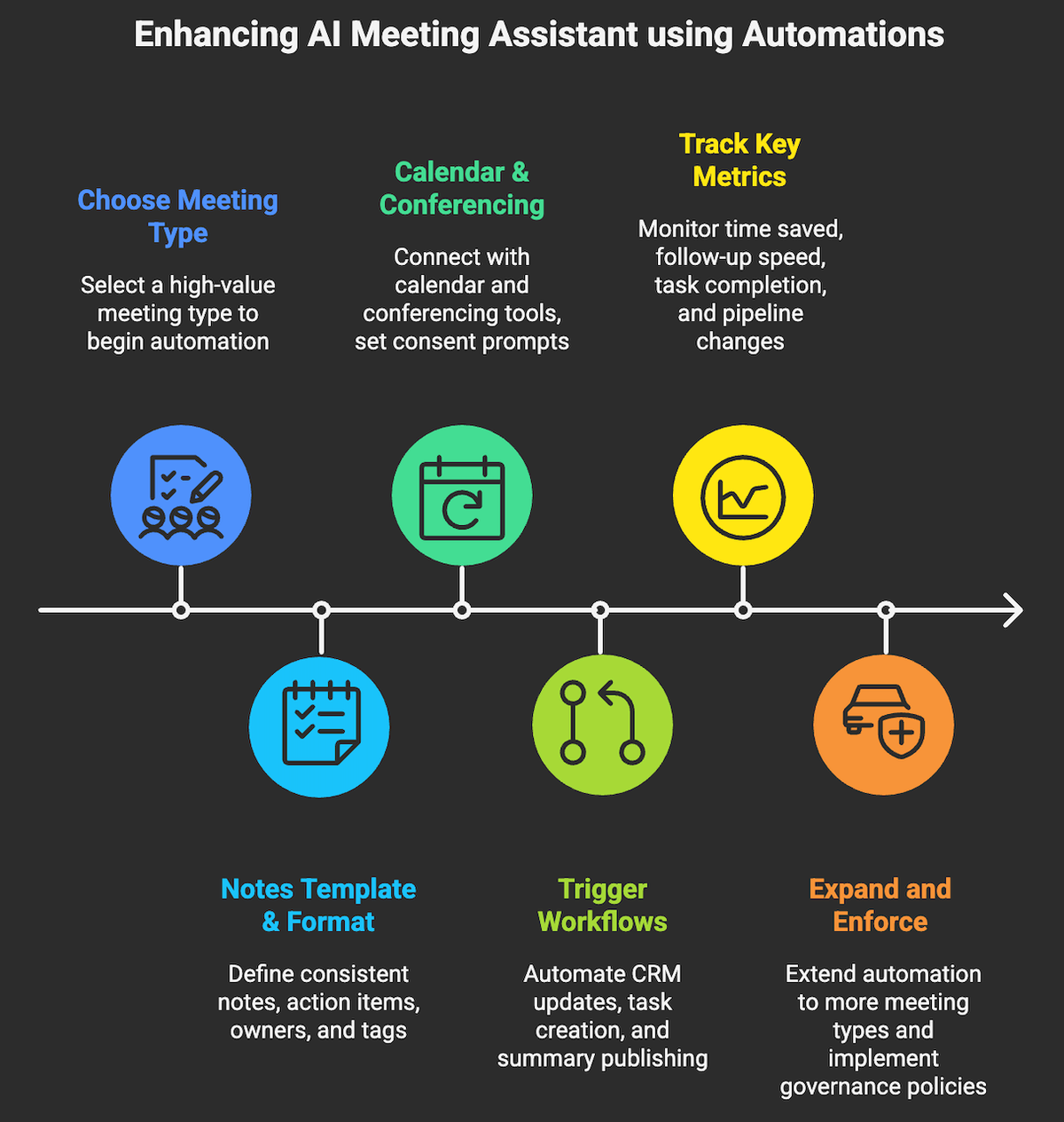
- Pick one high value meeting type to start, for example sales discovery, customer onboarding, or incident reviews. Define success in minutes saved and outcomes improved.
- Standardize your notes template, action item format, owners, and tags so summaries are predictable and automatable.
- Integrate with your calendar and conferencing stack, then configure consent prompts and retention policies.
- Automate handoffs. Trigger workflows when a meeting ends or a summary is ready to:
- Create or update CRM records with next steps, due dates, and sentiment, then notify the account team in Slack.
- Create tasks in Asana or Jira for each action item with assignee and due date derived from the transcript.
- Publish a concise summary to a channel or space, linking the recording and transcript for transparency.
Use built in connectors or iPaaS, for example Zapier, Make, Workato, or native cloud tools such as Power Automate and AWS Step Functions.
- Measure impact. Track time saved per meeting, follow up time to first action, task completion rate, and pipeline changes tied to better notes.
- Scale to more meeting types, then tighten governance with redaction, PII detection, and automated retention enforcement.
If you need help getting from pilot to production, Makeitfuture can design and implement the automations that turn meeting outputs into business results. We connect assistants to your systems of record, set up secure data flows, and help you quantify ROI with clear before and after metrics. Explore our Automation Services to see typical engagement patterns.
Curious what this looks like in the wild? Review our case studies to see how meeting insights feed CRM, support, and product backlogs in real implementations.
Book a call with us and we’ll find the AI meeting assistant that fits you best.