An agentic workflow is a business process where an AI model plans, decides and acts across a series of steps using your tools and data, while the process around it stays defined, checked and owned by your team.
Most companies already have automations that move data from A to B. They break the moment an input looks different from what the rule expected: a supplier sends a PDF instead of a CSV, a customer writes three questions in one email, a lead fills the form in Romanian. Agentic workflows handle that messy middle. The AI reads the input, works out what needs to happen and calls the right tools, and the workflow keeps it on a track you can audit.
This guide explains what an agentic workflow is, how it differs from classic automation and from a fully autonomous AI agent, the patterns teams use in production, real examples, the risks, and how to build your first one without burning budget on a pilot that never ships.
What is an agentic workflow?
An agentic workflow is a multi-step process in which a large language model (LLM) does more than answer a prompt. It reasons about the task, chooses actions, uses tools such as your CRM, inbox or ERP, checks its own output and passes the result to the next step.
Anthropic, the company behind Claude, draws a useful line in its engineering guide Building effective agents. It calls both kinds of system "agentic", then separates them: workflows are systems where LLMs and tools are orchestrated through predefined code paths, while agents are systems where LLMs dynamically direct their own processes and tool usage.
That distinction matters for a business. In an agentic workflow, you decide the route and the AI handles the judgement inside each step. In an autonomous agent, the AI decides the route as well. Most of the value we see in client work today sits in the first category, because it is predictable enough to put in front of customers and finance teams.
How is an agentic workflow different from automation and from an AI agent?
Think of it as a spectrum of how much control you hand to the model.
| Approach | Who decides the steps | Handles messy input | Predictability | Best for |
|---|---|---|---|---|
| Rule-based automation | Fixed rules you write | No, it fails or skips | Very high | Clean, repeatable data transfers |
| Agentic workflow | You define the route, the AI decides within each step | Yes | High, with checks and approvals | Recurring processes with variable inputs |
| Autonomous AI agent | The AI plans the route itself | Yes | Lower, needs stronger guardrails | Open-ended tasks such as research or coding |
A classic Make.com or Zapier scenario is the first row: if the field is empty, the run fails. An agentic workflow keeps that same scaffolding and adds an AI step that can read an unstructured email, classify it and decide which branch to take. A fully autonomous agent goes one step further and chooses its own next move each time, which is why we cover agents separately in our guide to AI agent examples and business use cases.
How does an agentic workflow work?
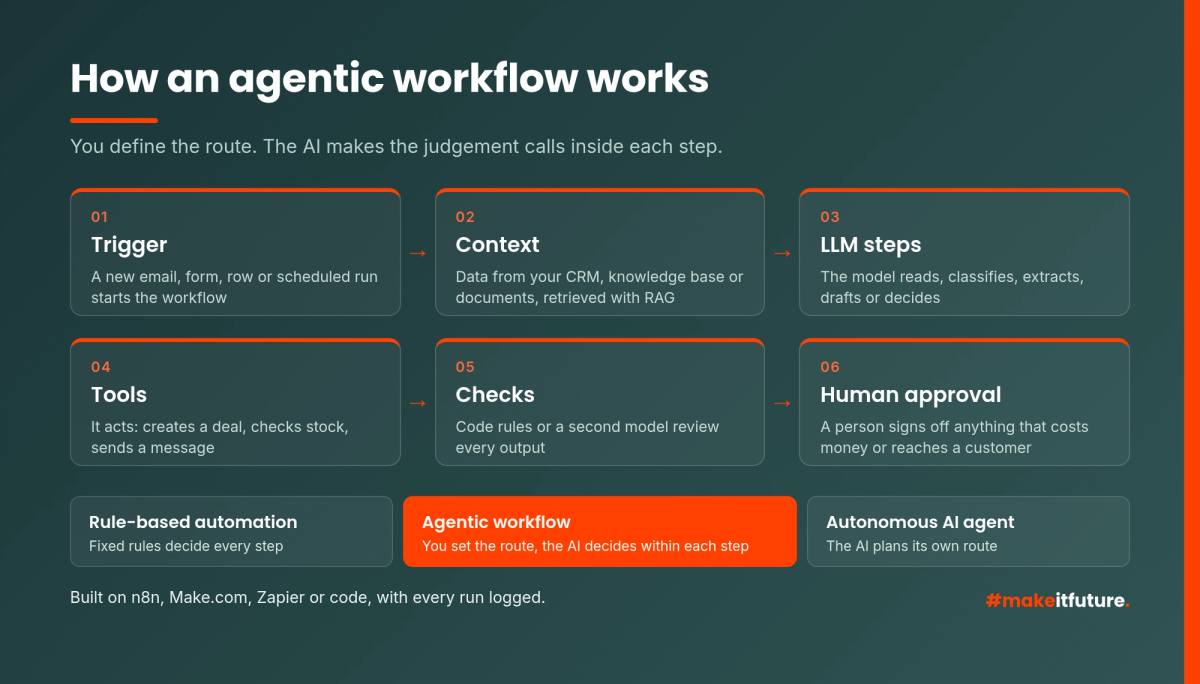
Under the hood, almost every agentic workflow we build has the same six parts.
- A trigger, such as a new email, a form submission, a row added to a sheet or a scheduled run.
- Context: the data the model needs, pulled from your CRM, a knowledge base, past tickets or documents, often through retrieval (RAG) so the model answers from your sources rather than its training data.
- One or more LLM steps that read, classify, extract, draft or decide. Each step has a narrow job and a clear instruction.
- Tools the model can call: create a deal, look up stock, send a Slack message, generate a PDF. Standards such as the Model Context Protocol (MCP) make these connections easier to reuse.
- Checks, which can be code (is the total a number, does the customer exist) or a second model that reviews the first one's output.
- A human in the loop wherever a mistake is expensive, for example approving a quote above a set value before it goes out.
The orchestration layer, usually n8n, Make, Zapier or custom code, holds all of this together, logs every run and retries when an API times out. That layer is what turns a clever prompt into a process you can trust on a Monday morning. Designing and running that layer is the core of our AI workflow automation work.
What are the main agentic workflow patterns?
Anthropic's guide names five workflow patterns. They are worth knowing because almost every business case is one of them, or a combination.
Prompt chaining
The task is split into a sequence, and each LLM call works on the output of the previous one, with a check in between. Example: extract the requirements from a client brief, then draft a proposal outline, then check the outline against your service catalogue before anyone sees it.
Routing
The model classifies the input and sends it to the right specialised path. Example: inbound emails sorted into sales enquiry, support issue, invoice or spam, each with its own downstream workflow and prompt.
Parallelisation
Several LLM calls run at the same time on parts of the task, or the same task runs several times and the answers are compared. Example: one call checks a contract for payment terms while another checks liability clauses, and the results are merged into one review.
Orchestrator and workers
A central model breaks a task into subtasks it could not predict in advance, hands them to worker steps and combines the results. Example: a research request on a target account where the orchestrator decides which sources to check and the workers summarise each one.
Evaluator and optimiser
One model produces an answer and another scores it against clear criteria, looping until it passes. Example: product descriptions rewritten until they meet your tone, length and keyword rules.
Agentic workflow examples for business
These are the agentic workflows we see deliver a return fastest, because the inputs vary but the outcome is well defined.
- Quote and proposal generation. A request arrives by email or form, the workflow extracts the requirements, checks pricing rules and stock, drafts the quote and sends it to a salesperson for approval. We cover this use case in depth on our AI quotation agent page.
- Customer support triage. Tickets are classified, enriched with order data and either answered from the knowledge base or routed to the right person with a suggested reply, which is the core of a customer support AI agent.
- Credit and lead qualification. For one financial services client, we replaced a 5 to 7 day manual loan pre-qualification process with a conversational workflow built on Make.com that collects data, verifies it and updates the CRM, bringing the decision down to about five minutes. The full story is in our AI credit qualification case study.
- Document questions at scale. For a legal firm, we built a retrieval workflow that answers questions across tens of thousands of case pages and keeps each answer inside the right client file, saving around 20 hours of paralegal work a week, as described in how one AI can save hours of paralegal work.
- Inbound document processing. Invoices, delivery notes and forms are read, the fields are extracted and validated, and only the exceptions reach a person.
If you want to see one of these built live, our webinar replay on how to build agentic business workflows with Claude AI walks through a working example step by step.
What are the advantages of agentic workflows?
Better results from the same model. Andrew Ng's team found that on the HumanEval coding benchmark, GPT-3.5 scored 48.1% on its own and GPT-4 scored 67.0%, yet GPT-3.5 wrapped in an iterative agent workflow reached up to 95.1% (The Batch, issue 241). How you structure the work can matter more than which model you buy.
They handle the inputs your current automations reject. Free-text emails, scanned PDFs and half-filled forms stop being exceptions that a person has to clear by hand.
Your team moves to review instead of data entry. In the credit qualification project above, loan officers stopped spending their days on verification and data entry and went back to advising customers.
You can start small and keep control. Because the route is fixed, you can add one AI step to an existing scenario, measure it and widen the scope only when the numbers justify it.
Companies are already moving. McKinsey's State of AI survey (November 2025) found that 23% of organisations are scaling an agentic AI system somewhere in the business and a further 39% are experimenting with AI agents.
What are the limitations and risks of agentic workflows?
Many projects fail before they pay back. Gartner predicts that over 40% of agentic AI projects will be cancelled by the end of 2027, citing rising costs, unclear business value and weak risk controls. Gartner also warns about "agent washing", where existing chatbots and RPA tools are rebranded as agents.
They cost more per run and take longer than a plain automation. Anthropic is blunt about this: agentic systems often trade latency and cost for better task performance, so the simplest solution that works is usually the right one. If a rule can do the job, use the rule.
The model can still be wrong. An LLM step can misread a document or invent a detail. Checks, retrieval from your own sources and human approval on high-value actions are what keep that from reaching a customer.
Governance gets harder as access grows. Every tool you connect is a permission you have to manage. Decide up front which systems the workflow can read, which it can write to, and where logs are kept.
Someone has to own it. An agentic workflow is a live process, and prompts, models and APIs change. Without a named owner and monitoring, quality drifts quietly. We wrote more about this in 10 realities to face before starting an AI implementation.
Which platforms can you build agentic workflows on?
You don't need to start from code. The main automation platforms now include AI agent steps, and the choice depends on your hosting needs, volume and team.
| Platform | Best for | Coding needed | Hosting |
|---|---|---|---|
| n8n | Complex, high-volume agentic workflows and data that must stay on your infrastructure | Optional | Cloud or self-hosted |
| Make.com | Visual multi-step scenarios with AI steps across hundreds of business apps | None to light | Cloud |
| Zapier | Quick wins and simpler agentic steps for non-technical teams | None | Cloud |
| Code frameworks (for example LangGraph) | Custom orchestration, unusual logic or product features | Yes | Your choice |
For n8n, its AI Agent node lets a workflow call tools and memory inside a normal scenario, which we use for most of our n8n AI agent builds. If your team already runs on Make.com, adding AI steps to existing scenarios is often the fastest first project. And when agents need to work where your people already talk, in Slack or Teams, we built ChannelGate to run them there with the right permissions.
How to build an agentic workflow in six steps
1. Pick one process with a clear outcome
Choose something frequent, measurable and annoying, such as answering quote requests or triaging a shared inbox. Write down today's volume, handling time and error rate so you have a baseline.
2. Map the route before you add AI
Draw the steps a good employee follows today and mark where judgement is needed. Those judgement points are where the LLM steps go; everything else stays as normal automation. Our workflow consulting work usually starts here.
3. Give the model the right context
Connect the data each step needs: product catalogue, price rules, past tickets, policies. Retrieval from your own sources is what separates a useful answer from a confident guess.
4. Choose the simplest pattern that works
Start with prompt chaining or routing. Move to orchestrator and workers only if the task cannot be predicted in advance.
5. Add checks and a human approval
Validate every output that leaves the workflow, and keep a person in the loop for anything that commits money, changes a contract or speaks to a customer, at least until the error rate is proven.
6. Launch, measure and widen
Run it on a share of the volume, compare against your baseline and log every run. Expand only when the numbers hold for a few weeks.
Is an agentic workflow right for your business?
An agentic workflow is a good fit when most of these are true:
- The process runs often enough that saving minutes per item adds up to hours per week.
- Inputs vary (free text, documents, different languages), so rules alone keep breaking.
- The outcome is easy to check: a correct quote, a ticket in the right queue, a validated invoice.
- You can name an owner who will review results and adjust prompts.
If the inputs are already clean and structured, a standard automation will be cheaper and more reliable. If the task is open-ended research or software work, a more autonomous AI agent may suit it better.
The bottom line
Agentic workflows sit in the practical middle between rigid automation and fully autonomous agents. You keep control of the route, the AI handles the judgement calls, and checks catch the mistakes. Start with one process, measure it against today's numbers and grow from there. If you'd like a second opinion on which process to start with, book a call with our team.
Frequently asked questions
What is an agentic workflow in simple terms?
It is an automated process where an AI model makes decisions and uses tools inside a series of steps that you have defined. The AI handles the parts that need judgement, such as reading an email or choosing the next action, while the workflow keeps the process predictable and auditable.
What is the difference between agentic workflows and AI agents?
In an agentic workflow, the steps are predefined and the AI works within them. In an AI agent, the model decides its own steps and tool use as it goes, which Anthropic describes as the model dynamically directing its own process. Workflows are more predictable; agents are more flexible but need stronger guardrails.
What are examples of agentic workflows?
Common business examples include generating quotes from inbound requests, triaging support tickets, qualifying leads or loan applicants, extracting data from invoices and answering questions across large document sets. Each one has variable inputs but a clear, checkable outcome.
What tools do you need to build an agentic workflow?
You need an orchestration platform such as n8n, Make.com or Zapier (or a code framework like LangGraph), access to an LLM such as Claude or GPT, and connections to the business systems the workflow will read from and write to. Most projects also need a knowledge source for retrieval and a place to log runs.
Are agentic workflows safe for business data?
They can be, if you design for it. Limit each workflow's access to the systems it needs, keep sensitive data on infrastructure you control where required (self-hosted n8n is one option), log every run and require human approval for high-value actions. Gartner's warning that over 40% of agentic AI projects will be cancelled by 2027 cites inadequate risk controls as one of the main causes, so treat governance as part of the build.