Employee onboarding works best as one checklist that every new hire runs, with tasks for HR, IT and their manager, approvals wherever access or risk is granted, and a record of who completed each step and when.
This article follows that employee onboarding process through a growing professional services firm, from a signed contract to the end of probation. It explains what the new hire checklist contains, who owns each step, where approvals belong and what the record should show, then looks at the ways you can run it, from a spreadsheet to a compliance operations platform such as Process Street connected to the rest of your systems.
What makes employee onboarding different in professional services?
Employee onboarding is everything that happens between a candidate accepting an offer and that person working fully in their role: contracts and right-to-work checks, accounts and equipment, introductions, training and the probation review. In most companies it is an HR onboarding process with some help from IT.
Professional services firms (law, accountancy, consulting, engineering and agency work) add three things that make it harder. New joiners need access to client data, so someone has to decide what they can see and record that decision. Many firms run conflict or independence checks before a person can work on a client. And every day a new fee earner can't log in is a day they can't be staffed, so a slow start shows up directly in utilisation.
Why does the onboarding process break as a firm grows?
At 30 people, onboarding works because the office manager knows everyone and remembers every step. At 120 people across two offices, hiring five or six people a month, that memory becomes the bottleneck. Gallup found that only 12% of employees strongly agree their organisation does a great job of onboarding new employees, and growing firms tend to fail in the same few places.
- Handovers by email. HR emails IT about a start date, IT replies to the wrong thread, and the laptop arrives on day three.
- Unrecorded decisions. Someone agreed that the new associate could access a client workspace, but nobody can say who or when, which matters the first time a client sends a security questionnaire.
- Office drift. The second office adapts the process slightly, then a bit more, until the firm has two onboarding processes and neither is written down.
- No view of progress. The managing partner asks whether next Monday's three starters are ready, and HR has to chase five people to find out.
How does a shared onboarding checklist work?
The fix is to stop treating onboarding as a list someone keeps and to treat it as an employee onboarding workflow every hire goes through. The firm writes one checklist template that lists every task, who owns it and when it is due. Each new hire gets their own copy of that checklist, filled in with their name, role, office and start date, and HR, IT, the hiring manager and the new hire all work from that one copy.
Five rules make the checklist hold up as the firm grows.
- Every task has an owner by role, such as "IT lead" or "hiring manager", so the checklist assigns the right person for each hire automatically.
- Due dates count from the start date, so if a start date moves, the whole plan moves with it instead of showing a page of false overdue tasks.
- Gates lock later steps. Day-one tasks stay locked until IT confirms the accounts and laptop are ready, so nobody ticks off "first login checked" for an account that doesn't exist.
- Approvals sit where risk is accepted, with a named approver who can approve or reject with a comment.
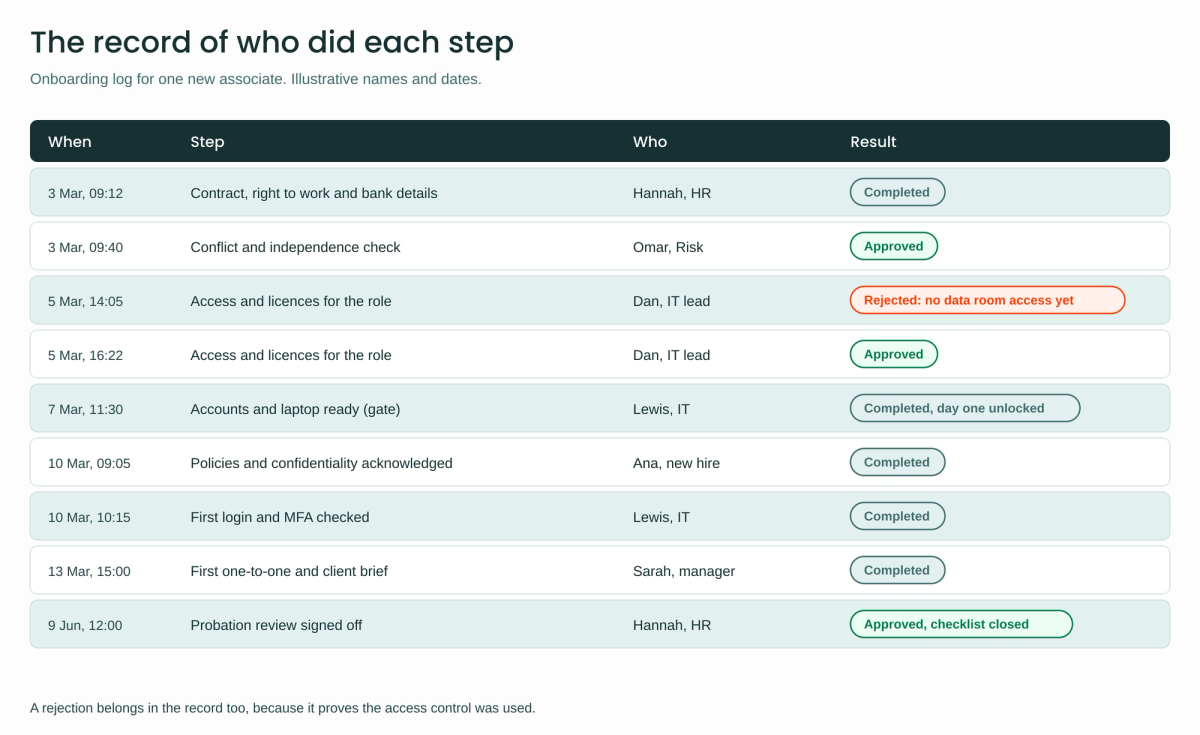
- Everything is logged: each completed task, approval, rejection and comment, with who did it and when.
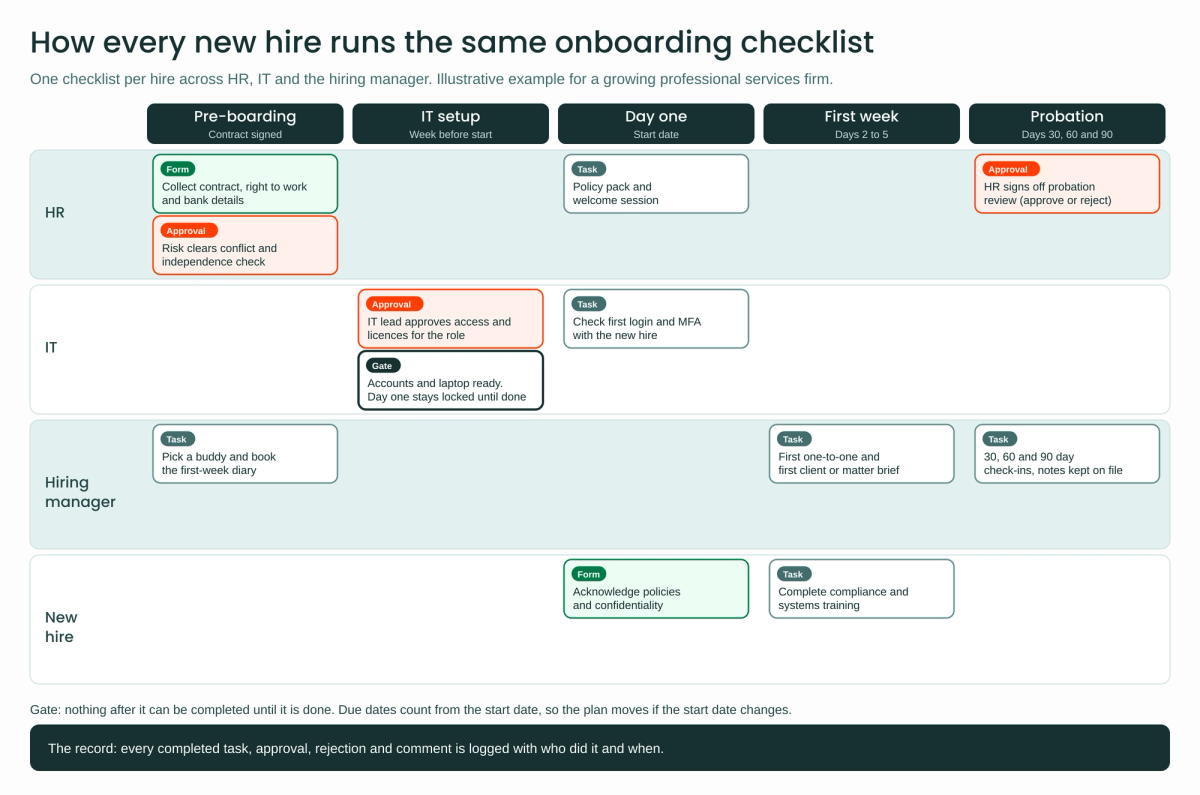
The onboarding process for new hires, stage by stage
The diagram shows the firm's checklist. Here is what happens at each stage and why.
Pre-boarding: from signed contract to a cleared start
The checklist starts when the contract is signed. HR collects the contract, right-to-work documents and bank details through a form, so the details are entered once and reused later. In parallel, the risk or compliance team approves the conflict and independence check, because a new hire who previously worked for a client's competitor may need restrictions before they are staffed. The hiring manager chooses a buddy and books the first-week diary, so the human side of onboarding starts before the paperwork is finished.
IT setup: access only after approval
The week before the start date, the IT lead receives an approval listing the systems, licences and client workspaces the role needs. This is the IT onboarding checklist in miniature: the right accounts, the right licences and nothing more. If something is wrong ("no access to the deal data room until the matter is staffed"), the IT lead rejects it with a comment and HR resolves it. Once approved, a gate holds the checklist until IT confirms the accounts and laptop are ready. That gate is the single most useful step in the process, because it turns "IT is probably on it" into a fact.
Day one and the first week
On the start date, HR runs the welcome session and policy pack, IT checks the first login and multi-factor authentication with the new hire, and the new hire acknowledges the confidentiality and IT policies through a short form. During the first week, the manager holds the first one-to-one and briefs the new hire on their first client or matter, while the new hire completes compliance and systems training.
Probation: 30, 60 and 90 days
The checklist stays open through probation. The manager has check-ins dated 30, 60 and 90 days after the start date, and HR closes the checklist with an approval that signs off the probation review. At that point the firm has a complete history of the hire's onboarding in one place.
| Stage | Owner | Approval or gate | What it protects |
|---|---|---|---|
| Pre-boarding | HR, risk, hiring manager | Conflict and independence check | No work on a client the new hire is conflicted on |
| IT setup | IT lead | Access approval, then the accounts-ready gate | Only the access the role needs, ready before day one |
| Day one | HR, IT, new hire | Policy acknowledgement | Evidence the new hire accepted confidentiality terms |
| First week | Hiring manager, new hire | None | A planned first week instead of an empty diary |
| Probation | Hiring manager, HR | Probation sign-off | A documented decision at the end of probation |
Where do approvals belong, and what should the record show?
Approvals belong wherever someone accepts risk on the firm's behalf, and nowhere else. In this firm that means three points: the conflict check, access to systems and client data, and the end of probation. Making every task an approval slows the process down and teaches people to approve without reading.
The record is what turns the checklist into evidence. For each step it should show who completed it, when, and what they decided, including rejections and the comments that explain them. When a client's security questionnaire asks how the firm approves access for new joiners, the answer is a log rather than a description of good intentions.
What are the ways to run the checklist?
There are four realistic options, and most firms move through them as they grow.
| Option | Works until | Approvals and record | Main gap |
|---|---|---|---|
| Spreadsheet or shared document | About one hire a month, one office | None, beyond version history | No owners, no reminders, no evidence |
| Onboarding module in the HR system | The process is mostly HR tasks | Basic, usually HR only | IT and manager tasks sit outside it |
| Compliance operations platform | HR, IT and managers share the process | Built in, with a log of each step | Doesn't create accounts or update other systems by itself |
| Platform plus integrations | Several systems, offices and hiring at volume | Built in, and automated steps are logged too | Needs someone to design and maintain the integrations |
For the firm in this example, the third and fourth options fit: onboarding crosses three teams, needs recorded approvals and varies by role and office.
How would the firm run it in Process Street?
Process Street is a compliance operations platform: it runs the recurring processes a business has to get right and prove it got right, and employee onboarding is one of the most common. Its features map closely onto the five rules above. The firm builds the checklist as a workflow and starts one workflow run per new hire, starting from Process Street's own employee onboarding workflow template.
- Owners by role: role assignments give each task to whoever started the run, to a member chosen in a field such as "hiring manager", or to an email address, which invites that person as a guest.
- Due dates from the start date: dynamic due dates count from a date field or from another task's completion, with business-day options.
- Gates: stop tasks block everything after them until they are complete, and the tasks behind them stay hidden until then.
- Variations by role and office: conditional logic shows or hides tasks based on answers, so a trainee gets different training from a senior hire.
- Approvals: approval tasks let a named approver approve or reject with comments, and a run can't be completed while approvals are outstanding.
- The record: the workflow run activity feed logs every action on a run, including actions taken by automations, and the logs can be exported to CSV.
To reach the rest of the firm's systems, Process Street has webhooks for events such as a task being approved or a run being completed, a public API, and connectors for the main automation platforms. Make has an official Process Street app that can create and update workflow runs, and Process Street also connects to Zapier, Power Automate and, more recently, n8n.
In practice the firm would automate three steps with Make: a hire confirmed in the HR system starts the checklist with the details filled in, the IT approval creates the Microsoft Entra ID account and writes the work email back into the run, and a completed run updates the HR record and posts a welcome in Slack. The same pattern in reverse covers onboarding and offboarding, with access removed on the last working day.
Advantages of a shared, approved checklist
- Every hire gets the same start. The checklist is the process, so the second office and the tenth hire follow the same steps as the first.
- Handovers stop depending on email. Each team sees its tasks in one place, and the gate makes IT readiness visible before day one.
- Decisions become evidence. Conflict checks, access approvals and probation sign-offs are recorded with names and timestamps, ready for audits and client questionnaires.
- Plans survive a moved start date. Relative due dates shift the whole plan without manual edits.
- Measurable gains are possible. On its employee onboarding software page, Process Street reports that Raw Capital Partners cut onboarding from 15 to 20 days to one day and that IMCD UK cut setup time by more than 75%. These are vendor figures, so treat them as a sign of what's possible rather than a forecast.
How do you get started?
- Map the current process with HR, IT, one hiring manager and someone who joined in the last six months, and write down every step, owner and handover.
- Agree the approvals with the partners or risk lead, and keep them to the points where risk is accepted.
- Build the checklist template with owners by role, due dates from the start date and the accounts-ready gate.
- Run three real hires through it before automating anything, and fix the steps people skip or argue about.
- Automate the edges: starting the checklist from the HR system first, then account creation, then offboarding.
If you would rather not design and maintain the integrations yourself, Makeitfuture's integration services connect Process Street to the rest of your stack, from your HR system and Microsoft Entra ID to Slack, payroll and reporting, on Make, n8n, Zapier or Power Automate, and we monitor and support those connections as your hiring changes.
Conclusion
For a growing professional services firm, good onboarding comes down to one shared checklist that HR, IT and the manager all work from, with approvals at the three or four points where risk is accepted and a record of every step. Write that process down first, prove it with a few real hires, then run it in a compliance operations platform such as Process Street and connect it to your HR and IT systems once the steps hold up.
Frequently asked questions
What is the employee onboarding process?
The employee onboarding process is the set of steps that takes a new hire from signed contract to fully working in their role, covering documents, accounts and equipment, introductions, training and the probation review. The administrative part should be finished before day one, while the process itself stays open through probation, with check-ins at 30, 60 and 90 days.
What should be on a new hire checklist?
A new hire checklist should cover the contract and right-to-work documents, accounts and equipment, a policy and confidentiality acknowledgement, a first-week plan with a named buddy, training, and probation check-ins. Professional services firms should add a conflict or independence check before client work and a recorded approval for access to client data.
What goes on an IT onboarding checklist?
An IT onboarding checklist covers the accounts, licences, groups and equipment a role needs, an approval for anything sensitive such as client workspaces, a check that the laptop and accounts are ready before the start date, and a first-login and multi-factor authentication check on day one. The same list, run in reverse, is the basis of offboarding.
Who owns employee onboarding: HR, IT or the hiring manager?
All three own parts of it, which is why it fails when it lives in one team's inbox. HR usually owns the overall process and the probation sign-off, IT owns access and equipment, and the hiring manager owns the first weeks of work. A shared checklist makes those boundaries explicit.
Which tools can run an onboarding checklist with approvals?
Compliance operations platforms such as Process Street handle owners by role, gates, approvals and an activity log, and some HR systems include an onboarding module for HR tasks. To create accounts and update records automatically, connect the checklist to your other systems with a platform such as Make, Zapier, Power Automate or n8n.