In this Salesforce review, we explore how automating PDF workflows can significantly enhance efficiency and accuracy within businesses.
Summary. This article shows you how to use Salesforce to implement pdf workflow automation end to end, from generating branded documents to collecting signatures and archiving with full audit trails. You will learn when to use native Salesforce features versus AppExchange tools, how to orchestrate flows, and where the ROI comes from.
We cover the why, the how, the benefits that matter to executives, and concrete use cases. We close with a pragmatic path to value and how Makeitfuture can help you deliver measurable results.
WHY AUTOMATE PDF WORKFLOWS?
PDFs sit at the heart of commercial processes, from quotes and order forms to contracts, invoices, and compliance notices. Manual steps slow revenue, create rework, and introduce risk. With pdf workflow automation, you connect documents to your system of record, reduce latency, and enforce consistency.
- Accelerate revenue cycles. Digital generation and e signature shrink turnaround from days to minutes. Forrester’s Total Economic Impact study of DocuSign found median time to signature fell from 5 days to 37 minutes, freeing sales capacity and speeding cash flow.
- Reduce errors and disputes. Merge fields from Salesforce eliminate manual keying, ensure legal entities, pricing, and terms match your records, and cut rework.
- Strengthen compliance. Automated templates, approval gates, signature authentication, and audit logs support controls for regulated industries and enterprise governance.
- Lower operating cost. Paper handling, scanning, and ad hoc edits are replaced by straight through processing. Forrester also reports material cost and labor savings with digital signature programs.
- Improve visibility. Every document event becomes data. You can track cycle times by segment, spot bottlenecks, and forecast with more confidence.
Strategy note for leaders, keep files as an output, not a database. Move data, not files. Salesforce should remain the single source of truth, while automation assembles PDFs and writes back status, links, and key milestones.
USING SALESFORCE FOR AUTOMATING PDF WORKFLOWS
Salesforce gives you the building blocks to automate PDFs across the lifecycle. Use Salesforce Flow to trigger document creation from record changes, approvals, or schedules. Generate PDFs with native Visualforce rendering or with document generation apps like Conga Composer, S Docs, Formstack Documents, or Nintex Drawloop. Send for signature through DocuSign eSignature for Salesforce or Adobe Acrobat Sign, then store the final, tamper evident file in Salesforce Files with a full audit trail and status on the originating record.
The pattern is straightforward. Orchestrate with Flow, generate with a template engine, route for e signature, then update records and files. For complex intake of third party PDFs, add MuleSoft RPA or an OCR service to classify, extract, and post data into Salesforce.
Approach Best for Key tools Watch outs Native Salesforce PDF Simple quotes, service reports, internal docs Visualforce PDF, Flow, Salesforce CPQ templates Limited complex layouts, advanced formatting requires developer skills AppExchange doc generation Branded, multi language, conditional sections, embeddings Conga, S Docs, Formstack, Nintex Drawloop Licensing and governance, template sprawl if unmanaged E signature integrated Contracts, NDAs, order forms with approvals and identity checks DocuSign, Adobe Acrobat Sign Define clear ownership of templates and clause libraries Inbound PDF ingestion Vendor invoices, applications, KYC documents MuleSoft RPA, OCR, parsing services Data quality and exception handling, retention controls
BENEFITS OF AUTOMATING PDF WORKFLOWS WITH SALESFORCE
Centralizing document workflows on Salesforce gives you control, speed, and measurable outcomes. You shorten time to revenue, reduce cost to serve, and tighten compliance, while keeping every step observable.
- Faster cycle times. Trigger document creation at the exact sales or service milestone and auto route for signature. Independent TEI research shows digital signature programs drive dramatic reductions in turn times, often to under an hour for standard agreements.
- Lower cost per transaction. Eliminate printing, scanning, shipping, and manual reconciliation. TEI analyses of e signature programs quantify hard dollar savings in materials and labor.
- Fewer errors and rework. Merge fields from Salesforce ensure customer names, legal entities, pricing, discounts, and addresses are correct. Exceptions are captured in Flow for human review instead of slipping into the wild.
- Audit ready compliance. Track who generated which document, what was sent, who signed, and when. Use Salesforce Shield for event monitoring and field audit trail, and store tamper evident PDFs alongside records.
- Better customer and partner experience. Clean, branded PDFs, fewer back and forth emails, mobile signatures, and instant confirmations reduce friction and improve NPS.
- Data foundation for AI and analytics. Every document step generates telemetry in Salesforce. You can benchmark conversion by template, segment, or region, and feed models with reliable timestamps and statuses.
- Scalability and governance. Salesforce profiles, permission sets, and approval processes let you control who can generate what, and when. Templates and clauses can be versioned and audited.
- Future proofing. As automation and AI expand, more activities become automatable across roles. McKinsey analysis shows a large share of tasks in knowledge work can be automated, and document processes are prime candidates.
USE CASES FOR SALESFORCE PDF AUTOMATION
Start where volume and variance intersect. High frequency documents with predictable structure deliver fast ROI. Below are patterns we see succeed across SMBs, SaaS platforms, and enterprises.
- Quotes and proposals. Generate quote PDFs from Opportunity or Quote records, include optional line items and pricing tiers, then route for approval and signature. Salesforce CPQ templates
- Order forms and renewals. Assemble commercial terms based on product bundles and entitlements, apply proration, and send for e-signature with DocuSign or Adobe Sign. DocuSign for Salesforce, Acrobat Sign for Salesforce
- Master agreements and NDAs. Use clause libraries and conditional sections to adapt terms by region and segment, then archive signed copies to Accounts and Opportunities.
- Invoices and statements. Generate PDF invoices from Billing objects or custom objects, attach to emails, and post links to customer portals.
- Service reports and field work orders. Produce job summaries with photos and parts used from Field Service data, capture customer sign off on device, and store in Files.
- Onboarding packets. Automate welcome letters, service guides, and kickoff forms when a deal reaches Closed Won, with tasks assigned to owners.
- Compliance and disclosures. Send privacy notices, KYC requests, or policy updates, track acknowledgments on Contact records, and maintain a searchable audit trail.
- Partner enablement. Issue reseller agreements and program updates from Partner Community events, track who accepted, and control access by tier.
- Claims and applications intake. Ingest third party PDFs via email or S3, classify and extract fields with RPA or OCR, then create or update Salesforce records. MuleSoft RPA
- HR and internal operations. Automate offer letters, policy sign offs, and expense approvals for employees and vendors with the same document stack.
HOW CAN MAKEITFUTURE HELP YOU WITH PDF WORKFLOW AUTOMATION SOLUTIONS?
Conclusion. Salesforce can power pdf workflow automation from generation to signature to archival, with observability and control that spreadsheets and shared drives will never match. The upside shows up in faster cycle times, fewer errors, cleaner audits, and happier customers.
We architect and deliver automation that sticks. Makeitfuture combines Salesforce expertise, document generation tooling, and integration know-how to replace manual steps with straight through flows. Our stance is simple. Start with one high volume document, instrument everything, then scale.
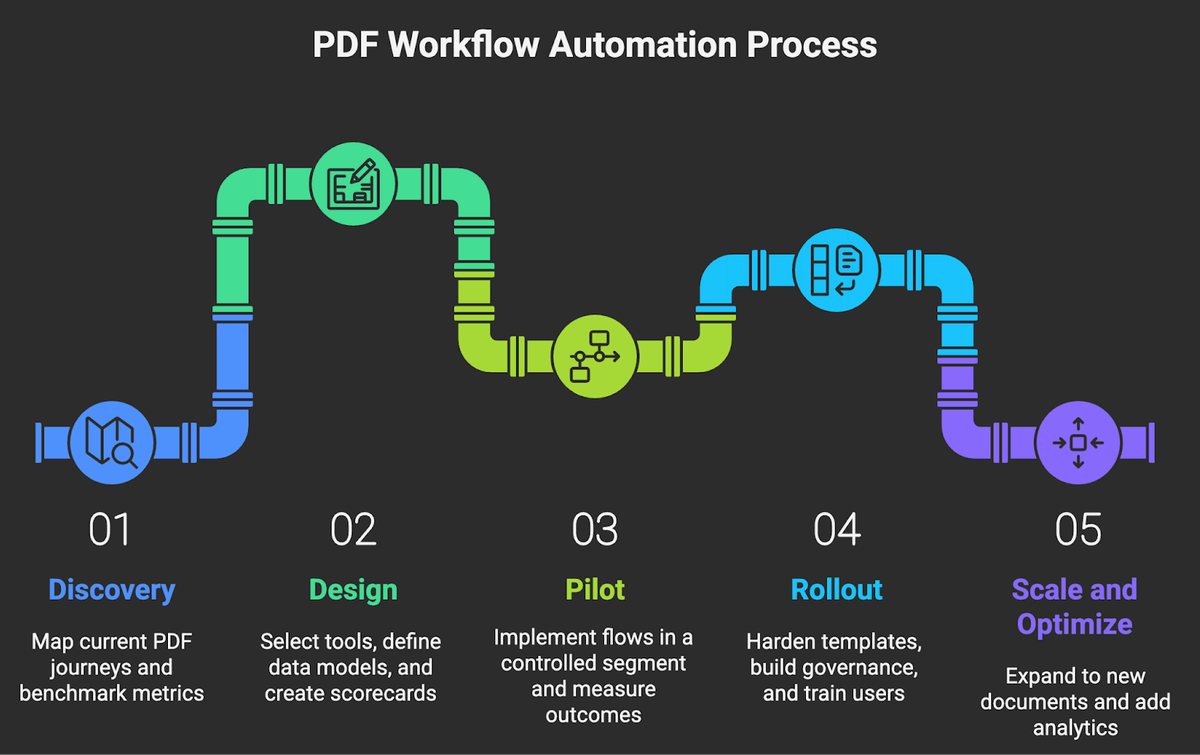
- Discovery. Map your current PDF journeys, volumes, exception paths, and compliance needs. Benchmark baseline cycle time and cost.
- Design. Select the right tooling mix, define data models, templates, and approval logic. Write a simple success scorecard.
- Pilot. Implement one or two flows in a controlled segment, integrate e signature, and measure outcomes against baseline.
- Rollout. Harden templates, build governance for versioning and access, train users, and retire shadow processes.
- Scale and optimize. Expand to adjacent documents, add OCR for inbound PDFs, and wire analytics to drive continuous improvement.
If you want a partner to move fast without breaking compliance, we should talk. Explore our automation services and see how we help teams like yours ship production grade workflow in weeks, not quarters. Contact us!