Generarea contractelor nu trebuie să fie lentă sau manuală. Aflați cum Airtable transformă procesul într-un flux de lucru rapid, automat, care economisește timp și reduce erorile.
Lista scurtă a software-ului potrivit de generare a contractelor fără presupuneri. Acest ghid prezintă cinci instrumente de top de generare a contractelor, pentru cine sunt cele mai bune, unde excelează, unde nu și modul în care fiecare abordează prețurile. Veți primi, de asemenea, un manual executiv pentru a evalua, pilota și scala cu rentabilitate măsurabilă a rentabilității investiției.
Punchline: alegeți instrumentul care se potrivește volumului contractului, stilului de negociere și sistemelor de înregistrare. Apoi automatizați fluxul de intrare în semnături, integrați datele și aplicați manualele, astfel încât Legal să protejeze afacerea fără a încetini tranzacțiile.
CE ESTE UN INSTRUMENT DE GENERARE A CONTRACTELOR?
Un instrument de generare a contractelor este un software care asamblează contracte conforme din șabloane și biblioteci de clauze aprobate, îmbină datele de afaceri din sisteme precum CRM și ERP, direcționează termenii prin aprobări, acceptă negocierea, colectează semnături și stochează înregistrarea finală pentru căutare și urmărirea obligațiilor.
În practică, aceste instrumente acoperă trei modele:
- Platforme cu semnături electronice cu șabloane de bază,
- automatizarea documentelor de vânzare pentru oferte și propuneri,
- gestionarea completă a ciclului de viață al contractului care acoperă intrarea în depozit și analiza.
De ce contează? Contractele sunt sistemul de lucru pentru venituri, vânzători și oameni. Contractarea slabă, șabloanele fragmentate și liniile roșii manuale determină scurgeri de valoare. Organizațiile pierd în medie câteva puncte procentuale de valoare din cauza practicilor slabe de contractare, pe care CLM disciplinat le reduce prin standardizare, vizibilitate și reduceri de timp ale ciclului.
Analiștii definesc CLM ca aplicarea fluxurilor de lucru, a depozitului, a analizei și a automatizării pe întregul ciclu de viață al contractului, nu doar semnătură. Acesta este punctul de referință pentru evaluarea amplorii capacităților și a nevoilor de integrare.
1. DOCUSIGN
Site-ul: https://www.docusign.com
DocuSign combină semnătura electronică lider pe piață cu CLM, un motor de clauze și șabloane și căutare și analiză bazate pe AI prin Insight. Vă ajută să standardizați șabloanele, să generați automat acorduri din CRM, să aprobați rutele, să negociați și să semnați la scară.
Istoria și pentru ce sunt cunoscute: Fondată în 2003, DocuSign este pionierul categoriei în domeniul semnăturii electronice și s-a extins în ciclul de viață al contractului cu DocuSign CLM și AI cu Insight după achiziționarea Seal Software în 2020. Cunoscut pentru încredere, scară și un ecosistem mare de integrare.
Cel mai bun caz de utilizare: Organizații multifuncționale care au nevoie de semnătură electronică omniprezentă, generare puternică de contracte bazată pe Salesforce și guvernanță scalabilă. O alegere sigură atunci când legislația, vânzările și achizițiile trebuie să se standardizeze pe o singură platformă.
Avantaje pentru utilizarea DocuSign
- Adoptarea omniprezentă a semnăturilor electronice cu trasee extinse de audit și conformitate.
- Integrări puternice Salesforce, Microsoft și ERP pentru îmbinarea datelor și fluxuri de lucru.
- CLM plus Insight, căutare asistată de AI și analiză în contractele executate.
- Administrator matur și permisiune pentru gestionarea lanțurilor complexe de aprobare.
- Acoperire globală, verificare identitate și acreditări de reglementare.
Contra DocuSign
- Configurația CLM poate fi complexă, de obicei necesită implementare expertă.
- Modul de extindere a modulelor adaugă costuri, semnătura electronică, CLM, Insight și AI premium sunt SKU-uri separate.
- Redlining-ul centrat pe cuvinte rămâne implicit pentru echipele juridice, editările browserului sunt secundare.
- Gestionarea modificărilor necesară pentru a menține șabloanele și bibliotecile de clauze curate în timp.
Opțiuni de preț 2026
DocuSign publică niveluri de planuri de semnătură electronică pentru persoane fizice și echipe și oferă planuri de întreprindere. CLM și Insight sunt evaluate în funcție de domeniu și utilizatori prin vânzări. Numele planului și schimbarea ambalajelor, confirmați pe pagina de prețuri înainte de bugetare.
2. ÎMBRĂCAT ÎN FIER
Site-ul: https://www.ironcladapp.com
Ironclad este un CLM condus legal construit în jurul unui designer de flux de lucru, un editor modern în browser, captare structurată de date, depozit și negociere asistată de AI. De asemenea, include Clickwrap pentru acceptarea termenilor online.
Istoria și pentru ce sunt cunoscute: Lansat în 2014, Ironclad este cunoscut pentru fluxurile de lucru prietenoase cu operațiunile legale, UX puternic de negociere și comunitate. Compania a achiziționat PactSafe în 2021 pentru a adăuga acceptarea clickwrap la scară.
Cel mai bun caz de utilizare: Echipele juridice cu creștere rapidă sau întreprinderi care trebuie să proiecteze admiterea și aprobările, să mențină negocierile într-o experiență structurată bazată pe browser și să ruleze atât contracte negociate, cât și termeni web. Este deosebit de eficient atunci când Legal deține proiectarea proceselor.
Avantajele utilizării Ironclad
- Constructor vizual de flux de lucru cu logică condiționată, ușor de întreținut pentru operațiile juridice.
- Negocierea nativă a browserului reduce pingpongul documentelor și păstrează datele structurate.
- Importul asistat de AI și cărțile de joc ajută la standardizarea liniilor roșii și a utilizării clauzelor.
- Clickwrap pentru acceptare online scalabilă alături de contracte negociate.
- Formulare robuste de admisie pentru direcționarea cererilor nestandard și urmărirea obligațiilor.
Contra lui Ironclad
- Poziționarea întreprinderii, costul total și implementarea sunt mai mari decât instrumentele IMM-urilor.
- Raportarea avansată și BI necesită adesea configurare sau depozit extern.
- Gestionarea schimbărilor este reală, editările bazate pe browser pot provoca obiceiurile Word first.
Opțiuni de preț 2026
Ironclad este întreprindere, prețurile sunt bazate pe module, utilizatori și volumul contractului. Ironclad Clickwrap este un SKU separat. Așteptați-vă la un proces de descoperire și determinare a scopului pentru o cotație exactă. Consultați furnizorul pentru ambalajul curent.
3. PANDADOC
PandaDoc se concentrează pe vânzări și documente orientate către clienți, șabloane, biblioteci de conținut, cataloage de prețuri, CPQ ușor, semnătură electronică și plăți. Poate genera contracte rapid din CRM cu prețuri și aprobări încorporate.
Istoria și pentru ce sunt cunoscute: Fondată în 2013, PandaDoc a crescut pe măsură ce a solicitat propuneri și cotații, apoi s-a extins la contracte și reînnoiri. Cunoscut pentru ușurința de utilizare, implementarea rapidă și raportul calitate-preț pe piața IMM-urilor și mijlocii.
Cel mai bun caz de utilizare: Organizații conduse de vânzări care au nevoie de propuneri de mare viteză, cotații și contracte standard cu prețuri integrate, aprobări, semnături electronice și plăți, toate legate de CRM.
Avantaje pentru utilizarea PandaDoc
- Asamblare de documente foarte rapidă bazată pe șabloane pentru echipele de vânzări.
- Catalog încorporat, tabele de prețuri, aprobările și colectarea plăților.
- Integrări și analize CRM bune ieșite din cutie pentru fluxurile de lucru cu venituri.
- Niveluri clare, publicate și timp rapid de obținere a valorii pentru IMM-uri și piața medie.
Contra lui PandaDoc
- Nu este un CLM complet pentru întreprinderi, fluxurile de lucru legale avansate și urmărirea obligațiilor sunt limitate.
- Guvernanța clauzelor și manualele complexe urmăresc primele platforme legale.
- Achizițiile grele sau cazurile de utilizare a riscului furnizorului vor avea probabil nevoie de un CLM.
Opțiuni de preț 2026
PandaDoc oferă planuri pe niveluri potrivite pentru IMM-uri și piața mijlocie, plus pachete de întreprinderi. Nivelurile includ de obicei o opțiune la nivel de intrare, un nivel de afaceri cu fluxuri de lucru avansate și caracteristici de întreprindere prin cotație. Verificați nivelurile și limitele curente pe pagina de prețuri.
4. AGILOFT
Site-ul: https://www.agiloft.com
Agiloft este o platformă CLM extrem de configurabilă, fără cod, pentru fluxuri de lucru complexe pe partea de cumpărare și de vânzare. Include biblioteci de șabloane și clauze, metadate robuste, aprobări, depozit și AI pentru extragerea clauzelor și detectarea riscurilor.
Istoria și pentru ce sunt cunoscute: Având rădăcini în software-ul enterprise fără cod, Agiloft a fost o alegere frecventă a analiștilor pentru conducerea CLM datorită profunzimii și configurabilității, în special pentru achiziții și complexitatea juridică.
Cel mai bun caz de utilizare: Întreprinderi cu fluxuri de lucru complexe de achiziții, furnizori și riscuri care necesită configurare fină, gestionare a datelor și integrare în ERP și instrumente de aprovizionare.
Avantaje pentru utilizarea Agiloft
- Nu există o platformă de cod care să poată reflecta procese complexe din lumea reală.
- Este un model profund de metadate, iar obiectele personalizate suportă raportarea și obligațiile bogate.
- Puternic pentru partea de cumpărare și gestionarea furnizorilor, alături de contractele laterale de vânzare.
- Importul moștenit asistat de AI și identificarea clauzelor pentru a accelera compilarea depozitelor.
Contra Agiloft
- Implementarea necesită configurare experimentată și guvernare clară.
- Experiența utilizatorului este puternică, dar se poate simți grea pentru utilizatorii obișnuiți.
- Overkill pentru echipele care au nevoie doar de contracte de vânzare rapide și semnătură electronică.
Opțiuni de preț 2026
Agiloft este de obicei citat pe baza modulelor, utilizatorilor și domeniului de implementare. Pachetele Enterprise, piloții de dovadă a valorii și serviciile sunt comune. Contactați furnizorul pentru o ofertă personalizată.
5. JÜRO
Site-ul: https://www.juro.com
Juro este o platformă de contract nativă a browserului cu șabloane structurate, biblioteci de clauze, aprobări și negociere colaborativă în editor. Acesta își propune să păstreze fluxul de la capăt la capăt, solicitarea semnăturii, într-un singur spațiu de lucru fără a exporta în Word.
Istoria și pentru ce sunt cunoscute: Fondată în 2016, Juro este cunoscută pentru un UX curat, un contract de auto-servire și o implementare rapidă pentru companiile tehnologice scalabile. Produsul pune accentul pe colaborarea în browser și păstrarea structurată a datelor pe tot parcursul negocierii.
Cel mai bun caz de utilizare: Companii cu creștere ridicată care doresc să modeleze contractele de vânzări și resurse umane, să permită crearea de autoservire, să negocieze în aplicație cu contrapărțile și să analizeze timpii ciclurilor fără cheltuieli mari de administrare.
Avantaje pentru utilizarea Juro
- Experiența browserului de la un capăt la altul reduce Word înainte și înapoi și păstrează datele.
- Excelent pentru autoservire, formularele de admisie sunt adaptate la șabloane și reguli de aprobare.
- Interfață intuitivă, lansare rapidă și fluxuri de lucru clare pentru utilizatorii de afaceri.
- Integrări solide cu CRM și suite de colaborare.
Contra lui Juro
- Unele echipe juridice preferă redlining-ul Word first, care necesită export și rupe structura.
- Managementul achizițiilor și obligațiilor foarte complex favorizează CLM al întreprinderii.
- Personalizarea avansată dincolo de modelul nativ poate necesita asistență furnizorului.
Opțiuni de preț 2026
Juro oferă planuri pe niveluri pentru echipele în creștere și un plan de întreprindere prin cotație. Ambalajele, limitele utilizatorilor și porțile caracteristicilor sunt publicate de furnizor. Vă rugăm să verificați detaliile actuale cu vânzările Juro.
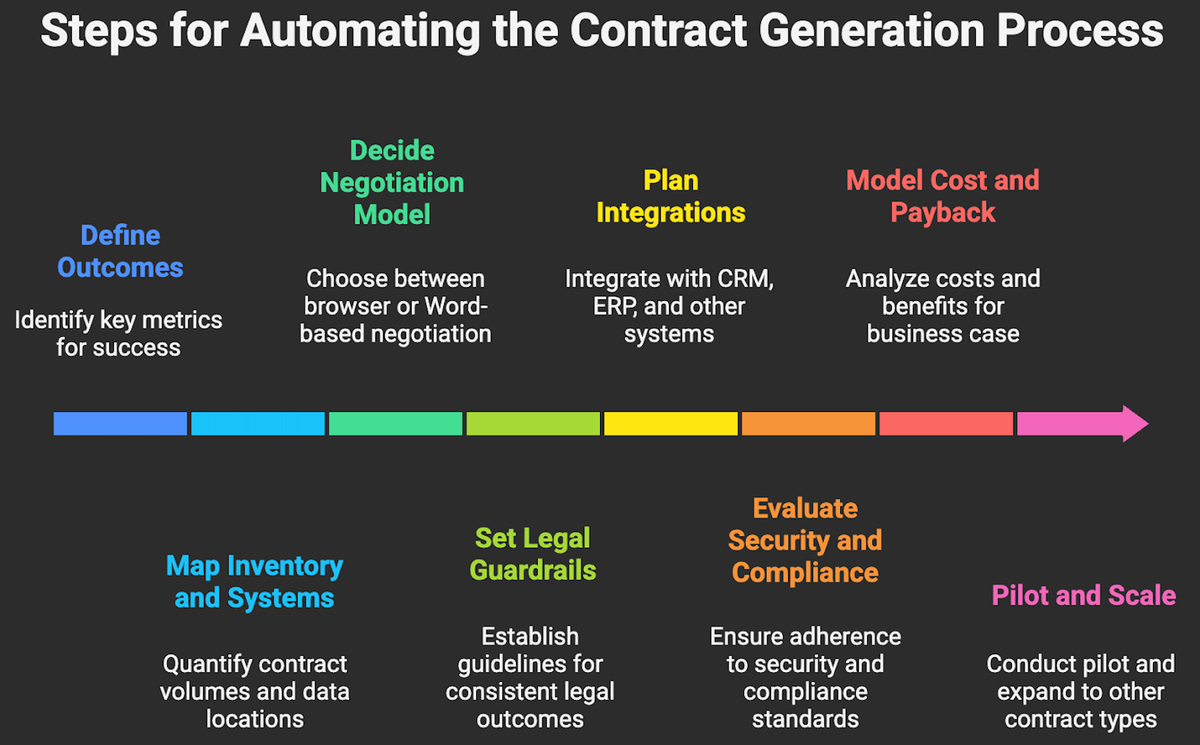
PAȘI PENTRU GENERAREA UNUI CONTRACT FOLOSIND UN INSTRUMENT DEDICAT
- Definiți rezultatele. Vizați două sau trei valori care contează, timpul mediu al ciclului de la cerere până la semnare, procentul de utilizare a termenilor standard și punctele de contact manuale pe contract.
- Harta inventarului contractului și a sistemelor. Cuantificați volumele lunare după tip, cine inițiază, unde se află datele, CRM, ERP, HRIS și unde trebuie să aterizeze obligațiile.
- Decideți modelul dvs. de negociere. Colaborarea nativă a browserului versus redlinarea inițială a Word. Această alegere îngustează câmpul imediat.
- Setați balustrade pentru Legal. Caietele de joc, bibliotecile de clauze, logica de rezervă și asistența AI ar trebui să producă rezultate consistente, fără a deveni un blocaj.
- Planificați integrările. Cel puțin, CRM pentru partea de vânzare, ERP sau P2P pentru partea de cumpărare, identitate și SSO și o destinație de date pentru raportare. Preferă conectorii nativi față de versiunile personalizate.
- Evaluează securitatea și conformitatea. SOC 2 Tip II, ISO 27001, rezidența datelor, DLP și controale de administrare adecvate industriei dvs.
- Costul total al modelului și rambursarea. Nivelurile de licență, implementarea, gestionarea modificărilor și timpul de administrare. Ancorați cazul de afaceri la timp economisit, numerar mai rapid, cheltuieli mai mici pentru consilieri externi și reducerea riscurilor și validați cu un mic pilot.
- Pilot și scară. Rulați un pilot de 60 până la 90 de zile pe un caz de utilizare de volum mare, înghețați domeniul de aplicare al șablonului, măsurați săptămânal timpul ciclului și ratele de excepție, apoi scalați la tipurile de contracte adiacente.
Utilizați acest tabel pentru a restrânge câmpul înainte de dovada conceptului. Se concentrează pe potrivire, abordarea prețurilor și compromisurile comune pe care le întreabă directorii. Nu este exhaustiv, dar vă ajută să vă restrângeți rapid lista scurtă.
Tool Best for Key strength Editor style Pricing approach DocuSign Mixed eSignature plus CLM at scale Ubiquity and integrations Word first, browser supported Published eSign tiers, CLM by quote Ironclad Legal led workflows and negotiation Visual workflows and clickwrap Browser first, Word export Enterprise, quote based PandaDoc Sales proposals, quotes, and contracts Templates, pricing tables, payments Browser editor Tiered, published, enterprise available Agiloft Complex buy side and sell side CLM No code configurability Word centric with web UI Enterprise, quote based Juro Scaling tech and self serve contracts In browser collaboration Browser first, Word export Tiered for growth, enterprise by quote
CUM SĂ ECONOMISEȘTI MAI MULT TIMP LA GENERAREA CONTRACTELOR?
Instrumentele de generare a contractelor de top împărtășesc un obiectiv, generează contracte conforme mai rapid, cu mai puține atingeri și mai puține riscuri. Cea mai bună potrivire depinde de locul în care se află blocajul tău. Dacă semnătura și scala sunt constrângerea, DocuSign este o platformă sigură. Dacă proiectarea procesului juridic și disciplina de negociere sunt decalajul, Ironclad sau Agiloft vă vor oferi controlul. Dacă viteza vânzărilor conduce afacerea, PandaDoc este greu de învins. Dacă doriți o experiență de browser curată și colaborativă, Juro simplifică fluxul.
Există mai multe performanțe pe masă. Majoritatea echipelor obțin o reducere suplimentară de 20 până la 40% a timpului ciclului prin reproiectarea aportului, curățarea șabloanelor și integrarea datelor cu CRM și ERP. Aici intrăm în joc.
Serviciile noastre de automatizare a documentelor și contractelor conectează platforma CLM sau platforma de documente aleasă cu fluxurile de primire, guvernanța clauzelor și integrările CRM, ERP și cu depozitele de date, astfel încât să obțineți un ROI măsurabil din generarea contractelor. Dacă doriți să vedeți cum arată acest lucru în practică, consultați rezultatele clienților noștri pe pagina de studii de caz.
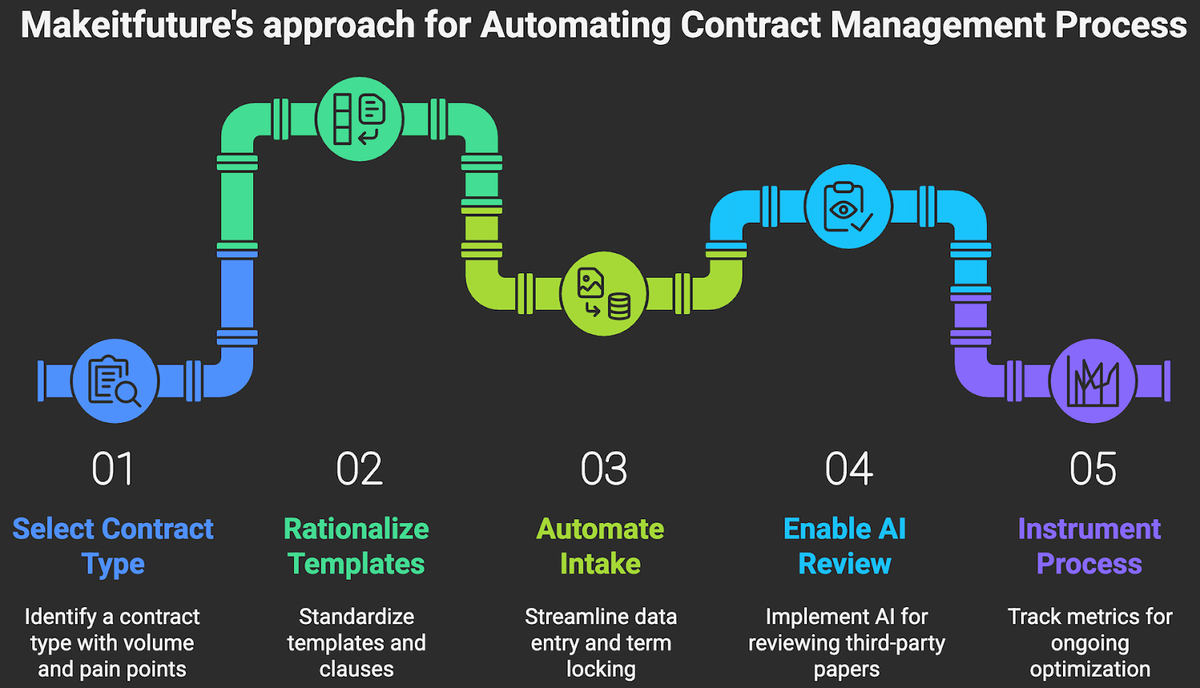
Planul de implementare pe care îl rulăm de obicei:
- Selectați un tip de contract cu volum și durere, de exemplu, formulare de comandă.
- Raționalizați șabloanele și clauzele la un standard de aur cu backbacks.
- Automatizați aportul, mapați datele din CRM sau ERP la câmpurile obligatorii și blocați termenii pe baza regulilor de afaceri.
- Activați revizuirea asistată de AI pe hârtie terță parte cu căi simple de escaladare.
- Instrumentați procesul, timpul ciclului, numărul de atingeri, ratele de excepții și împingeți datele către BI pentru optimizare continuă.
Dacă doriți un diagnostic rapid pentru a identifica câștigurile de 90 de zile, rezervați o evaluare cu echipa noastră. Vom cartografia primele trei cazuri de utilizare, potrivirea potrivită a instrumentului din această listă și secvența de automatizare care se rambursează trimestrial.