Looking for an honest Airtable review? Explore this comprehensive guide to see if the acclaimed platform meets your needs in 2024.
If you are evaluating Airtable to modernize operations, this review gives you the executive view that matters. You will see what Airtable does well, where it falls short, how pricing scales, and how it stacks up to Monday, Notion, Asana, and ClickUp.
We break down key features like Interfaces, Automations, AI, and Sync, translate them into business outcomes, and summarize real user feedback. By the end, you will know when Airtable delivers measurable ROI and how to implement it safely with governance in mind.
KEY FEATURES OF AIRTABLE
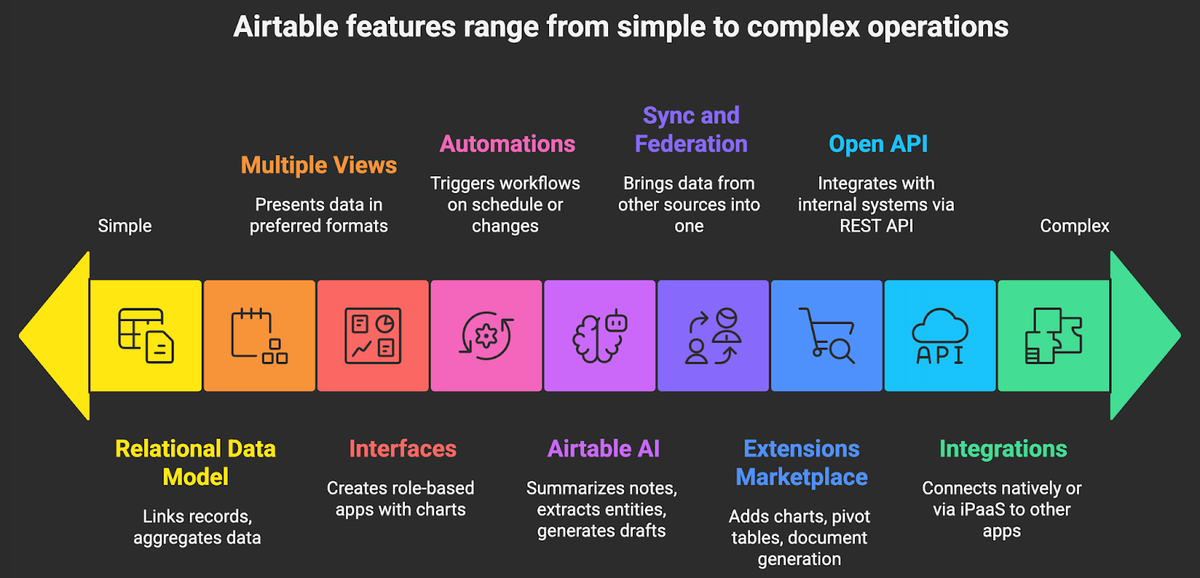
Airtable blends a spreadsheet-like UI with a relational database, automations, and a growing AI layer. Here are the capabilities leaders actually use to cut cycle times and reduce tooling sprawl.
- Relational data model with spreadsheet simplicity. Link records across tables, use lookups and rollups to aggregate, and build views without SQL. This is the core that lets nontechnical teams run database-grade workflows. See Airtable’s overview of fields, links, and views for details (Airtable documentation).
- Multiple views for execution. Grid, Kanban, Calendar, Timeline, Gantt, Gallery, and Form views help each role work the same data in the way they prefer.
- Interfaces for secure, app-like experiences. The Interface Designer lets you create role-based apps on top of your data with pages, charts, record summaries, and permissions, no code required. Execs see KPIs. Ops sees work queues.
- Automations to reduce manual touch. Trigger workflows on schedule or when records change. Actions include create or update records, send emails or Slack messages, call webhooks, and run scripts.
- Airtable AI for summarization, extraction, and classification. Add AI fields and steps in automations to summarize notes, extract entities, generate drafts, and tag content, all configurable by prompt.
- Sync and federation. Bring data from other bases or sources into a single source of truth with one-way or two-way sync. This reduces copy paste errors across teams.
- Extensions marketplace. Add charts, pivot tables, document generation, scripting, and more through extensions.
- Open API and webhooks. Use a well documented REST API, official SDKs, and webhooks to integrate with internal systems.
- Integrations with your stack. Connect natively or via iPaaS like Zapier and Make to Slack, Google Workspace, Microsoft 365, Jira, HubSpot, and more.
- Governance and security. Granular permissions at workspace, base, interface, and field levels, audit logs on higher tiers, SSO SAML, SOC 2 Type II, and GDPR commitments.
AIRTABLE’S USER EXPERIENCE
Airtable’s interface is approachable for spreadsheet natives, yet powerful enough for operations teams. The grid is fast for bulk edits. Views switch in one click. Filters and grouping are intuitive. Most new users can navigate basics in under an hour, then learn linked records and rollups as they go.
Interfaces are the UX multiplier. You can design pages with charts, kanban boards, record detail panels, and action buttons, then assign who sees what. This keeps executives, sales, marketing, finance, and partners in the same system without exposing raw tables. It also reduces tool switching because dashboards and work queues live next to the data that powers them. Interfaces overview
Automations are configured through plain language triggers and actions. The builder is clear, and testing steps makes debugging straightforward. When you need more, a scripting action supports JavaScript with examples and logs, which is valuable for IT teams who want safeguards without standing up separate services. Automations overview
Mobile is reliable for viewing, quick edits, and form submissions. It is not the place to design schemas, complex interfaces, or automations. Desktop is where building and administration happen. Many leadership teams adopt a pattern where field teams capture via forms on mobile, then operations manage the heavier work on desktop.
AIRTABLE’S PRICING AND PLANS
Pricing is seat based and tiered by governance, scale, and advanced features. As of publication, the common tiers are:
- Free. Best for personal or very small teams to prototype. Core features with lower record and storage limits.
- Team. Starting at 20 dollars per user per month billed annually, includes higher limits, advanced views, forms, and basic automations suitable for most departmental deployments.
- Business. Starting at 45 dollars per user per month billed annually, adds greater record limits, advanced sync, granular permissions, admin controls, and better audit capabilities for cross team scale.
- Enterprise Scale. Custom pricing, SSO SAML, SCIM provisioning, enterprise grade admin, increased limits, and priority support. Required for regulated environments and large seat counts.
Exact limits for records per base, attachment storage, and advanced features vary by tier. Verify current entitlements on the pricing page before committing, as these change over time. (please check official Airtable pricing)
COMMUNITY FEEDBACK
Sentiment from professional users converges on a few themes:
- Flexibility without deep database skills. Users rate Airtable above 4.5 out of 5 across review platforms for its ease of building relational workflows that would otherwise require custom apps.
- Interfaces reduce shadow spreadsheets. Teams appreciate turning messy sheets into clean, role based apps that nontechnical colleagues adopt quickly. Interfaces overview
- Automation is a clear win for cycle time. Reviewers cite reduced manual tasks, such as follow ups and status updates, once simple automations are in place. Automations overview
- Costs can rise with seats and scale. As more teams adopt Airtable, leaders flag per seat pricing and base limits as planning considerations.
- Performance and permissions need design. Very large bases, complex rollups, and cross base sync can slow down if not modeled well. Permissioning is powerful but requires an admin pattern to avoid sprawl.
PROS AND CONS OF AIRTABLE
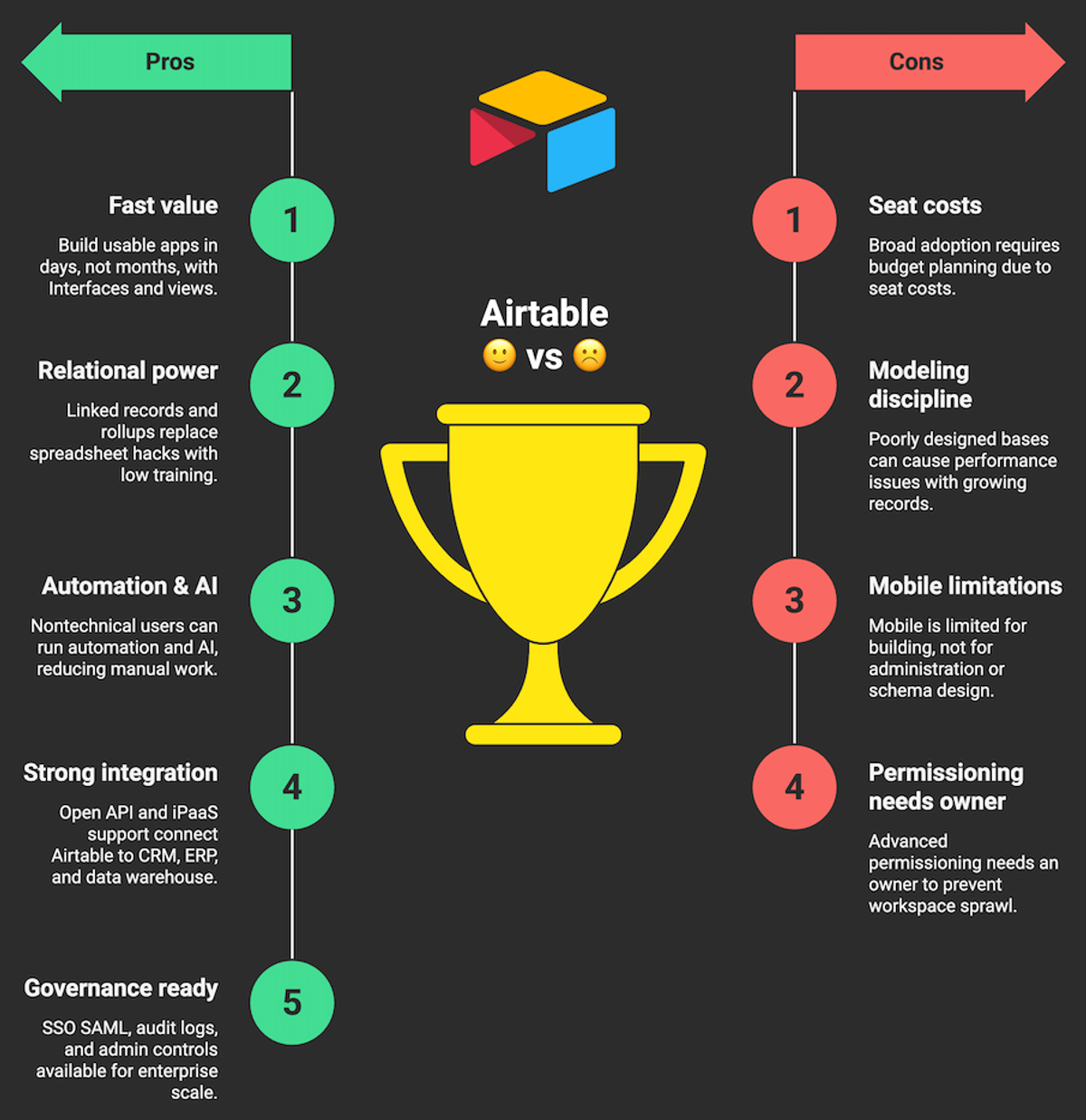
In executive terms, the question is whether Airtable will shorten time to value, reduce the number of tools in your stack, and maintain control as you scale. Here is a balanced view.
PROS OF AIRTABLE
- Fast time to value. Teams build usable apps in days, not months, with Interfaces and views.
- Relational power with low training burden. Linked records and rollups replace many spreadsheet plus macro hacks.
- Automation and AI that nontechnical users can run. Significant reduction in manual updates and reporting work. Airtable AI overview
- Strong integration surface. Open API, webhooks, and broad iPaaS support connect it to your CRM, ERP, and data warehouse. API docs
- Governance ready on higher tiers. SSO SAML, audit logs, and admin controls available for enterprise scale. Security overview
CONS OF AIRTABLE
- Seat costs can add up. Broad adoption across departments requires budget planning and clear license policies. Pricing
- Modeling discipline required. Poorly designed bases can cause performance issues as records and lookups grow.
- Mobile is limited for building. Great for capture and updates, not for administration or schema design.
- Advanced permissioning needs an owner. Without standards, workspaces and interfaces can sprawl.
AIRTABLE VS COMPETITORS
Many teams compare Airtable with work management and docs platforms. The right choice depends on whether your primary need is relational data with app-like interfaces, classic project management, or documentation centric collaboration.
Platform Best for Core strengths Watchouts Airtable Operational databases with app-like Interfaces across teams Relational data, views, Interfaces, Automations, AI, API Seat cost at scale, modeling discipline and governance required Monday Project and portfolio management with visual boards Templates, dashboards, resource planning, time tracking Less relational depth than Airtable for complex data models Notion Knowledge management and docs with lightweight databases Docs first UX, flexible pages, wiki adoption Databases and automations less robust for operations at scale Asana Task and goal management with strong execution tracking Work graph, goals, timeline, stakeholder updates Limited for building data centric apps and custom schemas ClickUp All in one tasks, docs, and dashboards for teams seeking breadth Highly configurable, many features in one place Complexity and setup time can be higher for nontechnical users
OUR VERDICT: IS AIRTABLE WORTH IT?
Yes, Airtable is worth it for teams that need a flexible, secure way to turn spreadsheets and scattered tools into governed, app-like workflows without waiting on engineering. If your primary outcome is faster cycle times, fewer handoffs, clean role based interfaces, and reduced spend on point tools, Airtable delivers strong ROI. Choose it when you have cross functional processes with structured data that outgrew spreadsheets, and when you want business users to own daily changes with IT oversight for governance.
Where it is not ideal, classic PPM with complex resource management or heavy document authoring as the core. In those cases, Monday or Asana for PM, or Notion for docs may fit better, and Airtable can still serve as the operational database connected via API.
If you want a safe, accelerated rollout, contact us here. We design your data model, Interfaces, and automations, integrate with CRM or ERP, and set up permissions and governance so adoption scales without chaos. Explore our automation services to see engagement models and typical timelines.
If you’re curious about outcomes others achieved with intelligent automation and no code platforms like Airtable, Make, and Zapier, including cycle time reductions and cost savings, please browse our case studies for real project patterns.