Compare iPaaS platforms against the workflows your team actually needs to run.
This iPaaS comparison shows where Make.com, Zapier, n8n, Workato and Tray fit for workflow automation and system integration.
We compare team fit, hosting, governance and billing. These five options span visual workflow tools, self-hosted automation and enterprise integration; this is a focused shortlist, not a ranking of every iPaaS vendor.
iPaaS platforms at a glance
| Platform | Best fit | Hosting | Billing model | Check before buying |
|---|---|---|---|---|
| Make.com | Visual workflows across apps | Cloud | Credits | High-volume consumption |
| Zapier | Fast SaaS automations | Cloud | Tasks | Multi-step workflow cost |
| n8n | Technical teams wanting control | Cloud or self-hosted | Executions on paid plans | Hosting and security ownership |
| Workato | IT-governed enterprise integrations | Cloud with on-premise connectivity | Custom quote | Governance and total cost |
| Tray | Enterprise and embedded integrations | Cloud | Features and usage quote | Plan scope and task volume |
Pricing models can change. Check the official vendor pricing pages before choosing; each vendor is linked in its section below.
What is an iPaaS platform?
An Integration Platform as a Service, iPaaS, is a cloud delivered platform to connect applications, data, APIs, and events. It provides prebuilt connectors, workflow orchestration, data transformation, error handling, and governance so you can automate business processes across tools without building point to point integrations from scratch. Gartner defines iPaaS as a suite of cloud services that enables development, execution, and governance of integration flows connecting any combination of on premises and cloud based processes, services, applications, and data within individual or across multiple organizations. This lets IT, operations, and marketing teams coordinate data and actions reliably at scale.
For marketing, iPaaS unifies customer data between CRM, MAP, CDP, analytics, and ad platforms, routes qualified leads in real time, enriches profiles with third party data, and keeps consent preferences compliant across systems. The result is faster campaigns, cleaner data, and fewer manual errors. Teams also reduce the integration backlog and move faster on revenue critical use cases.
What does iPaaS improve for connected teams?
When marketing depends on dozens of tools, fragmentation kills speed and data quality. iPaaS centralizes integration building blocks so you can orchestrate end to end revenue workflows with less engineering effort and more governance.
- Faster lead routing and SLA adherence. Trigger real time handoffs from ads and forms to CRM and sales tools with enrichment and dedupe in line, reducing response time and missed opportunities.
- Clean, unified profiles. Normalize, match, and merge records across CRM, MAP, CDP, and analytics to improve targeting and measurement. Poor data quality costs organizations an average of 12.9 million dollars annually.
- Channel and attribution consistency. Sync campaign metadata, UTM parameters, and conversions across platforms, improving budget allocation and ROI tracking.
- Privacy and consent enforcement. Propagate consent changes and suppression lists across all tools to comply with GDPR, CCPA, and email regulations.
- Reduced integration backlog. Reuse connectors, templates, and governance policies to ship automations in days, not months.
- Scale with confidence. Built in retries, rate limiting, and observability reduce outages and fire drills during launches or peak season.
- AI ready workflows. Plug in LLMs and enrichment APIs for content, classification, and lead scoring inside the same orchestrations, without glue code.
- Lower total cost of ownership. Consolidate scripts and custom builds into a managed platform with support, SLAs, and security reviews.
What should you check in an iPaaS platform?
The right platform depends on your stack, risk profile, and scale. Use this checklist as a filter before vendor demos. A strong marketing iPaaS should reduce manual ops, improve data quality, and meet your compliance bar without slowing you down.
- Connector coverage: Native connectors for Salesforce, HubSpot, Marketo or Adobe, Google and Microsoft suites, Meta and Google Ads, LinkedIn Ads, Shopify or Commerce Cloud, Slack, Snowflake or BigQuery, and a flexible HTTP connector for anything else.
- Trigger breadth and latency: Real time webhooks, polling, scheduled jobs, event streams. Clear guarantees on delivery, retries, and rate limiting.
- Data transformation and quality: Mapping, enrichment, validation rules, deduplication, and identity resolution patterns relevant to marketing data.
- Bulk and streaming: Support for large list uploads and bulk API operations, plus event based updates for speed sensitive flows.
- Error handling and observability: Dead letter queues, alerting, run history, replays, and detailed logging for audits.
- Security and compliance: SSO, RBAC, audit logs, secrets management, network controls, SOC 2, ISO 27001, data residency options as needed.
- Lifecycle management: Develop, test, production workspaces, version control, approval workflows, and change tracking to avoid breaking campaigns mid quarter.
- Extensibility: Custom connectors and code steps, JS or Python, SDKs, and APIs for CI/CD.
- AI capabilities: Native LLM actions, prompt management, classification and summarization nodes, and safeguards for PII handling.
- Team collaboration: Shared libraries, permissions by workspace, templates, and usage analytics.
- Commercial model: Transparent usage metrics, e.g., tasks, operations, executions, or recipes, with predictable scaling and enterprise SLAs.
Five iPaaS platforms compared
Below we evaluate five widely adopted platforms against the criteria above. Each can work for marketing, but they differ in depth of governance, connector ecosystems, extensibility, and commercial fit. Pick based on your stage, stack, and security needs, not brand familiarity.
Make.com
What it is: Make.com is a visual automation and integration platform, formerly Integromat, for building complex workflows with branching, iterators, and robust data manipulation. It offers hundreds of native connectors, real time and scheduled triggers, a strong HTTP module, webhooks, error handling, and data stores. The canvas makes it easy to visualize multi step journeys like lead capture, enrichment, scoring, and campaign sync.
Background: The platform originated as Integromat and rebranded to Make in 2022, expanding its focus on collaborative workflows and templates for business teams while keeping a powerful technical core.
Best for: Marketing ops teams that need a highly visual builder to orchestrate multi system workflows with complex branching or array handling without writing code.
Pros Make.com:
- Visual scenario builder with routers, aggregators, and iterators suited to messy real world marketing data.
- Strong HTTP and webhook modules to integrate less common tools quickly.
- Granular error handling with scenario reruns and detailed execution logs.
- Good price to capability ratio for small to mid sized teams.
- Growing library of templates for common marketing use cases.
Cons Make.com:
- Usage / cost based on operations require careful budgeting for high volume campaigns.
- Advanced governance, e.g., fine grained RBAC and release management, is lighter than enterprise first tools.
- Learning curve for arrays and complex mappings on the canvas.
Make.com lists Free, Core, Pro, Teams and Enterprise plans. Estimate cost from the credits and features your workflows need using the official pricing page.
Zapier
What it is: Zapier is a no code automation platform known for an extensive app ecosystem and simple trigger action “Zaps.” It supports multi step workflows, branching with Paths, filters, webhooks, schedule, bulk data via Transfer, and complementary tools like Tables and Interfaces that help marketing teams build light data apps around workflows.
Background: Founded in 2011, Zapier popularized no code automation and has one of the largest catalogs of SaaS integrations, suitable for long tail app connectivity in SMB and mid market.
Best for: Fast moving marketing teams and SMBs that need quick wins across a wide variety of apps, prototyping new automations, and lightweight data flows with minimal setup.
Pros Zapier:
- Very broad connector catalog, making it easy to integrate niche marketing tools.
- Low friction builder with clear triggers, actions, and path logic.
- Transfer for bulk backfills, plus Tables and Interfaces for simple internal apps.
- Good documentation and community examples for common marketing automations.
Cons Zapier:
- Task based pricing can spike under high volume campaigns if not monitored (just la make.com.
- Governance and SDLC controls are lighter compared to enterprise iPaaS.
- Complex data transformations or large scale data pipelines are not its core strength.
Zapier bills completed tasks. Estimate how many billable steps a typical workflow uses with its official task-pricing guide.
n8n
What it is: n8n is a source-available, workflow automation platform that you can self host or consume as a managed cloud. It offers nodes for common services, code nodes for JavaScript, webhooks, schedulers, credentials management, and an expression system for advanced transformations. With self hosting, teams keep data in their environment and extend the platform with custom nodes.
Background: Launched in 2019, n8n grew rapidly in developer and ops communities for its extensibility and fair code model. It is now used by startups and enterprises that want flexibility and control over data flows.
Best for: Technical marketing ops, data, and product teams that need self hosted control for data residency and compliance, or heavy customization with code alongside visual flows.
Pros n8n:
- Self hosting and data locality, attractive for regulated industries.
- Deep extensibility with custom nodes and built in JavaScript for bespoke logic.
- Cost effective at scale compared to per task pricing, especially when self hosted.
- Active community and a source-available codebase.
Cons n8n:
- Requires DevOps for secure, reliable self hosted deployments and updates.
- Smaller catalog than long standing commercial catalogs, though growing.
- Productivity features for non technical users are lighter than no code tools.
n8n offers a self-hosted Community Edition and paid plans based on workflow executions. Check collaboration and governance features on the official pricing page.
Workato
What it is: Workato is an enterprise iPaaS and automation platform that combines low code recipes with strong governance, security, lifecycle management, and a broad connector library. It supports real time and bulk operations, on premises connectivity via agents, robust observability, and advanced features like environment promotion and API management.
Background: Founded in 2013, Workato is frequently recognized by analysts for enterprise integration and automation capabilities, with an emphasis on governance at scale and collaboration between IT and business.
Best for: Enterprises with complex cross departmental workflows, stringent compliance, and the need to balance citizen development with IT oversight for business critical processes.
Pros Workato:
- Enterprise grade security, RBAC, auditability, and environment promotion.
- Strong connector catalog and performance for both event driven and bulk workloads.
- Operational reliability, SLAs, and mature monitoring to reduce downtime risk.
- Collaboration patterns that let IT govern while business builds safely.
Cons Workato:
- Higher price point and licensing complexity relative to SMB focused tools.
- Steeper learning curve for non technical users compared to simple no code builders.
- Often benefits from partner led implementation, which adds cost and time.
Workato uses a tailored commercial model. Request a quote for your expected volume and governance needs. See the official pricing page.
Tray
What it is: Tray.io is a low code enterprise iPaaS known for flexible connectors, callable workflows, error handling, and strong options for embedded integrations that SaaS companies can ship to their customers. It supports real time and scheduled jobs, bulk actions, and developer friendly features for complex data structures.
Background: Founded in 2012, Tray.io serves both enterprise automation and ISV use cases with its Tray Platform and Tray Embedded offerings, focusing on extensibility and deployment options for product teams.
Best for: Enterprise RevOps and SaaS product teams that need customizable automations or want to deliver native, customer facing integrations with governance and supportability.
Pros Tray.io:
- Strong foundation for embedded integration, including tenant management and embedding SDKs.
- Flexible connector development and handling of complex JSON payloads.
- Enterprise security features and administration controls.
- Good balance between low code usability and developer extensibility.
Cons Tray.io:
- Licensing and cost typically align to enterprise budgets.
- Smaller long tail app ecosystem than Zapier for niche tools.
- Training recommended for best practices on large scale deployments.
Tray lists Pro, Team and Enterprise plans, with pricing based on features and usage. See the official pricing page.
How can Makeitfuture help you choose an iPaaS?
Start with the workflow and the systems it must connect. Make.com and Zapier suit teams that need a visual route between SaaS apps. n8n gives technical teams more hosting control. Workato and Tray are better candidates when governance or embedded integrations shape the decision.
Before a vendor demo, write down one real workflow, its event volume, data sensitivity, failure handling and who will own it after launch.
- Discovery. Map the source and destination systems, the data fields, the response time needed and the cost of a failed run.
- Pilot. Build one workflow with realistic data, then test retries, duplicate events and the support handoff.
- Governance. Check access roles, secrets, logs and a safe way to change a live integration.
- Cost review. Estimate monthly credits, tasks or executions from your pilot, and include the time needed to maintain it.
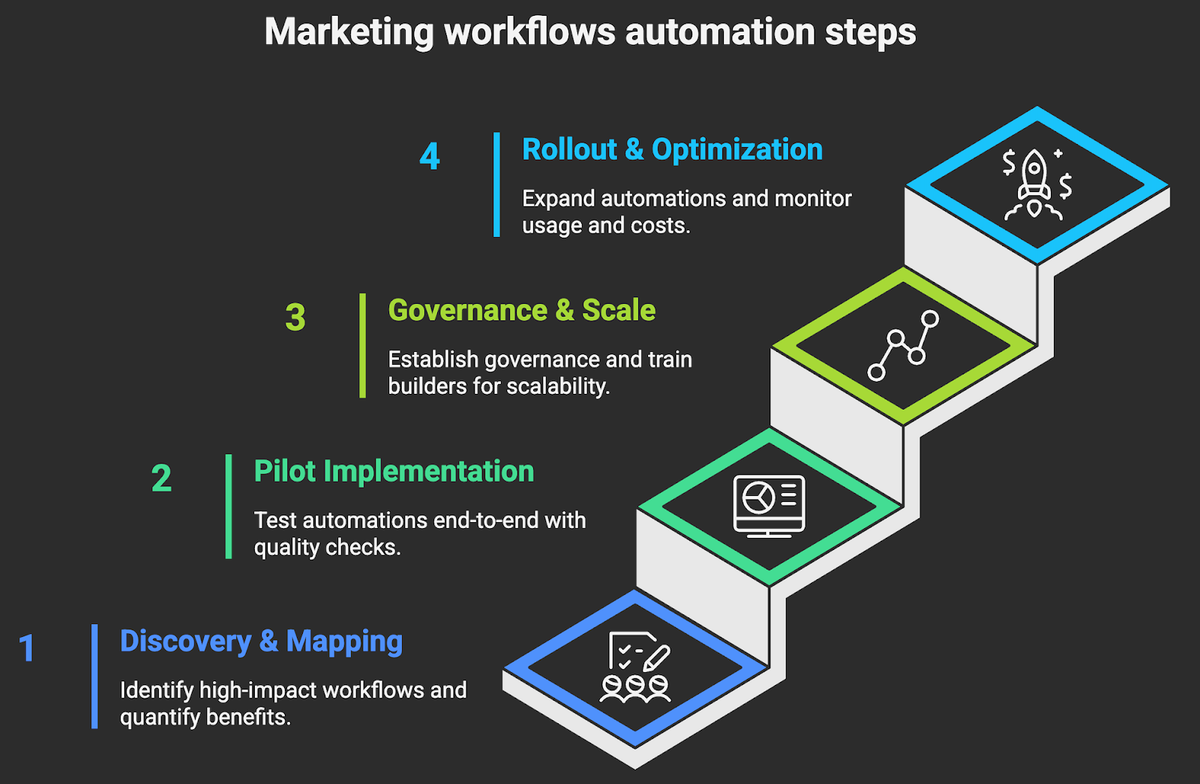
Makeitfuture can compare these platforms against a real workflow, build the pilot and define who owns the integration after launch.
See our SaaS integration services if you need integration architecture, implementation or ongoing support.