Discover how to seamlessly run JavaScript Python code with Zapier Make MIF automation solutions for enhanced efficiency.
Here’s a practical guide to using JavaScript and Python inside Make.com and Zapier to solve the 10 to 20 percent of use cases that native connectors cannot handle. You will learn why adding light code unlocks new automation ROI, the exact steps to add code in both platforms, and when to choose JavaScript or Python for Make and Zapier.
We also include governance tips and a simple decision table you can share with your IT and operations leads. If you are looking for hands-on help implementing Make or Zapier with Python or JavaScript, we show how Makeitfuture can partner with you at the end.
WHY USE CODE IN AUTOMATION?
Low code platforms cover most of the journey. Code covers the edge cases that block scale. Adding a thin slice of code inside your Make or Zapier workflow extends capability without building a full custom service. Below are a few examples:
- Close functional gaps, for example, transform messy payloads, normalize product SKUs, or compute HMAC signatures for APIs that do not have a native connector.
- Reduce connector sprawl by keeping small logic in line, not spread across extra apps or spreadsheets.
- Improve data quality with in flow validation, deduplication, enrichment, or fuzzy matching.
- Lower cycle time, one code step can replace several brittle branches or lookups.
- Control risk with contained, observable snippets rather than new microservices your team must maintain.
Two cautions. First, code steps have resource limits and no external package installs, so use them for light transformations and orchestration logic, not heavy data science. Second, keep secrets out of code, use platform connections or vaults instead. For context on the value of targeted automation, see McKinsey’s research on task automation and productivity uplift and where code often fills the last mile of integration gaps (McKinsey Global Institute). Analysts also note hyperautomation programs drive material cost reduction when orchestrated across tools and processes.
USING JAVASCRIPT IN AUTOMATION
JavaScript is ideal for quick, readable transformations in both platforms. It shines for string manipulation, date math, conditional routing, and shaping JSON between apps. Choose JavaScript when you want speed and clarity for lightweight data work.
USING JAVASCRIPT IN MAKE.COM
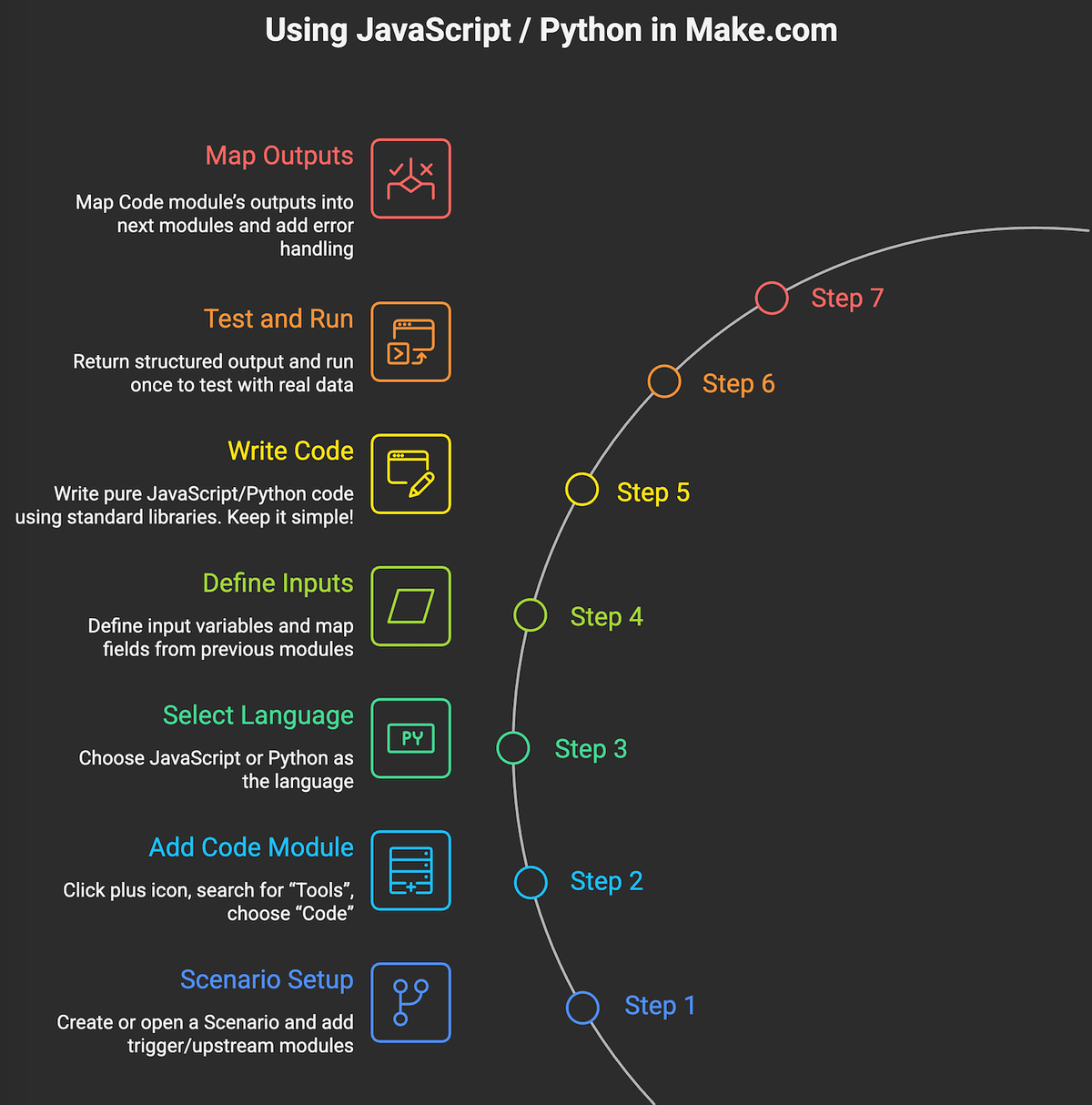
Steps to add JavaScript in Make.com
- Create or open a Scenario, add your trigger and upstream modules that provide the data you need.
- Click the plus icon to add a module. Search for “Tools”, then choose “Code”.
- Select JavaScript as the language in the Code module.
- Define input variables in the Code module, give each a name, then map fields from previous modules to these inputs.
- Write your JavaScript in the editor. Keep it pure, no external package imports. Use inputs to build your output object or an array of objects.
- Return structured output that downstream modules can map. Then click Run once to test with real data.
- Map the Code module’s outputs into the next modules. Add error handling branches if needed.
Best use cases for JavaScript in Make.com
- Reshape webhook payloads into the exact JSON an API expects, including nested objects and arrays.
- Normalize text, such as title casing names, removing diacritics, or creating URL slugs.
- Date and time math for SLAs, business hours, or timezone normalization.
- Pagination orchestration, computing offsets or cursors, then looping with Make’s iterator modules.
- Generating signatures or hashes for APIs that require HMAC or checksum headers, combined with Make’s HTTP modules for the call.
Make’s Code app supports inline JavaScript and Python, designed exactly for these use cases.
USING JAVASCRIPT IN ZAPIER
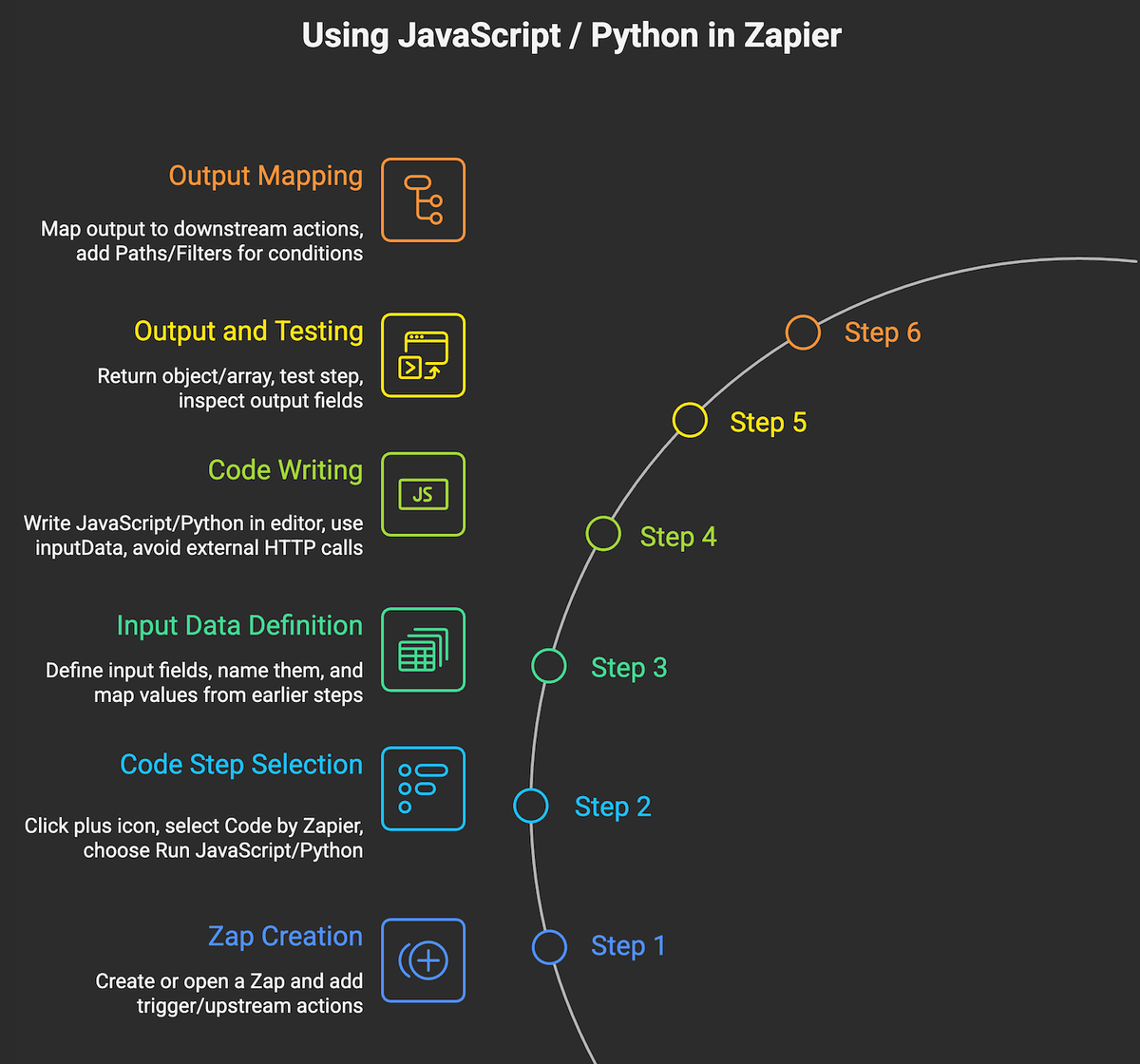
Steps to add JavaScript in Zapier
- Create or open a Zap. Add your trigger and upstream actions.
- Click the plus icon, select Code by Zapier, then choose Run JavaScript.
- Define Input Data fields, name each input, and map values from earlier steps.
- Write JavaScript in the editor. Use the provided inputData object for your inputs. Avoid external HTTP calls in the code step, use Webhooks by Zapier for network requests.
- Return an object or array of objects as your output. Test the step and inspect the output fields.
- Map the output to downstream actions. Add Paths or Filters if you need conditional flows.
Zapier documents the exact process and limitations, including supported runtime and execution limits.
Best use cases for JavaScript in Zapier
- Quick field transforms, for example, format phone numbers, split full name into first and last, or round currency.
- Conditional routing, compute a category or route flag to drive Paths.
- Array and JSON shaping between apps that flatten or nest fields differently.
- Creating deterministic IDs for idempotency checks before creating records.
USING PYTHON IN AUTOMATION
Python gives you rich data structures and strong standard library utilities. It is a great fit for heavier transformations, parsing CSV or XML, generating signatures, and algorithmic logic that benefits from Python’s readability. Choose Python when you need more complex data handling while staying inside Make or Zapier limits.
USING PYTHON IN MAKE.COM
Steps to add Python in Make.com
- Open your Scenario and add the trigger and sources that provide the data.
- Add a new module, search “Tools”, choose “Code”.
- Select Python as the language.
- Create input variables, then map fields from prior modules to these inputs.
- Write Python in the editor. Use only standard libraries. Keep logic focused on transformation, validation, and calculations.
- Return a dictionary or a list of dictionaries for downstream mapping. Run once to test with real inputs.
- Wire the Code module’s outputs into subsequent modules, typically HTTP, database, or CRM actions.
Best use cases for Python in Make.com
- Complex record merges and deduplication across multiple sources, for example CRM and billing.
- Parsing and transforming CSV, XML, or nested JSON into a normalized schema.
- Computing HMAC signatures, JWTs, or checksums for authenticated API workflows, paired with Make’s HTTP modules.
- Business rules engines, for example tiered pricing, partner commission logic, or SLA calculations.
USING PYTHON IN ZAPIER
Steps to add Python in Zapier
- Create or open a Zap. Build your trigger and upstream actions.
- Add a step, choose Code by Zapier, then Run Python.
- Define Input Data fields and map values from earlier steps.
- Write your Python using the provided input data object. Do not import external packages. Keep transformations within the code step’s execution limits.
- Return a dict or list of dicts. Test the step and verify the output fields.
- Map outputs into downstream actions. Use Paths or Filters for branching.
Best use cases for Python in Zapier
- Data normalization and enrichment, for example, merging multiple arrays or de duplicating before upserts.
- Signature generation and secure hashing for API calls handled by the Webhooks step.
- Advanced date math, fiscal period rollups, or allocation logic for finance ops.
- Flattening and unflattening complex JSON to match app field structures.
Platform Code option Strengths Limits to note Make.com JavaScript (Code module) Fast JSON shaping, text and date transforms, pagination helpers No external packages, short runtime, use HTTP modules for network calls Make.com Python (Code module) Heavier transformations, parsing CSV/XML, complex business rules No pip installs, keep outputs as JSON objects for mapping Zapier JavaScript (Code by Zapier) Quick field formatting, small logic blocks, routing flags Restricted runtime, no external HTTP in code, use Webhooks by Zapier Zapier Python (Code by Zapier) Data normalization, hashing, array and dict operations No external packages, short execution window
HOW CAN MAKEITFUTURE HELP YOU WITH AUTOMATION SOLUTIONS?
Conclusion. Low code gets you far. Adding targeted JavaScript or Python in Make.com and Zapier gets you the rest of the way with minimal overhead. Use JavaScript for speed and lightweight shaping, Python for deeper transformations and business rules, and keep network calls and secrets in the platform’s native modules. This balance delivers faster time to value, fewer brittle workarounds, and measurable ROI.
Where we fit. Makeitfuture partners with SMBs, SaaS platforms, and enterprises to design, implement, and operate intelligent automation, blending platforms like Make and Zapier with Python and JavaScript where it counts. We bring reference architectures, code templates, governance patterns, and test harnesses so your team scales confidently.
- Assessment to roadmap in weeks, not months, with clear ROI targets and guardrails.
- Build, test, and handover for mission critical automations, with monitoring and alerting.
- Security and compliance by design, including secrets management, audit trails, and least privilege access.
Explore our services and see how we can accelerate your next automation initiative.
If you want proof points, review selected client outcomes and patterns in our work portfolio.
Executive takeaway: Use Make or Zapier for 80 percent of the flow, insert compact JavaScript or Python for the final 20 percent, and keep everything observable, testable, and secure.
Have you identified any potential use of this information in your business? Don’t hesitate and book a call with our team. We’re happy to help!