Seeking Workato alternatives for your app development needs in 2024? Makeitfuture provides robust solutions.
Shortlist the right integration platform, reduce license waste, and accelerate automation, without locking yourself into a tool that doesn’t fit. This guide compares Workato alternatives head to head, so you can match platform capabilities with your team’s skills, governance needs, and budget.
You will find a clear summary of Workato’s strengths and gaps, a scannable comparison table, and deep dives on seven credible options, including Make, Zapier, MuleSoft, Boomi, Tray, Informatica, and Pabbly.
WHAT IS WORKATO?
Workato is an enterprise integration and automation platform, often classed as iPaaS, that lets IT and business teams orchestrate workflows across SaaS, databases, APIs, RPA, and AI services using low code “recipes.”
It combines prebuilt connectors, enterprise governance, and extensibility for embedded use cases. For iPaaS context, see this overview of integration platform as a service from IBM, a neutral primer on capabilities and patterns.
Key benefits of Workato
- Large catalog of connectors and triggers for common SaaS and enterprise apps, which shortens time to first integration
- Low code builder, monitoring, and error handling designed for both IT and business technologists, improving throughput on integration backlogs.
- Enterprise controls, including workspace separation, roles, audit, secrets management, and on premises connectivity via agents, supporting shared services models.
- Embedded integration capabilities for SaaS vendors to ship native integrations to their customers, creating product stickiness .
- AI assisted building and data transformation features that speed up mapping and recipe authoring for common patterns (vendor feature pages describe these assists.
WHY CONSIDER WORKATO ALTERNATIVES?
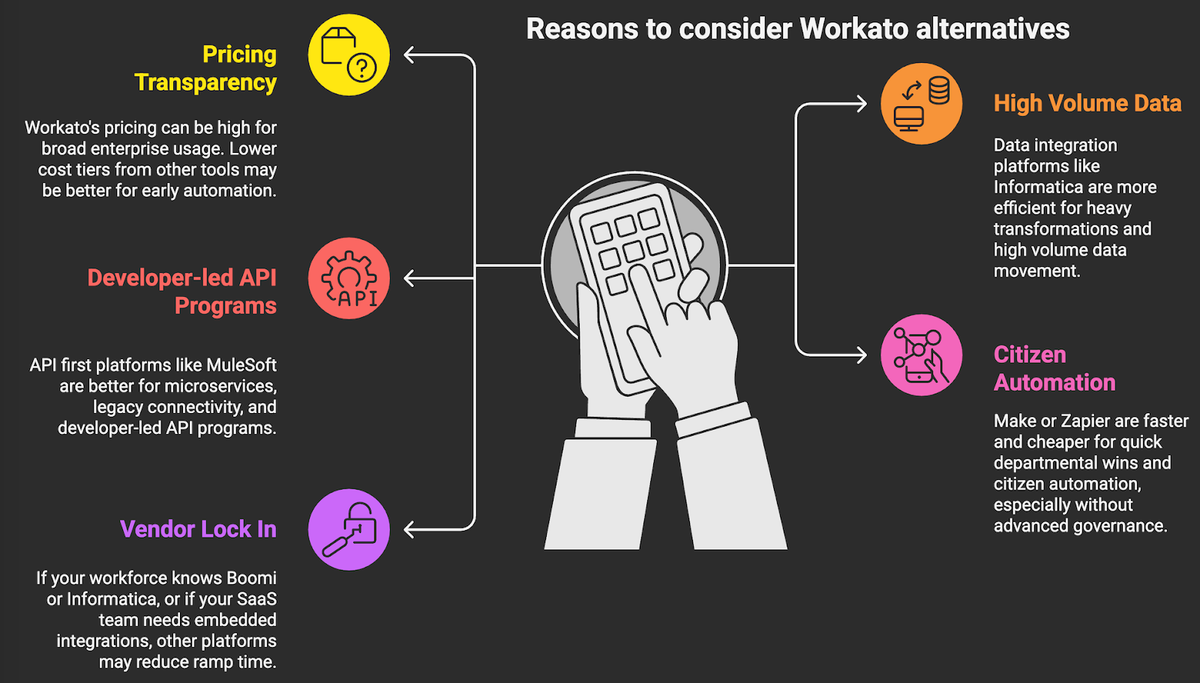
Workato excels for cross departmental automation at scale. You should still evaluate alternatives if your profile differs on price sensitivity, data volumes, or governance model.
- Pricing transparency: some capabilities are only available in higher tiers and pricing is typically by quote, which can land in mid to high five figures annually for broad enterprise usage. If you’re early in your automation journey, lower cost tiers from other tools may fit better.
- High volume data movement and heavy transformations may be more efficient in data integration platforms optimized for ETL or ELT, such as Informatica, especially when you need lineage and data governance baked in (helps satisfy compliance audits).
- Developer-led API programs, microservices, and legacy connectivity often benefit from API first platforms like MuleSoft that include full API lifecycle management and policy enforcement.
- Citizen automation and quick departmental wins can be faster and cheaper with Make or Zapier, particularly when advanced governance or on premises connectivity is not required.
- Vendor lock in and skills availability. If your workforce already knows Boomi or Informatica, or if your SaaS product team needs embedded integrations, other platforms may reduce ramp time and total cost of ownership.
If you need a structured decision path, align platform selection to three filters:
1. scope and latency, event automations vs large batch data jobs
2. control plane, citizen developers vs IT led center of excellence
3. risk posture, data residency, audit, and procurement constraints.
A QUICK COMPARISON OF WORKATO ALTERNATIVES
Use this table to narrow the field before your proof of concept. It focuses on fit, pricing approach, and common trade offs executives ask about.
Platform Best for Pricing model Notable strengths Typical limitations Workato Enterprise wide automations across SaaS with strong governance Quote based packages Rich connectors, low code recipes, governance, embedded integrations License complexity and cost for heavy usage, not a data warehouse ETL tool Make Visual, cost effective automation for SMB and mid market Tiered plans, public pricing Powerful visual builder, granular data manipulation, good value Fewer enterprise controls in lower tiers, scaling large scenarios needs care Zapier Fast, no code departmental automations and prototypes Tiered plans, public pricing Huge app directory, ease of use, AI assisted steps Costs scale with task volume, complex branching is limited MuleSoft API led connectivity, hybrid integration, and strict governance Quote based subscriptions End to end API lifecycle, enterprise security, legacy connectivity Higher cost and complexity, developer centric Boomi IT led integration across cloud and on premises with EDI and MDM Quote based tiers Distributed runtime, broad connectors, MDM, B2B/EDI strength Licensing can add up, UI feels heavy for non technical users Tray RevOps scale automations and embedded integrations for SaaS Quote based, usage aligned Scalable workflows, callable logic, developer friendly JSON handling Learning curve, fewer public price signals Informatica Data integration, governance, and lineage at enterprise scale Credits or subscriptions, quote based Metadata driven with AI, strong data quality and lineage Overkill for simple SaaS automations, requires data team Pabbly Budget friendly SMB automations and agency use Public, low cost tiers Good value per task, unlimited workflows Smaller connector set, lighter enterprise features
1. MAKE.com
Make.com is a visual integration and automation platform where you build “scenarios” by connecting modules on a canvas, ideal for multi step SaaS workflows, webhooks, and light data transformations.
Formerly known as Integromat, the platform rebranded as Make and expanded enterprise features while keeping a builder experience favored by operations teams for its fine grained data handling and routers.
Why is it an alternative for Workato? Make delivers broad SaaS coverage, a friendly builder, and strong value at lower tiers. If you do not need deep enterprise controls, it can reduce license spend while still automating across marketing, sales, support, and back office stacks.
Best use case. Departmental and mid market automations across tools like HubSpot, Slack, Google Workspace, Airtable, Shopify, and Notion, with occasional custom API calls and webhook events.
Pros for using Make.com
- Visual canvas with routers, iterators, and aggregators that make complex branching practical for non developers
- Strong data manipulation with mapping, functions, and JSON parsing inside scenarios, reducing the need for custom code
- Webhooks, scheduling, and error handling primitives that support both event and time based automations
- Team workspaces, versioning, and permissions in higher tiers for collaboration
- AI modules and connectors to popular LLM APIs to enrich flows with classification, summarization, or extraction
Cons of Make.com
- Enterprise features like SSO, advanced audit, and SLAs are limited to Teams or Enterprise plans.
- Very large or high frequency scenarios require careful design to manage concurrency and execution time.
- On premises connectivity and deep legacy system integration are not core strengths compared with enterprise iPaaS.
Pricing options (2026 Updated)
- Public tiers typically include Free, Core, Pro, Teams, and Enterprise. Representative starting prices as listed on the vendor pricing page when billed annually, Free, Core from about 10 to 12 USD per user per month, Pro from about 18 to 20 USD, Teams from about 35 USD, Enterprise by quote.
- Always confirm current quotas for operations and data transfers on the Make pricing page (they change periodically).
2. ZAPIER
Zapier is a no code automation tool for connecting apps using trigger action “Zaps”, with multi step flows, branching, and a large app directory.
Founded in 2011, Zapier popularized citizen led automation and now offers Interfaces for simple internal apps, Tables for lightweight data storage, and AI powered steps that can classify, generate, or route content within workflows.
Why is it an alternative for Workato? For fast “time to value” on simple to moderately complex automations, Zapier can be enough. It is easy to learn, has the largest long tail of connectors, and offers transparent pricing.
Best use case. Marketing, sales, and customer success automations that move data between SaaS tools, trigger notifications, and enrich records without heavy IT involvement.
Pros of using Zapier
- Extensive app directory with thousands of integrations, improving coverage for niche tools.
- Very low learning curve for business users, with good templates and community content.
- AI actions and utilities to build, classify, or transform text inside a Zap without external code.
- Interfaces, Tables, and Canvas features for lightweight internal apps and process mapping alongside automations.
Cons of Zapier
- Costs scale with task volume, so high frequency automations can become expensive.
- Polling based triggers on some apps introduce latency, which may not suit near real time needs.
- Advanced governance and on premises connectivity are limited compared with enterprise iPaaS.
Pricing options (2026 Updated)
- Public tiers include Free, Starter, Professional, Team, and Company. Representative monthly starting prices when billed annually, Starter around 19.99 USD, Professional around 49 USD, Team and Company scale by users, tasks, and features.
- Confirm current limits for tasks, users, and premium app access on the Zapier pricing page.
3. MULESOFT
MuleSoft’s Anypoint Platform is an enterprise integration and API management suite for API led connectivity across cloud and on premises, including design, governance, runtime, and observability.
Founded in 2006 and acquired by Salesforce in 2018, MuleSoft is known for full lifecycle API management, robust runtime with DataWeave transformations, CloudHub managed infrastructure, and adjacent offerings such as MuleSoft RPA for UI based automations.
Why is it an alternative for Workato? If your priority is a secure API backbone for mission critical systems, strict SLAs, and policy enforcement, MuleSoft provides controls and patterns that go beyond low code workflow tools.
Best use case. Complex, hybrid integrations spanning legacy systems, ERP, and modern microservices, where you also need to define, publish, and govern APIs as products.
Pros for using Mulesoft
- End to end API lifecycle from design and mocking through policy enforcement and analytics in one platform.
- Robust security, VPC networking, and hybrid deployment options that suit regulated industries.
- Rich connector library and templates for enterprise systems like SAP, Oracle, and Salesforce.
- RPA and event streaming options, plus AI assisted development tied into the Salesforce ecosystem for speed and governance.
Cons of Mulesoft
- Higher cost of ownership and specialized skills required compared with citizen automation tools.
- Longer “time to value” for simple SaaS automations.
Pricing options (2026 Updated)
- Subscription pricing is quote based, commonly aligned to vCores, environments, and add ons like API Manager and RPA.
- You can also procure via cloud marketplaces and Salesforce, which may offer credits or bundles. See the MuleSoft pricing overview for current packaging details.
4. BOOMI
Boomi AtomSphere is a cloud native iPaaS with a low code designer, distributed runtime called Atoms for hybrid connectivity, and complementary products such as API management, MDM, and B2B/EDI.
Launched in 2000, Boomi became an early leader in cloud integration and is known for rapid deployment, a large connector library, and strong capabilities for B2B, EDI, and master data management.
Why is it an alternative for Workato? Boomi balances low code speed with enterprise depth, especially when you need on premises agents, EDI, or MDM alongside SaaS integrations.
Best use case. IT led integration portfolios that span ERP, HRIS, CRM, and supply chain, with requirements for B2B partner connectivity and data governance.
Pros for using Boomi
- Distributed runtimes, Atoms and Molecules, that handle hybrid and edge scenarios reliably.
- Broad connector catalog and prebuilt process libraries to shorten delivery cycles.
- API management, MDM, and B2B/EDI options to consolidate vendor footprint.
- AI assisted mapping and error insights that cut configuration time on complex integrations.
Cons of Boomi
- Licensing across connectors, environments, and add ons can increase total cost of ownership.
- Citizen developer experience is less intuitive than lighter weight tools.
Pricing options (2026 Updated)
- Tiered, quote based plans that typically vary by number of connections, environments, and capabilities, with free trials available.
- Expect enterprise subscriptions in the mid to high five figure annual range for broad usage.
5. TRAY
Tray is a low code automation platform focused on scalable workflows and embedded integrations for SaaS companies, offered as the Universal Automation Cloud.
Since 2012, Tray has been popular with revenue and operations teams for robust JSON handling, callable workflows, and a builder that balances power with usability. Tray also offers an embedded integration product so SaaS vendors can ship native integrations to customers.
Why is it an alternative for Workato? Tray often lands between citizen tools and heavyweight enterprise suites, with stronger developer ergonomics and embedded options that suit product teams.
Best use case. RevOps scale automations across CRM, MAP, CS, data enrichment, and product led growth stacks. For SaaS platforms, embedded integrations to accelerate customer onboarding.
Pros for using Tray
- Scalable workflow engine with callable workflows and reusable components for maintainability.
- Developer friendly mapping, schema introspection, and error handling for complex JSON and API interactions.
- Team governance with workspaces, permissions, and audit suited to central operations teams.
- AI assists to speed up building and documentation of flows (vendor feature pages).
Cons of Tray
- Quote based pricing with fewer public signals on total cost.
- Learning curve for non technical users compared with Zapier or Make.
Pricing options (2026 Updated)
- Packaging is quote based and aligned to users, workflows, connectors, and for embedded, to customer volumes.
6. INFORMATICA
Informatica Intelligent Data Management Cloud, IDMC, includes Cloud Data Integration, application integration, API management, data quality, and governance. It is optimized for high scale data movement, transformation, and lineage.
Informatica is a longstanding leader in enterprise data management. Its metadata driven AI engine, CLAIRE, powers automation across mapping, lineage, and data quality, which matters when you need auditability and control.
Why is it an alternative for Workato? If your automation portfolio is data centric, with pipelines into Snowflake, Databricks, BigQuery, or Redshift, and you need governance and lineage, Informatica is often the safer bet.
Best use case. Batch and streaming data integration for analytics, data mesh, and MDM programs, while still supporting app integration where needed.
Pros for using Informatica
- Strong metadata, lineage, and governance, enabling compliance and impact analysis across pipelines
- High performance connectors and pushdown optimizations for modern cloud data warehouses.
- AI powered mapping, data quality, and cataloging through CLAIRE to reduce manual effort.
- Broad portfolio that consolidates data integration, quality, MDM, and API management.
Cons of Informatica
- Complexity and licensing breadth can be heavy for teams that only need SaaS to SaaS automations.
- Business user experience is less approachable than lightweight automation tools.
Pricing options (2026 Updated)
- Consumption based credits and annual subscriptions, with pay as you go options available via major cloud marketplaces.
- Enterprise packaging is quote based and depends on services used and throughput.
7. PABBLY
Pabbly Connect is a budget friendly automation tool that lets you build workflows across popular SaaS apps with triggers, actions, routers, and webhooks.
Pabbly became known for aggressive pricing and occasional lifetime offers, attracting freelancers, agencies, and small businesses that need solid coverage without enterprise bells and whistles.
Why is it an alternative for Workato? When cost is the top constraint and you mainly run straightforward SaaS to SaaS automations, Pabbly can cover the basics at a fraction of enterprise pricing.
Best use case. SMB and agency workflows for marketing, forms, CRM, email, and eCommerce where high governance, SSO, or on premises connectors are not required.
Pros for using Pabbly
- Very competitive pricing with generous task allotments relative to cost.
- Unlimited workflows on paid tiers and straightforward builder for common patterns.
- Webhooks and routers for event based flows and basic branching.
Cons of Pabbly
- Smaller connector catalog and fewer enterprise grade features.
- Limited governance and security features for regulated environments.
- Community and documentation depth are lighter than established enterprise vendors.
Pricing options (2026 Updated)
- Public tiers typically start around 19 USD per month for a Standard plan, with Pro around 39 USD and Ultimate around 79 USD, each with increasing monthly task allowances.
- Enterprise and annual discounts are available.
How to choose the right automation tool?
Match platform choice to your operating model. If you are building an API first backbone with strict governance, shortlist MuleSoft or Boomi. If you need data governance and lineage, consider Informatica. For fast, cost effective departmental wins, test Make or Zapier.
For embedded integrations and RevOps scale, evaluate Tray. If you want Workato’s blend of governance and speed and the budget supports it, stay with Workato. Align the tool to the work, not the other way around.
You could turn shortlists into ROI, run a two week proof of value across 3 to 5 representative flows, define measurable success criteria, saved time, error rate, data latency, and commit to a scaling plan tied to a center of excellence. If you want a second set of eyes on that plan, our team publishes practical playbooks here. Do you have questions? We have the answers! Don’t hesitate to contact us here, we’re happy to help.