Choose an HR automation tool by the process it has to run and the system that owns your employee data, then compare features. This 2026 guide compares six tools in one table, explains where AI agents fit and shows when you need automation across systems.
What are HR automation tools?
HR automation tools take repetitive administration off your HR team and coordinate the work that moves between recruitment, employee records, payroll, identity, documents and collaboration apps. They fall into four broad groups, and most companies end up using more than one:
- HR systems of record (HRIS) such as HiBob, BambooHR or SenseHR, which hold the employee record and run the workflows inside it.
- Process tools such as Introist, which coordinate one process (onboarding and offboarding, in its case) across several teams.
- Integration and automation platforms such as Make.com and n8n, which connect the HR platform to everything around it.
- AI agents, which handle the steps that need reading, judgement or a conversation, like answering a policy question.
The right mix depends on where the process starts, which system owns the data and which teams have to act. If your priority is the full joiner workflow, see our employee onboarding automation service, which explains how the applications, approvals and exception handling fit together.
How do HR automation tools work?
Every HR automation follows the same basic shape, whatever the product. An event triggers it (an offer is signed, a start date is confirmed, a leave request is submitted), the tool reads the employee record, applies your rules and then creates or updates records in the connected systems. Approvals pause the flow until the right person acts, and every step is logged so HR can see what happened.
The connections run through APIs and webhooks. When the HRIS has a native connector for the system you need, the workflow stays inside the HR platform. When it doesn't, or when the process crosses five or six systems, an integration layer carries the data between them and handles retries when one of the systems is slow or offline.
Which HR processes are good candidates for automation?
- Recruitment handover from the ATS to the HRIS after an offer is accepted.
- Onboarding and offboarding tasks across HR, IT, facilities and managers.
- Contract, policy and letter generation with approval and e-signature.
- Payroll and time-data validation before information reaches the payroll provider.
- Leave requests, approvals and return-to-work coordination.
- Employee questions that can be answered from an approved knowledge base.
- Compliance evidence, reminders and audit-ready records.
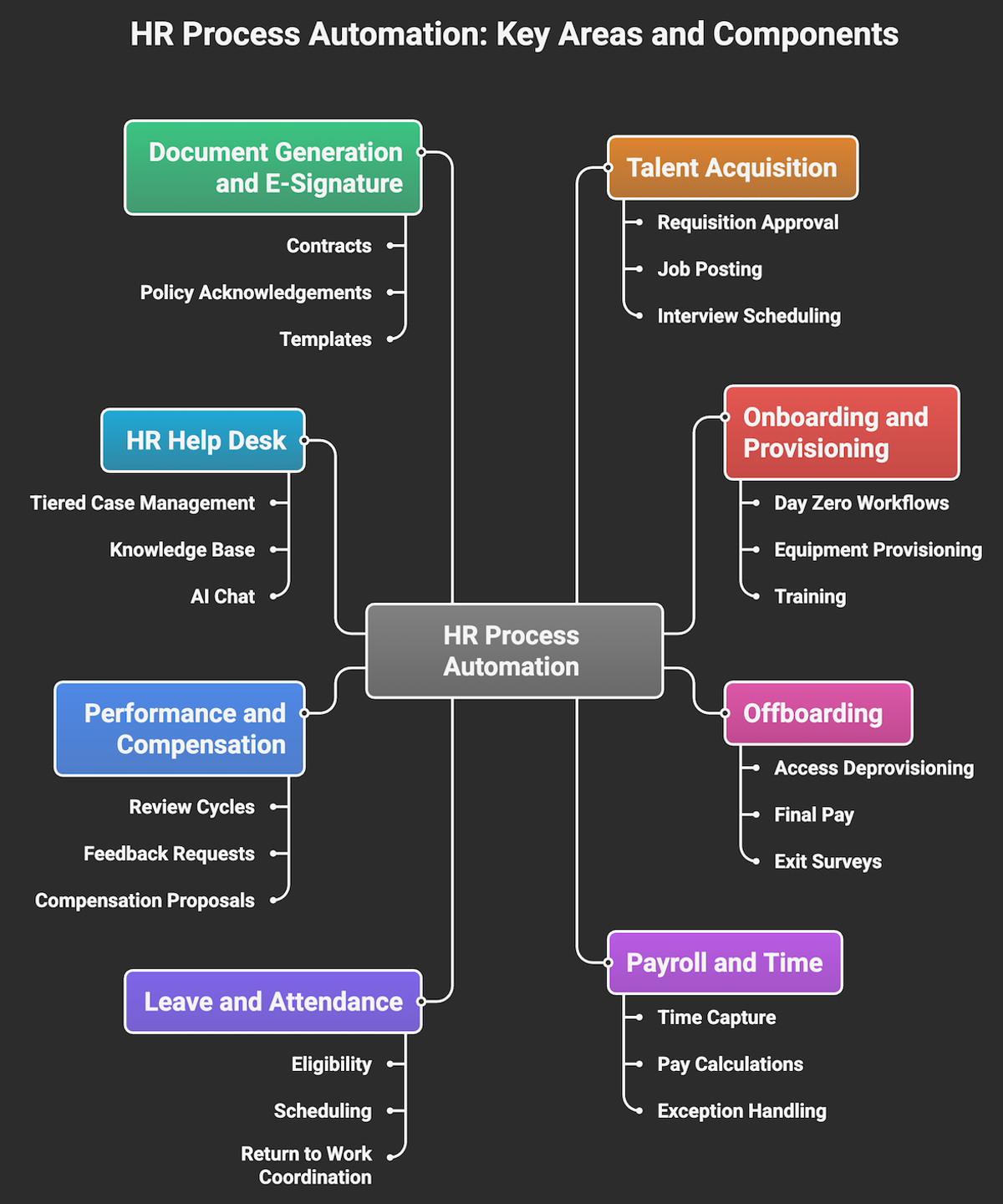
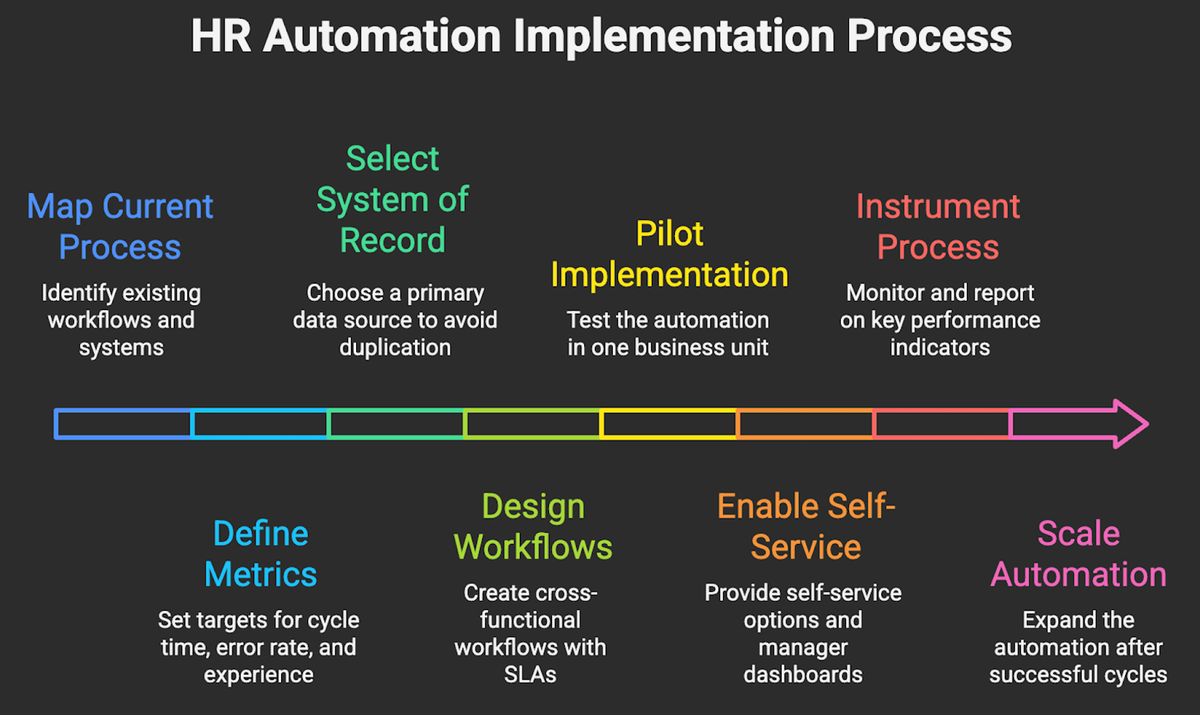
Choose a process with a clear owner, repeatable rules and a measurable baseline. Avoid starting with a rare exception or a process whose policy is still changing.
Here's a real example. MCRO, a Romanian company, onboarded freelancers by filling in six documents by hand, sending them for signature and working through a long checklist. We replaced that with a form that collects the freelancer's details, fills in all six documents automatically, sends them for e-signature and files the signed copies in the freelancer's folder. Tiberiu walks through this and other HR workflows in our webinar on automating your HR department.
What are the advantages of HR automation tools?
Less administration for HR. Data entry, chasing approvals and copying details between systems are the first things to go, so the team spends its time on people rather than paperwork.
Fewer data errors. When the employee record is entered once and synchronised, you stop finding different job titles, salaries or start dates in different systems.
A better first impression for new hires. Gallup found that only 12% of employees strongly agree their organisation does a great job of onboarding new employees. Automated onboarding means accounts, equipment and documents are ready on day one, every time.
An audit trail by default. Every approval, signature and change is logged, which makes compliance checks and internal audits much quicker to answer.
What are the limitations of HR automation tools?
Data ownership conflicts. If two systems both think they own the employee record, automation spreads the conflicts faster. Decide the system of record before you build anything.
Gaps at the edge of the platform. Native HR workflows stop where the platform stops. Identity, IT, finance and document tools often sit outside it, and that's where most manual handovers survive.
Regional and payroll fit. A tool that works well in one country may not cover local payroll, contracts or reporting rules in another, so check every location you operate in.
AI doesn't create value on its own. In a Gartner survey, 88% of HR leaders said their organisations had not realised significant business value from AI tools. Buying a tool with AI built in is no substitute for redesigning the process it supports.
How should you compare HR automation tools?
Data ownership
Confirm which product will hold the authoritative employee record and how changes are synchronised. Duplicate ownership produces conflicting records and manual reconciliation.
Integration coverage
Check the APIs and connectors for the systems you use, including identity, payroll, documents and communication tools. A long connector list matters less than reliable support for your critical path.
Controls and visibility
Look for approval steps, role-based access, audit logs, retries, alerts and an exception queue. HR teams need to see what completed, what failed and who must act next.
Fit for change
Test role changes, location changes, delayed start dates and leavers, not only the ideal onboarding path. These events show whether the design supports the full employee lifecycle.
Six HR automation tools to consider in 2026
This table summarises where each tool fits. The sections below cover what to check before you choose.
| Tool | Type | Best for | Check before choosing |
|---|---|---|---|
| SenseHR | HRIS | UK teams with frontline or shift workers that want simple core HR | Payroll setup and integrations outside the UK |
| Introist | Onboarding and offboarding orchestration | Coordinating joiner and leaver tasks across HR, IT and managers | Connections to your ATS, identity platform and task owners |
| HiBob | HRIS | Distributed, growing companies that want a modern HR platform | Regional coverage, payroll connections and complex cross-system flows |
| Rippling | HR and IT platform | Companies happy to run HR, devices and app access in one system | How many teams the switch affects |
| ADP Workforce Now | Payroll and HCM suite | Organisations where payroll and compliance come first | Regional fit, implementation effort and external integrations |
| BambooHR | HRIS | Small and mid-sized teams moving off spreadsheets | Workflow depth as you grow |
1. SenseHR
SenseHR centralises core employee records, absences and everyday HR administration, with time and attendance and recruitment modules alongside. It suits UK teams that want a simpler HR system before adding more complex cross-system orchestration. Check its support for your locations, payroll setup and required integrations.
2. Introist
Introist focuses on coordinating onboarding and offboarding tasks across HR, IT, managers and other teams. It's relevant when the main problem is consistent execution and visibility rather than replacing the HRIS. Check how it integrates with your ATS, identity platform and task owners.
3. HiBob
HiBob combines employee records with workflows, reporting and employee-facing HR features. Distributed, growing companies often shortlist it when they want a modern HRIS. Review regional coverage, payroll connections and the effort required for more complex cross-system flows.
4. Rippling
Rippling brings HR and IT administration into one platform, including employee data, devices and application access. This can cut handovers when the organisation is comfortable running on one connected platform. Model the scope carefully, because adoption will affect several operational owners.
5. ADP Workforce Now
ADP Workforce Now covers payroll, time and attendance, benefits and talent management in one suite. It's a strong fit for organisations that put payroll operations and regulatory support first. Confirm regional fit, implementation requirements and how external applications connect to it.
6. BambooHR
BambooHR provides employee records and common HR workflows for small and mid-sized organisations. It can be a practical first HRIS for teams moving away from spreadsheets. Check whether its workflow depth and regional integrations match the next stage of growth.
Where do AI agents fit in HR automation?
Rules-based automation is ideal for moving data and tasks between systems. AI agents take on the steps that need reading, interpretation or a conversation: answering an employee's question from your approved policies, summarising applications against a role's criteria, preparing a new hire's first-week plan or flagging timesheet entries that look wrong. HR vendors are moving quickly here, and Gartner predicts that 40% of enterprise applications will include task-specific AI agents by the end of 2026, up from less than 5% in 2025.
The built-in agents in your HR platform only see that platform's data. When an agent needs to work across your HRIS, ATS, documents and messaging tools, a custom AI agent connected to all of them is often the better route.
Keep a person in charge of decisions about people. The UK Information Commissioner's Office report Recruitment rewired says employers must tell candidates clearly when automated decision-making is used, and apply any human review consistently to everyone at the same hiring stage. Let the agent prepare and recommend, and let HR approve. In the EU, the AI Act goes further and lists AI systems used to filter job applications, evaluate candidates or monitor employee performance as high-risk.
When is HR software enough?
One HR platform may be enough when the process stays inside that platform and its native workflow covers the required rules. Cross-system automation becomes useful when the work moves between the ATS, HRIS, payroll, identity, e-signature and IT tools, or when several teams need one shared status.
For the process before the signed offer, explore recruitment automation. For contracts and policy packs, see document automation. For joiners, role changes and leavers, start with employee onboarding automation, and if you're designing that workflow yourself, our guide on how to automate employee onboarding walks through the architecture step by step.
See HR automation in practice
In our webinar on automating your HR department, Tiberiu Socaci shows working examples of freelancer onboarding with e-signature, automatic account creation for new hires, role-based training paths and leave requests approved directly in Microsoft Teams. For a shorter build, watch how to automate employee leave requests with n8n, from the request form to manager approval and calendar updates.
How can Makeitfuture help?
We map the process, assign data ownership and connect the systems around the HR platform you choose, adding AI agents where they save real time. The result is a monitored workflow with clear approvals and exception handling. Book a call to review the process and identify a suitable first release.
Frequently asked questions about HR automation tools
What is the best HR automation tool for a small business?
For most small businesses, the best starting point is a simple HRIS such as BambooHR or SenseHR, because it gives you one reliable employee record before you automate anything around it. Add integrations once you know which handovers still happen by hand.
Can HR automation replace an HR team?
No. Automation removes data entry, chasing and copying between systems, but decisions about hiring, performance, pay and wellbeing still need people. The aim is to give HR more time for that work.
How long does it take to automate an HR process?
A single, well-defined workflow such as leave requests or contract generation usually takes a few weeks to design, build and test. Full onboarding across HR, IT and finance takes longer, so start with one process and expand from there.
Do I need an integration platform if my HRIS has workflows built in?
Not always. If the process stays inside the HRIS, its native workflows are enough. Once the work has to reach identity, IT, payroll, documents or messaging tools that the HRIS doesn't connect to well, an integration platform such as Make.com or n8n fills the gap.
Is it legal to use AI in recruitment and HR decisions?
Yes, with safeguards. In the UK, the ICO expects employers to tell candidates when automated decision-making is used, apply meaningful human review consistently and monitor for bias. In the EU, the AI Act treats AI used in recruitment and employee management as high-risk, so check the rules in every country you hire in before you automate decisions about people.