In the dynamic sphere of project management, the implementation of digitale workflows has transformed the way businesses operate.
Executives ask a simple question first, what is a digital workflow, and then a harder one, how do we use it to deliver measurable impact in our projects. This article answers both. You will get a clear definition, the business benefits for project management, a step by step method to design and implement a digital workflow, and pragmatic ways to avoid common pitfalls.
We will also show where automation platforms fit, how to choose among them, and the metrics that prove value. If you want a concise playbook you can hand to your PMO and IT leads, you are in the right place.
WHAT ARE DIGITAL WORKFLOWS?
A digital workflow is the coordinated set of steps, decisions, data movements, and automations that move work from request to done across people and systems. It codifies who does what, when, with which inputs and outputs, and under what rules, in a reusable and measurable way. Think of it as the operational backbone for a repeatable process, encoded in software and connected to your systems of record.
Good vendor neutral definitions describe the concept consistently. IBM frames digital workflows as the orchestration of tasks, data, and tools to deliver outcomes across the enterprise, which captures the end to end nature of the practice (useful for executives aligning multiple functions). Adobe focuses on document driven workflows such as approvals, signatures, and compliance, a frequent starting point for PMOs and operations teams.
In project management, digital workflows translate activities like intake, scoping, approvals, resource assignments, stage gates, change requests, and handoffs into well defined flows, with automation eliminating repetitive steps. The outcome you are buying is consistent execution with transparency and control.
Core building blocks of a digital workflow
Building block What it does Example in projects Trigger Starts the workflow based on an event or request New project request form submitted Tasks and roles Defines work steps and who owns them PM reviews scope, Legal approves contract, Engineering estimates Rules and decisions Routes work based on criteria If budget over 100k, route to CFO for approval Data and documents Captures and moves information through the flow Requirements document, risk register, SOW Automations Executes repeatable actions without human effort Auto create Jira epics, post updates to Teams, send e signature SLAs and metrics Sets targets and measures performance Stage gate decision within 48 hours, cycle time per phase
BENEFITS OF DIGITAL WORKFLOWS FOR PROJECT MANAGEMENT
When you digitize and automate the path from request to delivery, you stabilize execution and make performance visible. That pays off across cost, speed, quality, and risk.
- Shorter cycle times. Fewer manual handoffs and instant routing reduce delays at stage gates and approvals, which cuts lead time and accelerates value delivery. Gartner projects organizations that combine hyperautomation with process redesign can lower operating costs by up to 30 percent, which correlates strongly with throughput and cycle time improvements.
- Higher throughput with the same headcount. Automation handles repetitive tasks, and standardized flows reduce rework so your team ships more projects per quarter. McKinsey’s analysis shows about 60 percent of occupations have at least 30 percent of activities that can be automated, a strong baseline for PMO efficiency gains.
- Real time visibility. Dashboards show status by phase, blockers, and forecasted delivery dates, allowing faster intervention and better portfolio decisions.
- Governance and audit. Every decision, approval, and change is time stamped with an owner, simplifying audits and reducing compliance risk. ServiceNow’s TEI by Forrester reports meaningful governance and productivity benefits with platform consolidation, alongside financial ROI.
- Consistent quality. Templates and rules reduce variance across teams, which improves predictability and stakeholder experience.
- Better resource utilization. Automated intake and prioritization make it easier to align scarce talent to the highest value work.
- Fewer failed or late projects. Standardized risk, change, and dependency workflows catch issues earlier. PMI has long tied disciplined delivery practices to lower waste in project investment.
HOW TO CREATE A DIGITAL WORKFLOW
The right way to build a digital workflow is to start small, measure rigorously, and scale what works. Aim for a 4 to 8 week MVP that proves value on one high friction flow, then iterate.
- Pick a high value use case with clear pain. Examples, project intake and triage, contract approval, change requests, vendor onboarding. Define a measurable business case up front, for example baseline cycle time, touch time, and error rate.
- Map the current state and quantify waste. Use a concise value stream map. Identify delays, rework loops, and decision bottlenecks. Capture systems involved, required data, and roles.
- Design the target state. Define roles, rules, SLAs, and required data. Decide what to automate and what to keep manual. Keep decision logic explicit so it is maintainable.
- Select the right platform fit for the job. Match your work type and integration needs to a platform category. Use the table below to guide the first pass.
Platform Selection Guide Platform category Best for Representative tools Watch outs Work management and collaboration Team and project workflows, backlogs, sprints, approvals Asana, Monday, Smartsheet, Jira Great for teams, limited for complex cross functional orchestration BPM and low code suites Rules heavy, cross functional flows with forms and state Appian, Camunda, Microsoft Power Platform Requires design discipline, governance to avoid sprawl Service management platforms Request to resolution, SLAs, enterprise service portals ServiceNow, Freshservice Licensing models and configuration rigor matter for TCO iPaaS and integration orchestration Connecting systems and APIs, event driven automations Workato, MuleSoft, Azure Logic Apps Avoid building business logic in integration only layers Task automation, RPA and documents UI based repetitive tasks, signatures, document processing UiPath, Automation Anywhere, Adobe Acrobat Sign, DocuSign RPA is brittle on UI changes, pair it with process redesign
- Build an MVP with guardrails. Configure forms, states, rules, and notifications. Automate 20 to 40 percent of tasks to start, wire in the highest value integrations, implement basic role based access controls.
- Instrument end to end metrics. Track lead time, touch time, flow efficiency, approval aging, rework rate, first time right, and throughput. Define a simple ROI model, for example annual hours saved multiplied by fully loaded cost, minus platform and run costs.
- Pilot with real users. Run for two to four weeks with one or two teams. Capture friction, exceptions, and missed data fields. Tune rules and notifications to reduce noise.
- Harden integrations and data quality. Stabilize connectors to systems of record. Add validation rules and reference data. Ensure error handling and alerting exist for failed jobs.
- Roll out with change management. Provide a short playbook, 60 minute training, and quick reference guides. Make leaders sponsors of the new way of working, and sunset obsolete channels.
- Scale and standardize. Template the workflow for other teams, publish naming conventions, reuse components, and stand up a light Center of Excellence to maintain standards and governance.
If you need a deeper primer on automation boundaries and cost impact, Gartner’s hyperautomation guidance is a good anchor when scoping what to automate and where to redesign the process first (framework to prioritize automation).
COMMON CHALLENGES AND HOW TO OVERCOME THEM
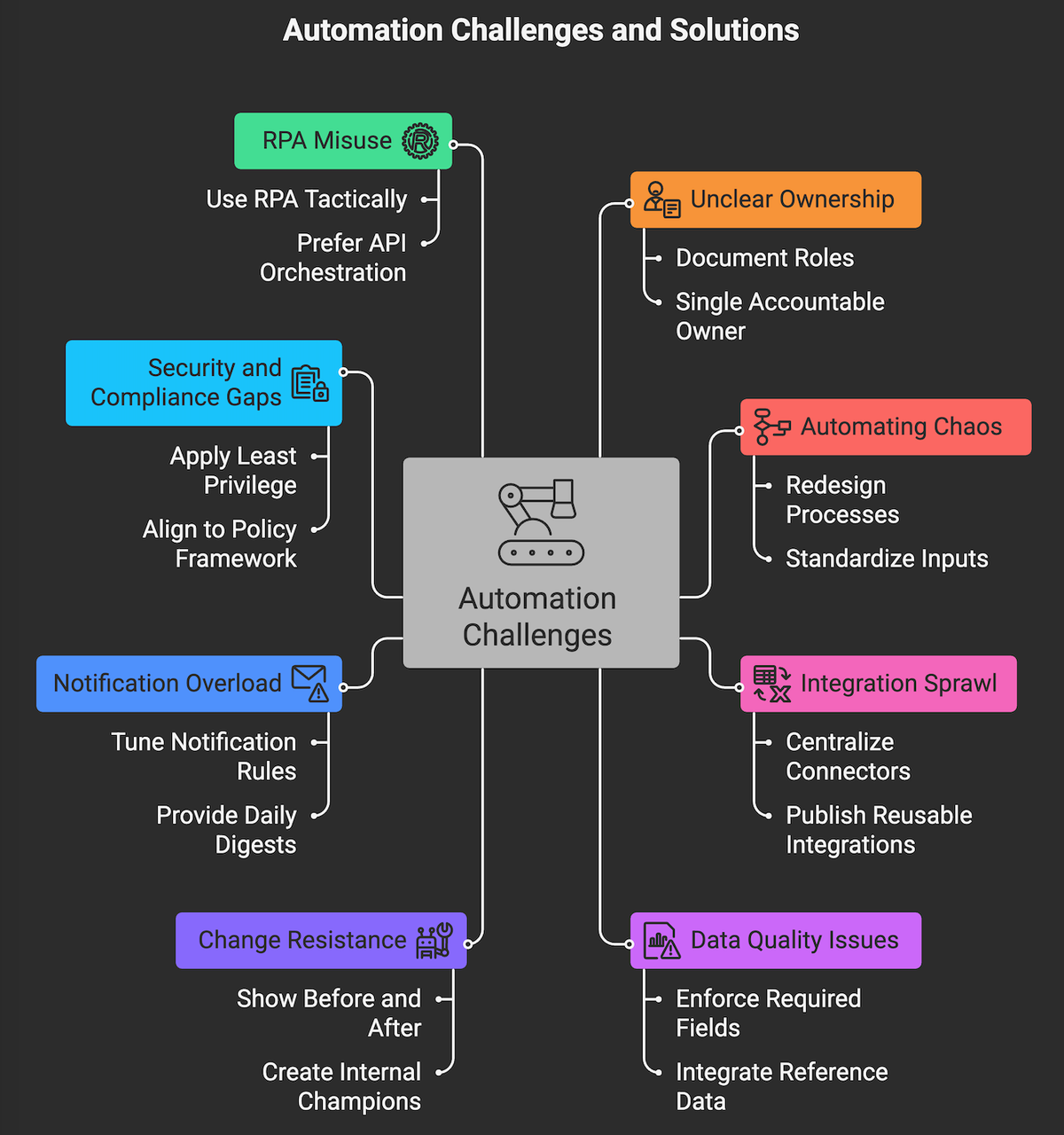
Digital workflows fail when teams automate broken processes, skip change management, or ignore data quality. Plan for these issues up front.
- Unclear ownership and RACI. Fix it by documenting roles at each state. Every task and decision needs a single accountable owner.
- Automating chaos. Do a light redesign first. Remove non value steps, consolidate approvals, and standardize inputs before automating.
- Integration sprawl. Centralize connectors in iPaaS where possible. Publish reusable integrations and naming conventions to avoid one offs.
- Data quality and missing fields. Enforce required fields at intake, add validation rules, and integrate reference data. Bad inputs destroy downstream automation.
- Change resistance. Show the before and after. Use a two week pilot to create internal champions, and remove legacy channels to avoid backsliding.
- Notification overload. Tune rules to notify only on state changes, SLA breaches, or exceptions. Provide daily digests for FYI updates.
- Security and compliance gaps. Apply least privilege, audit logs, and data retention policies. Use platform native controls and align to your policy framework. NIST’s zero trust principles are a good north star for access design.
- Excessive reliance on RPA for core flows. Use RPA tactically for legacy UI tasks, not as the primary process brain. Prefer API based orchestration where available.
- No success metrics. Set baselines and targets before you build. Measure weekly. If the MVP does not beat the baseline, pause and fix first.
- When not to automate. Early discovery, creative solutioning, or one off initiatives. Use light guardrails and templates, but keep heavy automation out.
HOW CAN MAKEITFUTURE HELP YOUR COMPANY WITH DIGITAL WORKFLOWS?
Bottom line, digital workflows turn project delivery into a repeatable, measurable system. Start with a narrow, high friction flow, prove the impact, and scale with governance. Use the right platform for the job, instrument end to end metrics, and treat change management as part of the build, not an afterthought. The payoff is faster delivery, consistent quality, and fewer surprises for your stakeholders.
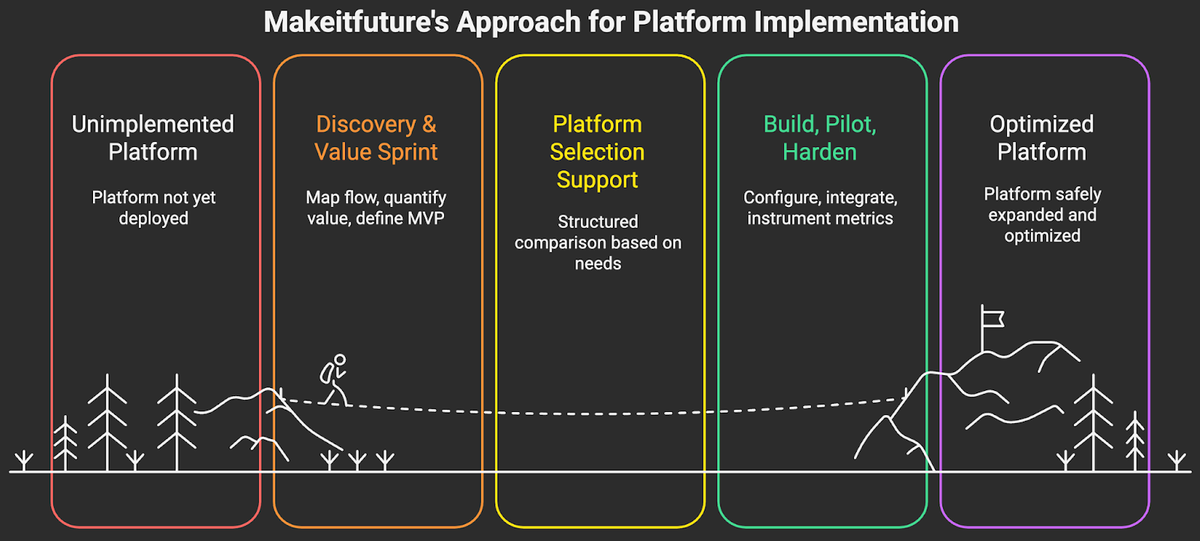
Makeitfuture helps you get there faster. We design and deliver digital workflows that fit your context, not the other way around. Our teams blend process design with hands-on build across leading platforms, including ServiceNow, Microsoft Power Platform, Camunda, Jira, Workato, UiPath, Adobe Acrobat Sign, and DocuSign. Typical engagement pattern:
- Discovery and Value Sprint. Two weeks to map the flow, quantify value, and define the MVP.
- Platform selection support. A structured comparison tied to your use case, security, and TCO considerations.
- Build, pilot, and harden. Four to eight weeks to configure, integrate, and instrument end to end metrics.
- Scale and govern. Templates, playbooks, and a light Center of Excellence so you can expand safely.
- Operate and optimize. Quarterly reviews to remove bottlenecks and refresh automations as systems change.
If you are evaluating where to start or need to accelerate a current initiative, see our overview of Automation and AI services for options and engagement models. You can also explore selected outcomes in our case studies, including reductions in cycle time for project intake, contract turnaround, and vendor onboarding.
Ready to compress delivery timelines and reduce project risk, without adding headcount? Contact us and let’s design a high impact digital workflow you can put in production in weeks, not months...or years.