Discover why you should automate client onboarding and the transformative impact it can have on streamlining your workflows.
Client onboarding sets the tone for the entire relationship. Done right, it accelerates time to value, reduces errors and rework, and creates the trust that drives retention and expansion. This article explains what client onboarding is, the real constraints of manual practices, and the benefits of automating client onboarding with modern workflow, AI, and integration platforms.
You will find concrete examples of what to automate, a step by step approach to implementation, and executive guidance on tooling, compliance, metrics, and change management. If you need a partner to move from slideware to measurable ROI, you will also see how Makeitfuture can help.
WHAT IS CLIENT ONBOARDING?
Client onboarding is the structured set of activities that takes a prospect who has agreed to buy, or is very close to buying, and turns them into a successful, active customer. It spans the first mile of the relationship, from data capture and identity verification to contracting, provisioning, configuration, training, first use, and validation of value delivered.
In regulated industries, it also includes KYC and AML checks. For B2B, onboarding often coordinates multiple stakeholders on both sides and integrates new accounts into your product, billing, support, and CRM systems.
The purpose is simple. Accelerate time to value while reducing risk and effort for both you and the customer. That requires consistent processes, clear handoffs, and reliable data across systems such as CRM, billing, product, and service management.
WHAT ARE THE CHALLENGES OF MANUAL CLIENT ONBOARDING?
Manual onboarding depends on emails, spreadsheets, and human handoffs. It works at low volume, then cracks appear. Cycle times stretch. Errors creep in. Customers repeat themselves. Compliance and audit trails get patchy. Leaders lose visibility into status and bottlenecks.
Here are the challenges of manual client onboarding:
- Fragmented data and duplicate entry across CRM, billing, product, and support, which drives rework and inconsistent records. Gartner estimates poor data quality costs organizations an average of 12.9 million dollars per year, a useful proxy for the avoidable cost of manual processes that generate bad data (Gartner, What Is Data Quality, 2021).
- Long cycle times driven by email back and forth, missed attachments, and unclear ownership of steps and approvals.
- Compliance exposure from inconsistent KYC, identity checks, consent capture, and incomplete audit trails.
- Inconsistent customer experience, with little personalization or guidance tailored by segment, risk, or product complexity.
- Low visibility. Leaders cannot see real time status, SLA risks, or where to add capacity, which makes forecasting and resource planning guesswork.
- Costly to scale. Volume goes up and headcount must grow linearly, or service levels degrade.
- Higher abandonment risk. The more friction you introduce, the more customers stall before activation.
- Integration gaps. Teams swivel chairs between tools rather than orchestrating a shared workflow.
BENEFITS OF AUTOMATED CUSTOMER ONBOARDING
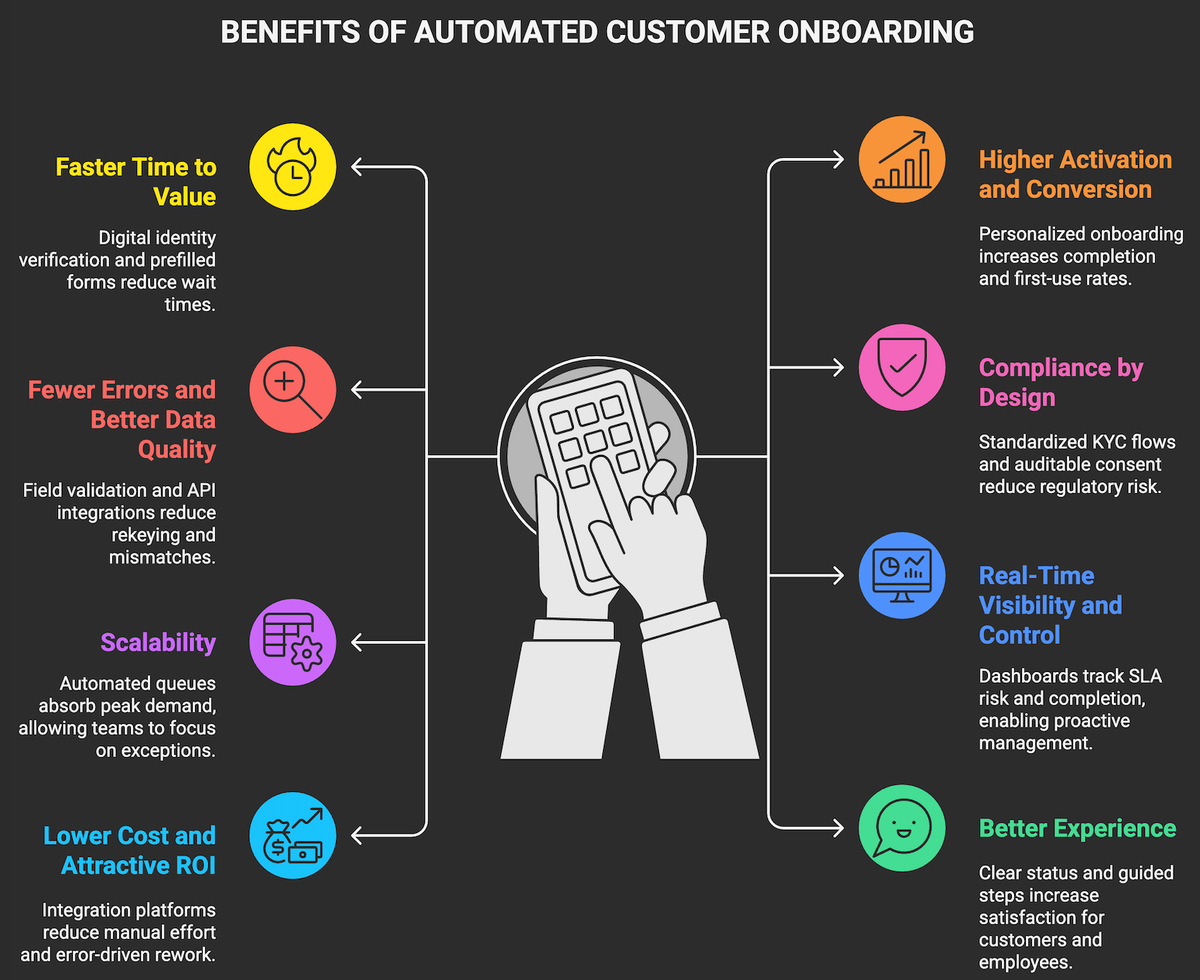
Automation replaces manual handoffs with orchestrated workflows, embeds rules and validations, and connects your systems so data flows once, correctly. The result is a smoother start for customers and a cheaper, faster, more compliant process for you.
- Faster time to value. Digital identity verification, prefilled forms, and instant provisioning cut wait times from days to minutes in many use cases, especially when using e-signature, dynamic forms, and product APIs.
- Higher activation and conversion. Personalized onboarding communications and in-app guidance lift completion and first-use rates. Companies that excel at personalization generate 40 percent more revenue from those activities than average players, a strong signal for tailoring onboarding journeys by segment and intent
- Fewer errors and better data quality. Field validation, deduplication, and API level integrations reduce rekeying and mismatches.
- Compliance by design. Standardized KYC flows, auditable consent, and role based access aligned to NIST SP 800 63 digital identity guidelines and ISO 27001 controls help reduce regulatory risk while speeding reviews . GDPR data minimization and purpose limitation are easier to enforce when forms and data retention are automated.
- Scalability without linear headcount growth. Automated queues and rules absorb peak demand, so teams focus on exceptions and high value interactions.
- Real time visibility and control. Dashboards track SLA risk, completion by step, and backlog, enabling proactive management and continuous improvement.
- Lower cost to serve and attractive ROI. Integration and workflow platforms reduce manual effort and error driven rework.
- Better customer and employee experience. Clear status, guided next steps, and fewer repetitive tasks increase satisfaction on both sides. 76 percent of customers expect consistent interactions across departments, which automation helps deliver by connecting sales, success, support, and finance.
Quick Comparison: Manual vs Automated Onboarding
Dimension Manual Onboarding Automated Onboarding Cycle time Long, variable, dependent on email and handoffs Short, predictable, parallelized steps where possible Error rate High rekeying and mismatch risk Low, single source of truth and validation rules Visibility Limited status and SLA insight Full step by step tracking and alerts Compliance Inconsistent, manual evidence collection Standardized controls and audit trails Scalability Headcount grows with volume Volume absorbed through orchestration, exceptions only to humans Experience One size fits all, friction Personalized, self service, proactive communication
EXAMPLES OF WHAT YOU CAN AUTOMATE IN THE CLIENT ONBOARDING PROCESS
Where should you start? Think in terms of tasks customers must complete, data you must capture, systems you must update, and controls you must evidence. Then automate the repetitive parts and orchestrate the rest. Here are some examples of what you can automate:
- Account setup and provisioning. Automate creation of accounts and roles in your product, CRM, and support tools using APIs and standards such as SCIM for user provisioning. Identity and access management through Okta or Azure AD helps enforce least privilege.
- Identity verification and KYC. Use hosted or API based identity verification with liveness checks, document capture, and sanctions screening. Vendors include Stripe Identity, Onfido, and Trulioo. Align assurance levels to NIST SP 800 63 where relevant.
- Contracting and e signature. Generate agreements with dynamic data merge, route for approvals, and collect signatures digitally through DocuSign or Adobe Acrobat Sign. Store the final agreement and metadata with retention policies.
- Data capture and dynamic forms. Replace static PDFs with forms that prefill from CRM, validate entries, adapt to the customer’s responses, and support consent capture, using platforms like Typeform, FormAssembly, or native workflow forms.
- Document generation and management. Auto create onboarding packets, welcome letters, and policy docs, then route copies to SharePoint, Google Drive, or S3 with access controls and lifecycle rules.
- Billing and payment setup. Provision subscriptions, collect payment details, and configure tax settings and invoicing via Stripe Billing or Adyen.
- Communication sequences. Trigger personalized email or SMS sequences that nudge customers through key steps. Tools like Twilio SendGrid or Customer.io make it easy to segment by behavior and status.
- Training and first use guidance. Schedule kickoff calls, enroll customers in training, and deliver in-app tours with Pendo or Appcues.
- Project orchestration. Auto create implementation projects and tasks in Asana, Jira, or Monday.com, assign owners, and update status bidirectionally from the workflow.
- Approvals and escalations. Route exception cases to managers or compliance, with SLA timers and reminders. Platforms like ServiceNow Flow Designer handle complex approvals at scale.
- Customer health and visibility. Push onboarding milestones to CRM, generate success plans, and expose status to customers through a portal. Tools like Salesforce and Gainsight support milestone tracking and health scoring.
- Feedback and continuous improvement. Capture NPS or CSAT at key steps with Qualtrics and route detractors for follow up.
- Data integration. Use iPaaS to sync records, events, and files and to orchestrate cross app flows. Enterprise options include MuleSoft Anypoint and Workato. Microsoft Power Automate is effective for Microsoft centric stacks.
HOW TO AUTOMATE THE CLIENT ONBOARDING PROCESS?
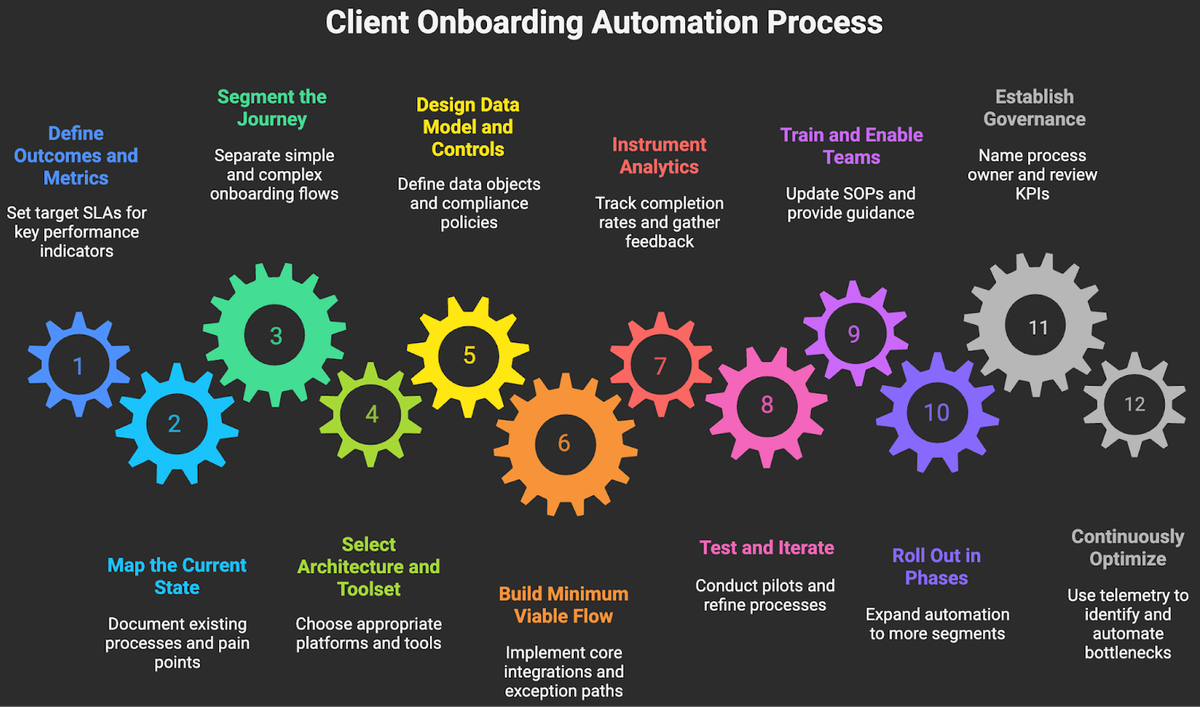
Move from siloed tasks to a single orchestrated flow. The practical path is to define outcomes, design the target journey, pick the right stack, then build and iterate with tight measurement.
- Define outcomes and metrics. Set target SLAs for cycle time, time to first value, activation rate, error rate, and NPS. Decide what “good” looks like by segment or risk tier.
- Map the current state. Document steps, systems, owners, inputs, outputs, and pain points. Identify handoffs, rekeying, duplicate approvals, and rework.
- Segment the journey. Separate simple self service flows from complex enterprise implementations. This enables tailored automation and staffing plans.
- Select an architecture and toolset. Choose a workflow or digital process automation platform, an iPaaS for integration, e-signature and document generation, identity verification if needed, and a single system of record for onboarding status, usually CRM or a customer success platform. ServiceNow, Power Automate, Workato, MuleSoft, DocuSign, and Stripe Identity are proven components in many stacks.
- Design the data model and controls. Define canonical customer and onboarding objects, data ownership, consent capture, and retention policies aligned to GDPR principles and ISO 27001 controls.
- Build a minimum viable onboarding flow. Start with the top one or two segments. Implement dynamic forms, e signature, provisioning, and core integrations. Include clear exception paths and a manual fallback for edge cases.
- Instrument analytics. Track completion by step, time in step, drop offs, and error categories. Add qualitative feedback loops at key moments.
- Test and iterate. Run pilots with real customers. A/B test microcopy and step order. Tighten validations and remove non essential fields to reduce friction.
- Train and enable teams. Update SOPs, RACI, and SLAs. Provide playbooks and embedded guidance in the tools your teams already use.
- Roll out in phases. Expand to more segments and products. Increase automation breadth, then depth, as data quality improves.
- Establish governance. Name a process owner, define change control, and run a monthly review of KPIs and backlog. Connect this to your broader automation and data governance councils.
- Continuously optimize. Use telemetry to identify friction, then automate or simplify the next bottleneck. Retire manual steps as confidence grows.
HOW CAN MAKEITFUTURE HELP YOU AUTOMATE YOUR CUSTOMER ONBOARDING PROCESS?
Manual onboarding drains time, introduces risk, and hides insights you need to scale. Automated onboarding flips that script. It compresses cycle time, improves data quality, strengthens compliance, and delivers a personalized experience that speeds activation and boosts retention. The benefits of automating client onboarding extend beyond operations. Done right, onboarding becomes a revenue engine and a competitive moat.
Where Makeitfuture fits? We help leadership teams design, implement, and scale automated onboarding that delivers measurable ROI. Our services span discovery and value modeling, journey and data design, platform selection, build and integration, security and compliance alignment, and change management.
We work with platforms like ServiceNow, Microsoft Power Automate, Workato, MuleSoft, DocuSign, and Stripe Identity, and we integrate deeply with your CRM, billing, and product stack.
Explore how we design and deliver customer onboarding automation that moves the needle on cost, speed, and customer experience. For proof points from adjacent processes and platforms, browse selected wins that we documented in our case studies, then book a short discovery session to see what automated onboarding could unlock for your business.