In the landscape of automation, the RPA alternative iPaaS is emerging as a powerful contender to traditional rpa technology.
You are choosing between two very different automation levers. This article breaks down what an integration platform as a service is, what robotic process automation is, where each shines, and the trade offs that matter for scale, resilience, and cost.
Expect a crisp comparison table, practical use cases, and decision criteria you can apply in architecture reviews and roadmap planning. You will also see how Makeitfuture helps you stand up enterprise grade iPaaS programs and combine them with RPA when that is the fastest path to measurable ROI.
WHAT IS AN INTEGRATION PLATFORM AS A SERVICE (IPAAS)?
An integration platform as a service is a cloud service that provides managed connectivity, orchestration, transformation, and monitoring to move and synchronize data and events across applications, APIs, and databases. It centralizes integrations as reusable assets, with prebuilt connectors, event triggers, mapping tools, and policy controls such as authentication, rate limiting, and observability.
iPaaS is designed for API first integration, real time event flows, and reliable batch syncs at scale. It reduces point to point sprawl and speeds up delivery with standardized patterns.
- Common vendors: Workato, Boomi, MuleSoft, Tray, Azure Logic Apps, SnapLogic.
- Core capabilities: connectors and SDKs, event and schedule triggers, data mapping and transformation, error handling and retries, secrets management, versioning and CI, monitoring and alerting, API management.
- Outcomes: cleaner system of engagement to system of record flows, lower maintenance, and centralized governance.
WHAT IS ROBOTIC PROCESS AUTOMATION (RPA)?
Robotic process automation uses software robots to emulate human interactions with user interfaces, such as clicking buttons, entering data, copying from spreadsheets, or navigating terminals and virtual desktops. RPA is ideal when systems lack APIs or when you must automate across heterogeneous desktop and web apps with human in the loop steps.It focuses on task automation at the UI layer, with attended and unattended execution models.
- Common vendors: UiPath, Automation Anywhere, Blue Prism, Microsoft Power Automate Desktop.
- Core capabilities: UI selectors and screen automation, recorders, OCR and document understanding, workflow orchestration and queues, attended bots for agents, unattended bots for back office, audit logs.
- Outcomes: quick wins over legacy apps and manual swivel chair steps, bridge gaps where APIs are not available.
RPA VS IPAAS: MAIN DIFFERENCES
These technologies solve different problems. iPaaS connects systems through APIs and events, RPA automates tasks through user interfaces. They are complementary. The choice depends on the interface available, the scale required, and how often things change.
Dimension iPaaS RPA Primary interface APIs, webhooks, events, databases UI, screens, keystrokes, terminal sessions Best fit SaaS to SaaS integration, system of record sync, event driven workflows Legacy apps with no APIs, desktop tasks, document heavy processes Stability and change resilience Stable if APIs are versioned, strong retry and idempotency patterns More fragile to UI changes, selectors, layouts, and latency Throughput High volume and parallel, optimized for data pipelines Human speed UI interactions, concurrency managed by bot scaling Governance and security Centralized policies, secrets vaults, API scopes and least privilege Credential vaults and controls available, extra care for desktops and VMs Development model Reusable integration flows, mappings, and APIs Bot scripts and workflows tied to UI selectors Typical cost model Per workspace, connection, operation, or message tier Per bot, runtime, and orchestrator licenses
- Primary interface: iPaaS talks to systems through APIs, events, and databases, which gives you structured contracts, versioning, and predictable error codes. RPA operates at the presentation layer, which is perfect when there is no API or when human steps must be emulated, but it inherits the brittleness of UI changes. Vendor perspectives mirror this difference.
- Best fit: Use iPaaS to automate core processes like lead to cash and order to invoice across CRM, ERP, and billing through APIs. Use RPA to automate steps in a thick client terminal, a legacy ERP screen, or to drive Citrix hosted apps where APIs are not present.
- Reliability and change resilience: API contracts change less often and are versioned. With iPaaS you can implement retries, backoff, and idempotency to make flows robust. UI selectors can break with minor layout updates, which means RPA needs stricter change control and test automation.
- Throughput: iPaaS can move thousands of records per minute, stream events, and run flows in parallel. RPA operates at human or slightly faster speeds because it must render UI, wait for screens, and respect application performance. That makes it ideal for task accuracy, not high volume data pipelines.
- Governance and security: iPaaS centralizes credentials and uses API scopes, OAuth, and audit logs. RPA platforms provide vaults and role based access too, but desktop bot execution introduces endpoint and VM hardening requirements you must manage with IT.
- Development model: iPaaS promotes reusable connections, mappings, and APIs that multiple teams can consume. RPA promotes reusable components too, but scripts are inherently tied to UI selectors and object models, which demands more regression testing with UI updates.
- Cost model: iPaaS pricing often scales with connections and operations. RPA pricing scales with bots and orchestrator capacity. Evaluate not just licenses, but also run, support, and change costs over 12 to 36 months.
USE CASES OF RPA AND IPAAS
Clarity on use cases prevents over engineering and reduces maintenance. The best automation portfolios blend iPaaS for system to system work and RPA for human keyboard and screen tasks that cannot be API enabled.
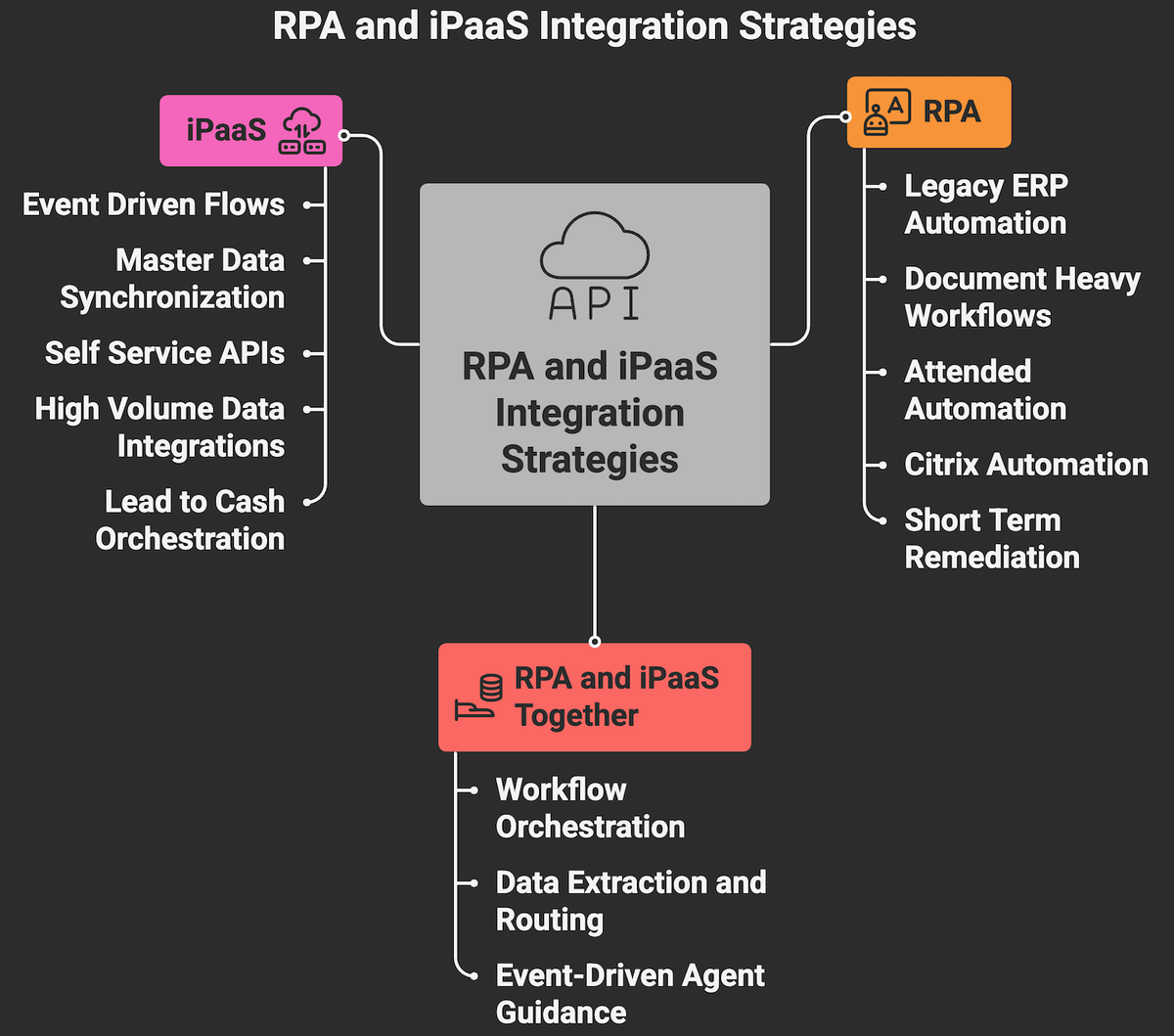
When to use RPA
- Automating legacy ERP or mainframe screens that have no APIs or are cost prohibitive to expose.
- Document heavy workflows such as invoice capture, claims, or KYC where OCR and classification feed data to downstream systems.
- Contact center or back office attended automation to reduce handle time, for example pulling customer data from multiple UIs into a single view.
- Citrix, VDI, or thick client automation where only UI access exists.
- Short term remediation of manual steps while APIs are being built.
When to use iPaaS
- Lead to cash, order to invoice, and procure to pay orchestrations across CRM, ERP, billing, and payment gateways.
- Event driven flows, for example new order webhook in commerce triggers fulfillment and updates finance in near real time.
- Master data synchronization, deduplication, and enrichment across systems of record and engagement.
- Self service APIs for partners and internal consumers with centralized policy enforcement.
- High volume data integrations that need retries, backpressure, and monitoring.
When to use both together
- iPaaS orchestrates the end to end workflow and calls an RPA bot for the one legacy step that still requires UI automation.
- RPA extracts data from scanned or emailed documents, then hands structured payloads to iPaaS for routing and system updates.
- iPaaS listens to events, applies business rules, and triggers attended RPA in the agent’s desktop to guide next best action.
WHAT TO CHOOSE BETWEEN RPA AND IPAAS
The right choice comes from the interface landscape, process characteristics, target SLAs, and long term total cost. Start with the systems you must touch and how they expose functionality. Then weigh throughput, change cadence, and governance needs.
- System connectivity: If 70% or more of the process steps can be reached through APIs, go with iPaaS. Reserve RPA for the last mile where APIs are missing.
- Process pattern: Event driven, high volume, or batch syncs point: pick iPaaS. If human intervention is needed in the loop, desktop tasks or terminal emulation point: pick RPA.
- Change cadence: Rapid UI changes increase (RPA) bot maintenance. Stable API contracts favor iPaaS for lower change cost.
- Throughput and latency: For thousands of records per minute or near real time propagation, iPaaS is better. For task accuracy across a few transactions, RPA is fine.
- Security and compliance: Centralized secrets and API scopes are easier to audit. RPA needs hardened desktops or VMs and stricter endpoint controls.
- User experience: If agents benefit from attended-helpers inside their desktop, RPA adds value. If you want invisible background automation, iPaaS fits.
- Skills and support: Consider the team’s API, integration, and bot development skills, and the vendor ecosystem you can support.
- Licensing and TCO: Model 12 to 36 month costs, including licenses, infrastructure, support, regression testing, and change management.
- Strategic architecture: If your target architecture is API first and event driven, build the backbone with iPaaS and integrate RPA only where required.
HOW CAN MAKEITFUTURE HELP YOU WITH IPAAS SOLUTIONS?
Use iPaaS when you can integrate through APIs and events for scale, reliability, and governance. Use RPA when the only viable path is the UI, especially for legacy or document heavy work. Use both when iPaaS can orchestrate the majority and RPA can close API gaps. That is how you get speed now without painting yourself into a corner later.
Makeitfuture helps you operationalize that strategy. We design and implement iPaaS backbones, integrate core business systems, and add RPA only where it delivers outsized value. Our architects are vendor fluent across Workato, Boomi, MuleSoft, Azure, and leading RPA platforms, so you get pragmatic guidance, not tool bias.
- Architecture and vendor selection based on your systems, SLAs, and security requirements.
- Implementation of reusable integrations, event flows, and APIs with observability and controls baked in.
- Targeted RPA for legacy steps, with governance to keep maintenance low.
- Center of Excellence setup, delivery playbooks, and change management so you scale safely.
Ready to evaluate or scale iPaaS in your stack? Explore our iPaaS services and whenever you‘re ready, book a working session.
If you would like to see concrete outcomes we have delivered for SaaS platforms and mid market enterprises, ask us for relevant case studies or visit our case study hub.